
 rE-oCdTexturenpakete · 1.20 – 26.x
An unofficial continuation of FVDisco's oCd resource pack.
Kostenlos745,673 Downloads

Unofficial Extended Resource Pack for CozyUI+
Direkter Download von Modrinth · 229,786 Downloads
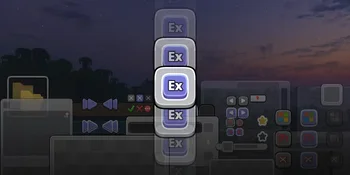
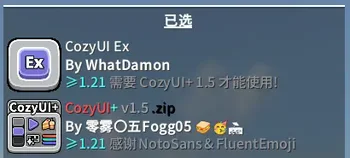

CozyUI Ex (Texturenpaket) stammt von WhatDamon. Unofficial Extended Resource Pack for CozyUI+.
Unterstützt wird Minecraft 1.20 – 1.21. Auf Modrinth gibt es 229,786 Downloads. Das letzte Update erschien am 31.05.2025.
CozyUI Ex hat seit 30.04.2025 4 Versionen auf Modrinth veröffentlicht. Keine davon erschien im letzten Jahr. Die neueste ist 0.4, erschienen am 31.05.2025. Sie ist für Minecraft 1.20 – 1.21.11 gemacht. Sie läuft auf Minecraft. Der Download ist 9.1 MB groß.
| Version | Veröffentlicht | Minecraft | Typ |
|---|---|---|---|
0.4 | 31.05.2025 | 1.20 – 1.21.11 | Alpha |
0.3 | 17.05.2025 | 1.20 – 1.21.5 | Alpha |
0.2 | 04.05.2025 | 1.21 – 1.21.5 | Alpha |
0.1 | 30.04.2025 | 1.21 – 1.21.5 | Alpha |
English | 简体中文
⚠️ WARNING!!!
Still in progress, some details may not be handled very well, please forgive 😥!
This project is temporary stop. Learn more.
Remember, please download CozyUI+ first, then load this resource pack as follows...
Unless you like that kind of bad experience.
This resource pack covers CozyUI+ into more mods, as well as supporting GUIs specific to the April Fool snapshot (e.g. 25w14craftmine)
You can download the latest version of this resources pack on Modrinth! (Recommended)
Want something more nightly? Get autopack version of this pack here!
Check it out here: github.com/WhatDamon/cozyui-ex/wiki/Extra-Suppo…
Check it out here: github.com/WhatDamon/cozyui-ex/wiki/FAQ
Licensed under GNU GENERAL PUBLIC LICENSE Version 3
Geschrieben von WhatDamon. Mit Bildern auf Modrinth lesen.
Lade die .zip-Datei von Modrinth herunter. Entpacke sie nicht.
Öffne in Minecraft Optionen, dann Ressourcenpakete, dann Paketordner öffnen.
Lege die .zip-Datei in diesen Ordner und gehe zurück ins Spiel.
Schiebe CozyUI Ex in die rechte Liste und klicke auf Fertig.
Es ist für Minecraft 1.20 – 1.21 gemacht. Auf anderen Versionen markiert Minecraft es als inkompatibel, oft funktioniert es aber trotzdem.
| Ressource | Downloads | Versionen | Letztes Update | Preis |
|---|---|---|---|---|
| CozyUI Exdie du angesehen hast | 230K | 1.20 – 1.21 | 31. Mai 2025 | Kostenlos |
| rE-oCdHoshinekoSanti | 746K | 1.20 – 26.x | vor 15 Tagen | Kostenlos |
 Default Dark Modenebulr | 8.3M | 1.8 – 26.x | 19. Sept. 2026 | Kostenlos |
 PVP zegarn+Anime skyzegarn | 860K | 1.8 – 26.x | 7. Juli 2026 | Kostenlos |
Noch nicht. Die neueste unterstützte Version ist Minecraft 1.21.
Ja. CozyUI Ex kannst du kostenlos bei Modrinth herunterladen.
Ja: Puzzle, CozyUI+. Installiere es vor CozyUI Ex.
Ja. Das letzte Update kam innerhalb des letzten Tages.
Am ähnlichsten sind rE-oCd, Default Dark Mode und PVP zegarn+Anime sky. Alle Alternativen vergleichen
rE-oCdTexturenpakete · 1.20 – 26.xAn unofficial continuation of FVDisco's oCd resource pack.
Default Dark ModeTexturenpakete · 1.8 – 26.x🌙 The Dark Mode Resource Pack for Minecraft: Java Edition
PVP zegarn+Anime skyTexturenpakete · 1.8 – 26.x[UPD 1.3.6] Minimalistic PvP resource pack with dark UI, custom sky, clean HUD & crosshair, small fire, and refined visuals (see description)
 CoquetTexturenpakete · 1.19 – 1.20
Just a typical resource pack that tries to be faithful to the original style of the game at times
 ToolTips StylizedTexturenpakete · 1.20 – 26.x
This resource pack adds badges/icons and colors to item tooltips.
 CPvP Marin Kitagawa PvP Pack + Anime skyTexturenpakete · 1.16 – 26.x
This PvP/CPvP resource pack replaces the model textures, sounds, GUI, inventory, menu, and sky with a Marin Kitagawa theme.
Logg dich ein, um eine Bewertung zu schreiben.