
 WorldTimeMods · 26.x
adds the time spent in the world
Kostenlos12 Downloads
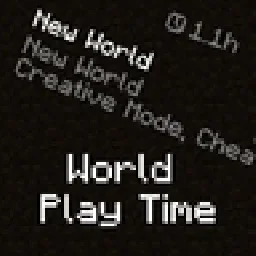
Displays the world's play time in the world selection menu.
Direkter Download von Modrinth · 3,821,009 Downloads
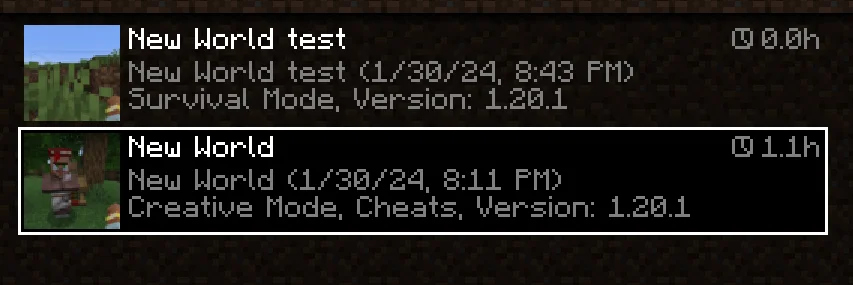
World Play Time (Mod) stammt von Khajiitos. Displays the world's play time in the world selection menu.
Unterstützt wird Minecraft 1.19 – 26.x. Auf Modrinth gibt es 3,821,009 Downloads. Das letzte Update erschien am 28.03.2026.
#
World Play Time is a mod that displays the amount of time you've spent on a given Minecraft world in the world selection screen, in the top-right corner of each world entry.
It does this by checking the "Play Time" statistic for the world, so playtime will be displayed for existing worlds that were created without the mod as well.
The mod is client-side only, and does nothing on the server-side.
#
Would you like to support me, or the mod?
Here is how you can do that:
Thanks a lot!
#
Whether you're looking for a server for your modpack, or just to mess around with your friends - **BisectHosting** is one of the most reliable and affordable options you can get! It makes installing modpacks just a couple of clicks. 25% off with code khajiitos!
Geschrieben von Khajiitos. Mit Bildern auf Modrinth lesen.
Diese Mod läuft nur in deinem eigenen Spiel. Server brauchen sie nicht, du kannst sie also auf jedem Server nutzen.
Installiere Fabric, Forge und NeoForge für Minecraft 1.19 – 26.x.
Lade die .jar-Datei von Modrinth herunter und lege sie in den mods-Ordner deines .minecraft-Verzeichnisses.
Starte Minecraft mit dem Fabric-Profil.
Einfacher: Suche in Prism Launcher oder der Modrinth App in den Mods deiner Instanz nach World Play Time und klicke auf Install. Loader und benötigte Mods werden für dich hinzugefügt.
| Ressource | Downloads | Versionen | Letztes Update | Preis |
|---|---|---|---|---|
| World Play Timedie du angesehen hast | 3.8M | 1.19 – 26.x | 28. März 2026 | Kostenlos |
| WorldTimesuheckii | 12 | 26.x | 19. Sept. 2026 | Kostenlos |
 Tiny Item AnimationsTrivaxy | 4.7M | 1.18 – 1.21 | 9. Aug. 2025 | Kostenlos |
 Starter KitSerilum | 10.8M | 1.16 – 26.x | vor 14 Tagen | Kostenlos |
Ja. World Play Time unterstützt Minecraft 26.x. Alle unterstützten Versionen: 26.x, 1.21, 1.20, 1.19.
Ja. World Play Time kannst du kostenlos bei Modrinth herunterladen.
Clientseitig. World Play Time kommt in deinen eigenen mods-Ordner und funktioniert auf jedem Server, auch auf Servern ohne Mods.
Ja. Das letzte Update kam innerhalb des letzten Tages.
Am ähnlichsten sind WorldTime, Tiny Item Animations und Starter Kit. Alle Alternativen vergleichen
WorldTimeMods · 26.xadds the time spent in the world
Tiny Item AnimationsMods · 1.18 – 1.21Adds little animations when you pick up or insert items with your mouse.
Starter KitMods · 1.16 – 26.x📦 Give all new players joining the world configurable starter gear, items, potion effects, Curios and Trinkets slots and/or commands. Compatible with FTB Team…
 Just Enough BreedingMods · 1.16 – 26.x
JEI/REI/EMI plugin that displays breeding information
 Difficulty LockMods · 1.16 – 26.x
🔒 Sets a difficulty in any world, optionally locked, or force a hardcore mode requirement.
 Packed PacksMods · 1.21 – 26.x
Pack resource and data packs into profiles with multiple selection, drag and drop, and extended mouse and keyboard controls.
Logg dich ein, um eine Bewertung zu schreiben.