
 ResourcifyMods · 1.8 – 26.x
In-game resource pack, data pack and shader browser and updater.
Kostenlos13,751,559 Downloads
Pack resource and data packs into profiles with multiple selection, drag and drop, and extended mouse and keyboard controls.
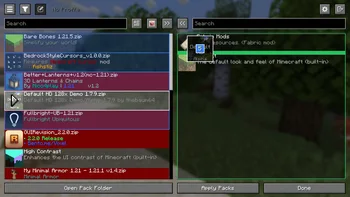

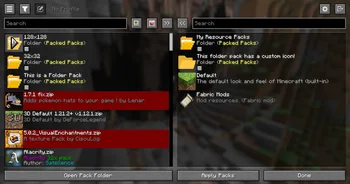
Packed Packs (Mod) stammt von fishstiz. Pack resource and data packs into profiles with multiple selection, drag and drop, and extended mouse and keyboard controls.
Unterstützt wird Minecraft 1.21 – 26.x. Auf Modrinth gibt es 2,837,122 Downloads. Das letzte Update erschien am 05.10.2026.
Packed Packs hat seit 07.05.2025 228 Versionen auf Modrinth veröffentlicht. 130 davon erschienen im letzten Jahr. Die neueste ist 2.3.1+26.3, erschienen am 05.10.2026. Sie ist für Minecraft 26.3 gemacht. Sie läuft auf Fabric. Der Download ist 971 KB groß.
| Version | Veröffentlicht | Minecraft | Typ |
|---|---|---|---|
2.3.1+26.3 | 05.10.2026 | 26.3 | Release |
2.3.1+26.3 | 05.10.2026 | 26.3 | Release |
2.3.1+26.2 | 05.10.2026 | 26.2 | Release |
2.3.1+26.2 | 05.10.2026 | 26.2 | Release |
2.3.1+1.21.11 | 05.10.2026 | 1.21.11 | Release |
Packed Packs ist Open Source. Die neueste Version auf GitHub ist v2.3.1+26.3, veröffentlicht am 05.10.2026.
Server Pack Unlocker or Catharis #76)
Davor: v2.3.1+26.2 (05.10.2026), v2.3.1+26.1 (05.10.2026).
Pack resource and data packs into profiles with multiple selection, drag and drop, and extended mouse and keyboard
controls.
📂 Additional Folders
resourcepacks or
datapacks.
📂📦 Folder Packs
folder root.
These are also known as modules.
{
"module": false,
"packIds": [
"continuity:default",
"examplenamespace:examplepath"
]
}
file is only loaded once on enter to prevent overwriting unsaved state.
🖱️ Mouse Controls
Open Context Menu
right click
Select range
hold Shift and click
Add/remove from selection
hold Ctrl and click
Quick transfer
double click
Undo
click backwards side button
Redo
click forwards side button
⌨️ Keyboard Controls
Navigate entries
↑, ↓
Navigate out of entries
Tab
Transfer selection
Space, Enter
Select range
Shift + ↑ / ↓
Select all
Ctrl + A
Move selection
Ctrl / Alt + ↑ / ↓
Undo
Ctrl + Z
Redo
Ctrl + Shift + Z, Ctrl + Y
Open folder pack
Enter
Close folder pack
Escape
Delete file
Delete
Rename file
Ctrl + R, F2 (if not bound to screenshot)
Open file
Ctrl + Enter
Show in file manager
Alt + Shift + R
Toggle profiles sidebar
Ctrl + `
Switch between default and no profile
F1
Refresh packs
F5
Focus search bar
Ctrl + F, Ctrl + K
⚙️ Configuration
🚀 Developer Mode
original screen.
configured pack selection and order.
and resolves to the first match, see the config.meta.json file.
correctly.
This can only be done from the config.meta.json file.
ID of file/test-v1.2 will always match "file/test-v1.2": "file/test-v1.4" over
"regex:file\\/test-v\\d*": "file/test-v2").
manually from the in-game GUI or the config file.
♨️ Java API
The Java API, designed as an optional dependency, allows mods to extend functionality or add compatibility with
Packed Packs. This includes subscribing to various events and registering custom preferences
to add configurable widgets at certain positions of the screen.
You can find example implementations in the **testmod**,
and in the **compat**
package of the main source set.
You may also view the **javadocs** from the source code.
Visit the wiki page for more details.
🔗 Compatibility
Explicit compatibility is added for:
Submit an issue if the above mods have become incompatible. Make sure
to verify that the correct mod version is used for the target minecraft version, and if the issue only occurs with
Packed Packs installed.
Note: Compatibility for the above mods were added before the Java API was made.
It would be better for other mods to make use of the Java API instead for better long
term compatibility. If the above mods make enough breaking changes, it may have to be dropped.
LTS versions: 1.21.1, 1.21.11, 26.1, 26.2, 26.3
Geschrieben von fishstiz. Mit Bildern auf Modrinth lesen.
Diese Mod läuft nur in deinem eigenen Spiel. Server brauchen sie nicht, du kannst sie also auf jedem Server nutzen.
Installiere Fabric und NeoForge für Minecraft 1.21 – 26.x.
Füge die benötigten Mods hinzu: Fabric API.
Lade die .jar-Datei von Modrinth herunter und lege sie in den mods-Ordner deines .minecraft-Verzeichnisses.
Starte Minecraft mit dem Fabric-Profil.
Mit dem CraftRank Launcher sparst du dir diese Schritte: Öffne Mods, suche nach Packed Packs und klicke auf Installieren.
| Ressource | Downloads | Versionen | Letztes Update | Preis |
|---|---|---|---|---|
| Packed Packsdie du angesehen hast | 2.8M | 1.21 – 26.x | 5. Okt. 2026 | Kostenlos |
| ResourcifyDeDiamondPro | 13.8M | 1.8 – 26.x | vor 17 Tagen | Kostenlos |
 PaxiYUNGNICKYOUNG | 11.4M | 1.19 – 26.x | 24. Juni 2026 | Kostenlos |
 Dynamic FPSjuliand665 | 71.8M | 1.16 – 26.x | 16. Sept. 2026 | Kostenlos |
Ja. Packed Packs unterstützt Minecraft 26.x. Alle unterstützten Versionen: 26.x, 1.21.
Ja. Packed Packs kannst du kostenlos bei Modrinth herunterladen.
Clientseitig. Packed Packs kommt in deinen eigenen mods-Ordner und funktioniert auf jedem Server, auch auf Servern ohne Mods.
Ja: Fabric API. Installiere es vor Packed Packs.
Ja. Das letzte Update kam innerhalb des letzten Tages.
Am ähnlichsten sind Resourcify, Paxi und Dynamic FPS. Alle Alternativen vergleichen
ResourcifyMods · 1.8 – 26.xIn-game resource pack, data pack and shader browser and updater.
PaxiMods · 1.19 – 26.xAutomatic data & resource pack loading made easy.
Dynamic FPSMods · 1.16 – 26.xReduce resource usage while Minecraft is in the background, idle, or on battery.
 InspectMCMods · 1.21 – 26.x
Inspect blocks, entities, biomes, registries, datapacks and runtime data in-game, then export diagnostics to JSON, CSV, Excel and ZIP.
 Pages of AtlasMods · 26.x
Minecraft Fabric mod that enables ultra-high-resolution resource packs by transparently distributing oversized texture atlases across multiple physical atlas…
 Better Block EntitiesMods · 1.21 – 26.x
A Minecraft optimization mod for Fabric-Sodium that improves framerates by improving block entity rendering via a hybrid renderer
Logg dich ein, um eine Bewertung zu schreiben.