
 ResourcifyMods · 1.8 – 26.x
In-game resource pack, data pack and shader browser and updater.
Gratuit13,770,087 téléchargements
Pack resource and data packs into profiles with multiple selection, drag and drop, and extended mouse and keyboard controls.
Téléchargement direct depuis Modrinth · 2,845,791 téléchargements
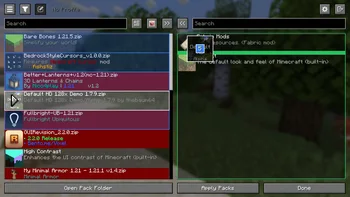

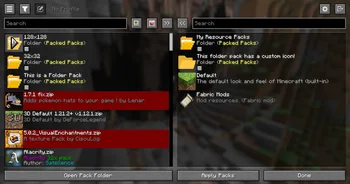
Packed Packs (mod) est une création de fishstiz. Pack resource and data packs into profiles with multiple selection, drag and drop, and extended mouse and keyboard controls.
Versions prises en charge : Minecraft 1.21 – 26.x. On compte 2,845,791 téléchargements sur Modrinth. La dernière mise à jour date du 05/10/2026.
Packed Packs a publié 228 versions sur Modrinth depuis le 07/05/2025. 130 sont sorties au cours de l'année passée. La plus récente est 2.3.1+26.3, sortie le 05/10/2026. Elle est faite pour Minecraft 26.3. Elle fonctionne sur Fabric. Le téléchargement fait 971 KB.
| Version | Publié | Minecraft | Type |
|---|---|---|---|
2.3.1+26.3 | 05/10/2026 | 26.3 | Stable |
2.3.1+26.3 | 05/10/2026 | 26.3 | Stable |
2.3.1+26.2 | 05/10/2026 | 26.2 | Stable |
2.3.1+26.2 | 05/10/2026 | 26.2 | Stable |
2.3.1+1.21.11 | 05/10/2026 | 1.21.11 | Stable |
Packed Packs est open source. Sa dernière version sur GitHub est v2.3.1+26.3, publiée le 05/10/2026.
Server Pack Unlocker or Catharis #76)
Avant : v2.3.1+26.2 (05/10/2026), v2.3.1+26.1 (05/10/2026).
Pack resource and data packs into profiles with multiple selection, drag and drop, and extended mouse and keyboard
controls.
📂 Additional Folders
resourcepacks or
datapacks.
📂📦 Folder Packs
folder root.
These are also known as modules.
{
"module": false,
"packIds": [
"continuity:default",
"examplenamespace:examplepath"
]
}
file is only loaded once on enter to prevent overwriting unsaved state.
🖱️ Mouse Controls
Open Context Menu
right click
Select range
hold Shift and click
Add/remove from selection
hold Ctrl and click
Quick transfer
double click
Undo
click backwards side button
Redo
click forwards side button
⌨️ Keyboard Controls
Navigate entries
↑, ↓
Navigate out of entries
Tab
Transfer selection
Space, Enter
Select range
Shift + ↑ / ↓
Select all
Ctrl + A
Move selection
Ctrl / Alt + ↑ / ↓
Undo
Ctrl + Z
Redo
Ctrl + Shift + Z, Ctrl + Y
Open folder pack
Enter
Close folder pack
Escape
Delete file
Delete
Rename file
Ctrl + R, F2 (if not bound to screenshot)
Open file
Ctrl + Enter
Show in file manager
Alt + Shift + R
Toggle profiles sidebar
Ctrl + `
Switch between default and no profile
F1
Refresh packs
F5
Focus search bar
Ctrl + F, Ctrl + K
⚙️ Configuration
🚀 Developer Mode
original screen.
configured pack selection and order.
and resolves to the first match, see the config.meta.json file.
correctly.
This can only be done from the config.meta.json file.
ID of file/test-v1.2 will always match "file/test-v1.2": "file/test-v1.4" over
"regex:file\\/test-v\\d*": "file/test-v2").
manually from the in-game GUI or the config file.
♨️ Java API
The Java API, designed as an optional dependency, allows mods to extend functionality or add compatibility with
Packed Packs. This includes subscribing to various events and registering custom preferences
to add configurable widgets at certain positions of the screen.
You can find example implementations in the **testmod**,
and in the **compat**
package of the main source set.
You may also view the **javadocs** from the source code.
Visit the wiki page for more details.
🔗 Compatibility
Explicit compatibility is added for:
Submit an issue if the above mods have become incompatible. Make sure
to verify that the correct mod version is used for the target minecraft version, and if the issue only occurs with
Packed Packs installed.
Note: Compatibility for the above mods were added before the Java API was made.
It would be better for other mods to make use of the Java API instead for better long
term compatibility. If the above mods make enough breaking changes, it may have to be dropped.
LTS versions: 1.21.1, 1.21.11, 26.1, 26.2, 26.3
Écrite par fishstiz. À lire avec les images sur Modrinth.
Ce mod fonctionne uniquement dans ton jeu. Les serveurs n'en ont pas besoin, tu peux donc l'utiliser sur n'importe quel serveur.
Installe Fabric et NeoForge pour Minecraft 1.21 – 26.x.
Ajoute les mods dont il a besoin : API Fabric.
Télécharge le fichier .jar depuis Modrinth et place-le dans le dossier mods de ton répertoire .minecraft.
Lance Minecraft avec le profil Fabric.
Plus simple : dans Prism Launcher ou la Modrinth App, cherche Packed Packs dans les mods de ton instance et clique sur Install. Le loader et les mods requis sont ajoutés pour toi.
| Ressource | Téléchargements | Versions | Mise à jour | Prix |
|---|---|---|---|---|
| Packed Packscelle que tu regardais | 2.8M | 1.21 – 26.x | 5 oct. 2026 | Gratuit |
| ResourcifyDeDiamondPro | 13.8M | 1.8 – 26.x | il y a 17 jours | Gratuit |
 Dynamic FPSjuliand665 | 71.9M | 1.16 – 26.x | 16 sept. 2026 | Gratuit |
 PaxiYUNGNICKYOUNG | 11.4M | 1.19 – 26.x | 24 juin 2026 | Gratuit |
Oui. Packed Packs prend en charge Minecraft 26.x. Toutes les versions prises en charge : 26.x, 1.21.
Oui. Packed Packs se télécharge gratuitement sur Modrinth.
Côté client. Packed Packs se place dans ton propre dossier mods et fonctionne sur n'importe quel serveur, même sans mods.
Oui : Fabric API. Installe-le avant Packed Packs.
Oui. La dernière mise à jour date des dernières 24 heures.
Les plus proches sont Resourcify, Dynamic FPS et Paxi. Comparer toutes les alternatives
ResourcifyMods · 1.8 – 26.xIn-game resource pack, data pack and shader browser and updater.
Dynamic FPSMods · 1.16 – 26.xReduce resource usage while Minecraft is in the background, idle, or on battery.
PaxiMods · 1.19 – 26.xAutomatic data & resource pack loading made easy.
 InspectMCMods · 1.21 – 26.x
Inspect blocks, entities, biomes, registries, datapacks and runtime data in-game, then export diagnostics to JSON, CSV, Excel and ZIP.
 Pages of AtlasMods · 26.x
Minecraft Fabric mod that enables ultra-high-resolution resource packs by transparently distributing oversized texture atlases across multiple physical atlas…
 Better Block EntitiesMods · 1.21 – 26.x
A Minecraft optimization mod for Fabric-Sodium that improves framerates by improving block entity rendering via a hybrid renderer
Connecte-toi pour laisser un avis.