
 ResourcifyModlar · 1.8 – 26.x
In-game resource pack, data pack and shader browser and updater.
Ücretsiz13,751,559 indirme
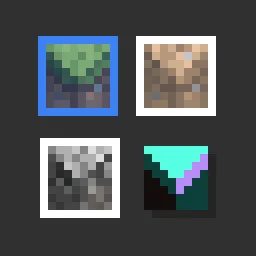
Pack resource and data packs into profiles with multiple selection, drag and drop, and extended mouse and keyboard controls.
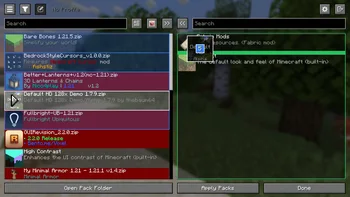

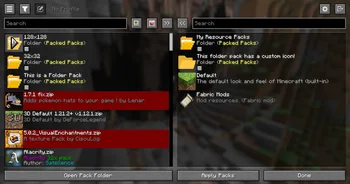
Packed Packs, fishstiz tarafından yapılmış bir mod. Pack resource and data packs into profiles with multiple selection, drag and drop, and extended mouse and keyboard controls.
Desteklediği sürümler: Minecraft 1.21 – 26.x. Modrinth üzerinde 2,837,122 kez indirildi. Son güncelleme 05.10.2026 tarihinde çıktı.
Packed Packs, 07.05.2025 tarihinden beri Modrinth üzerinde 228 sürüm yayınladı. Bunların 130 tanesi son bir yılda çıktı. En yenisi 05.10.2026 tarihinde çıkan 2.3.1+26.3. Minecraft 26.3 için yapıldı. Fabric üzerinde çalışır. İndirme boyutu 971 KB.
| Sürüm | Yayın tarihi | Minecraft | Tür |
|---|---|---|---|
2.3.1+26.3 | 05.10.2026 | 26.3 | Kararlı |
2.3.1+26.3 | 05.10.2026 | 26.3 | Kararlı |
2.3.1+26.2 | 05.10.2026 | 26.2 | Kararlı |
2.3.1+26.2 | 05.10.2026 | 26.2 | Kararlı |
2.3.1+1.21.11 | 05.10.2026 | 1.21.11 | Kararlı |
Packed Packs açık kaynaklıdır. GitHub'daki en yeni sürümü 05.10.2026 tarihinde yayınlanan v2.3.1+26.3.
Server Pack Unlocker or Catharis #76)
Öncekiler: v2.3.1+26.2 (05.10.2026), v2.3.1+26.1 (05.10.2026).
Pack resource and data packs into profiles with multiple selection, drag and drop, and extended mouse and keyboard
controls.
📂 Additional Folders
resourcepacks or
datapacks.
📂📦 Folder Packs
folder root.
These are also known as modules.
{
"module": false,
"packIds": [
"continuity:default",
"examplenamespace:examplepath"
]
}
file is only loaded once on enter to prevent overwriting unsaved state.
🖱️ Mouse Controls
Open Context Menu
right click
Select range
hold Shift and click
Add/remove from selection
hold Ctrl and click
Quick transfer
double click
Undo
click backwards side button
Redo
click forwards side button
⌨️ Keyboard Controls
Navigate entries
↑, ↓
Navigate out of entries
Tab
Transfer selection
Space, Enter
Select range
Shift + ↑ / ↓
Select all
Ctrl + A
Move selection
Ctrl / Alt + ↑ / ↓
Undo
Ctrl + Z
Redo
Ctrl + Shift + Z, Ctrl + Y
Open folder pack
Enter
Close folder pack
Escape
Delete file
Delete
Rename file
Ctrl + R, F2 (if not bound to screenshot)
Open file
Ctrl + Enter
Show in file manager
Alt + Shift + R
Toggle profiles sidebar
Ctrl + `
Switch between default and no profile
F1
Refresh packs
F5
Focus search bar
Ctrl + F, Ctrl + K
⚙️ Configuration
🚀 Developer Mode
original screen.
configured pack selection and order.
and resolves to the first match, see the config.meta.json file.
correctly.
This can only be done from the config.meta.json file.
ID of file/test-v1.2 will always match "file/test-v1.2": "file/test-v1.4" over
"regex:file\\/test-v\\d*": "file/test-v2").
manually from the in-game GUI or the config file.
♨️ Java API
The Java API, designed as an optional dependency, allows mods to extend functionality or add compatibility with
Packed Packs. This includes subscribing to various events and registering custom preferences
to add configurable widgets at certain positions of the screen.
You can find example implementations in the **testmod**,
and in the **compat**
package of the main source set.
You may also view the **javadocs** from the source code.
Visit the wiki page for more details.
🔗 Compatibility
Explicit compatibility is added for:
Submit an issue if the above mods have become incompatible. Make sure
to verify that the correct mod version is used for the target minecraft version, and if the issue only occurs with
Packed Packs installed.
Note: Compatibility for the above mods were added before the Java API was made.
It would be better for other mods to make use of the Java API instead for better long
term compatibility. If the above mods make enough breaking changes, it may have to be dropped.
LTS versions: 1.21.1, 1.21.11, 26.1, 26.2, 26.3
Yazan: fishstiz. Resimli halini Modrinth sayfasında oku.
Bu mod yalnızca senin oyununda çalışır. Sunucuların buna ihtiyacı yok, bu yüzden her sunucuda kullanabilirsin.
Minecraft 1.21 – 26.x için Fabric ve NeoForge kur.
İhtiyaç duyduğu modları ekle: Fabric API.
.jar dosyasını Modrinth üzerinden indir ve .minecraft klasöründeki mods klasörüne koy.
Minecraft'ı Fabric profiliyle başlat.
CraftRank Launcher ile bu adımları atlayabilirsin: Modlar'ı aç, Packed Packs ara ve Kur'a tıkla.
| Kaynak | İndirmeler | Sürümler | Son güncelleme | Fiyat |
|---|---|---|---|---|
| Packed Packsbaktığın | 2.8M | 1.21 – 26.x | 5 Eki 2026 | Ücretsiz |
| ResourcifyDeDiamondPro | 13.8M | 1.8 – 26.x | 17 gün önce | Ücretsiz |
 PaxiYUNGNICKYOUNG | 11.4M | 1.19 – 26.x | 24 Haz 2026 | Ücretsiz |
 Dynamic FPSjuliand665 | 71.8M | 1.16 – 26.x | 16 Eyl 2026 | Ücretsiz |
Evet. Packed Packs, Minecraft 26.x sürümünü destekliyor. Desteklenen tüm sürümler: 26.x, 1.21.
Evet. Packed Packs, Modrinth üzerinden ücretsiz indirilebilir.
İstemci tarafı. Packed Packs kendi mods klasörüne kurulur ve modsuz sunucular dahil her sunucuda çalışır.
Evet: Fabric API. Bunu Packed Packs öncesinde kur.
Evet. Son güncelleme son 24 saat içinde çıktı.
En yakın olanlar Resourcify, Paxi ve Dynamic FPS. Tüm alternatifleri karşılaştır
ResourcifyModlar · 1.8 – 26.xIn-game resource pack, data pack and shader browser and updater.
PaxiModlar · 1.19 – 26.xAutomatic data & resource pack loading made easy.
Dynamic FPSModlar · 1.16 – 26.xReduce resource usage while Minecraft is in the background, idle, or on battery.
 InspectMCModlar · 1.21 – 26.x
Inspect blocks, entities, biomes, registries, datapacks and runtime data in-game, then export diagnostics to JSON, CSV, Excel and ZIP.
 Pages of AtlasModlar · 26.x
Minecraft Fabric mod that enables ultra-high-resolution resource packs by transparently distributing oversized texture atlases across multiple physical atlas…
 Better Block EntitiesModlar · 1.21 – 26.x
A Minecraft optimization mod for Fabric-Sodium that improves framerates by improving block entity rendering via a hybrid renderer
Yorum yazmak için giriş yap.