
 Fresh Animations: Classic HorsesRessourcenpakete · 1.19 – 26.x
Recreates the old look for horses, but with Fresh Animations. An official FA extension.
Kostenlos361,586 Downloads

Brings back the old enchantment glint from 1.19.3!
Direkter Download von Modrinth · 156,313 Downloads
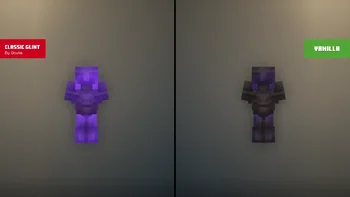
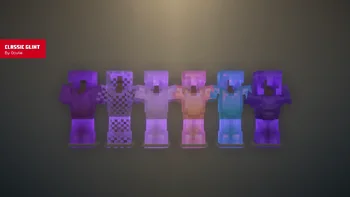
Classic Glint (Ressourcenpaket) stammt von Oculie. Brings back the old enchantment glint from 1.19.3!
Unterstützt wird Minecraft 1.19 – 26.x. Auf Modrinth gibt es 156,313 Downloads. Das letzte Update erschien am 17.06.2026.
Classic Glint hat seit 06.08.2024 15 Versionen auf Modrinth veröffentlicht. 3 davon erschienen im letzten Jahr. Die neueste ist 1.2.0, erschienen am 17.06.2026. Sie ist für Minecraft 1.21.5 – 26.3 gemacht. Sie läuft auf Minecraft. Der Download ist 15 KB groß.
| Version | Veröffentlicht | Minecraft | Typ |
|---|---|---|---|
1.2.0 | 17.06.2026 | 1.21.5 – 26.3 | Release |
1.1.1 | 26.03.2026 | 26.1, 26.1.1, 26.1.2 | Release |
1.1.1 | 10.12.2025 | 1.21.11 | Release |
1.1.1 | 05.10.2025 | 1.21.9, 1.21.10 | Release |
1.1.1 | 01.07.2025 | 1.21.7, 1.21.8 | Release |
#### Classic Glint brings back the old enchantment glint from 1.19.3 that is vibrant and actually visible to see!
For an accurate recreation of the old enchantment glint, apply the following changes to your settings in-game.
License
Geschrieben von Oculie. Mit Bildern auf Modrinth lesen.
Lade die .zip-Datei von Modrinth herunter. Entpacke sie nicht.
Öffne in Minecraft Optionen, dann Ressourcenpakete, dann Paketordner öffnen.
Lege die .zip-Datei in diesen Ordner und gehe zurück ins Spiel.
Schiebe Classic Glint in die rechte Liste und klicke auf Fertig.
Es ist für Minecraft 1.19 – 26.x gemacht. Auf anderen Versionen markiert Minecraft es als inkompatibel, oft funktioniert es aber trotzdem.
| Ressource | Downloads | Versionen | Letztes Update | Preis |
|---|---|---|---|---|
| Classic Glintdie du angesehen hast | 156K | 1.19 – 26.x | 17. Juni 2026 | Kostenlos |
| Fresh Animations: Classic HorsesFreshLX | 362K | 1.19 – 26.x | vor 11 Tagen | Kostenlos |
 Golden Days BasePoeticRainbow | 1.3M | 1.16 – 26.x | vor 17 Tagen | Kostenlos |
 Golden Days AlphaPoeticRainbow | 550K | 1.16 – 26.x | 11. Okt. 2026 | Kostenlos |
Ja. Classic Glint unterstützt Minecraft 26.x. Alle unterstützten Versionen: 26.x, 1.21, 1.20, 1.19.
Ja. Classic Glint kannst du kostenlos bei Modrinth herunterladen.
Ja. Das letzte Update kam innerhalb des letzten Tages.
Am ähnlichsten sind Fresh Animations: Classic Horses, Golden Days Base und Golden Days Alpha. Alle Alternativen vergleichen
Fresh Animations: Classic HorsesRessourcenpakete · 1.19 – 26.xRecreates the old look for horses, but with Fresh Animations. An official FA extension.
Golden Days BaseRessourcenpakete · 1.16 – 26.xGolden Days is a Minecraft resource pack meant to bring back old textures, lighting, names, and sounds from older versions of Minecraft, like Beta. Requires…
Golden Days AlphaRessourcenpakete · 1.16 – 26.xGolden Days Alpha brings back the iconic Alpha grass foliage color and more! Use this pack on top of Golden Days Base to relive the Alpha experience in Modern…
 Just ExpressionsRessourcenpakete · 1.18 – 26.x
A EMF resource pack that brings Fresh Animations eye Animations but for the player. Just that...
 Torta's Enchantment GlintRessourcenpakete · 1.21
glow and glint enchantments like a&s👀
 Immersive InterfacesRessourcenpakete · 1.20 – 26.x
Shrimp's Immersive Interfaces is a complete graphical revamp of Minecraft's GUI, brings variety and charm to the previously grey boxes.
Logg dich ein, um eine Bewertung zu schreiben.