
 Fresh Animations: Classic HorsesResource packs · 1.19 – 26.x
Recreates the old look for horses, but with Fresh Animations. An official FA extension.
Free359,959 downloads

Brings back the old enchantment glint from 1.19.3!
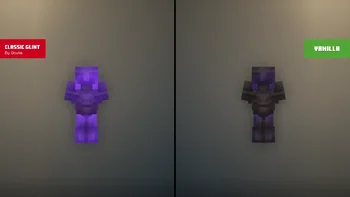
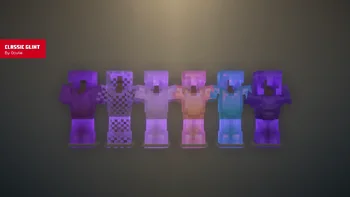
Classic Glint is a resource pack made by Oculie. Brings back the old enchantment glint from 1.19.3!
It supports Minecraft 1.19 – 26.x. It has been downloaded 156,313 times on Modrinth. The last update came out on Jun 17, 2026.
Classic Glint has had 15 releases on Modrinth since Aug 6, 2024. 3 of them came out in the past year. The newest is 1.2.0, released on Jun 17, 2026. It is made for Minecraft 1.21.5 – 26.3. It runs on Minecraft. The download is 15 KB.
| Version | Released | Minecraft | Type |
|---|---|---|---|
1.2.0 | Jun 17, 2026 | 1.21.5 – 26.3 | Release |
1.1.1 | Mar 26, 2026 | 26.1, 26.1.1, 26.1.2 | Release |
1.1.1 | Dec 10, 2025 | 1.21.11 | Release |
1.1.1 | Oct 5, 2025 | 1.21.9, 1.21.10 | Release |
1.1.1 | Jul 1, 2025 | 1.21.7, 1.21.8 | Release |
#### Classic Glint brings back the old enchantment glint from 1.19.3 that is vibrant and actually visible to see!
For an accurate recreation of the old enchantment glint, apply the following changes to your settings in-game.
License
Written by Oculie. Read it with pictures on Modrinth.
Download the .zip file from Modrinth. Do not unzip it.
In Minecraft, open Options, then Resource Packs, then Open Pack Folder.
Drop the .zip file into that folder and go back to the game.
Move Classic Glint to the right-hand list and click Done.
It is made for Minecraft 1.19 – 26.x. On other versions Minecraft marks it as incompatible, but it often still works.
| Resource | Downloads | Versions | Last update | Price |
|---|---|---|---|---|
| Classic Glintthe one you looked at | 156K | 1.19 – 26.x | Jun 17, 2026 | Free |
| Fresh Animations: Classic HorsesFreshLX | 360K | 1.19 – 26.x | 10 days ago | Free |
 Golden Days BasePoeticRainbow | 1.3M | 1.16 – 26.x | 17 days ago | Free |
 Golden Days AlphaPoeticRainbow | 550K | 1.16 – 26.x | Oct 11, 2026 | Free |
Yes. Classic Glint supports Minecraft 26.x. All supported versions: 26.x, 1.21, 1.20, 1.19.
Yes. Classic Glint is free to download from Modrinth.
Yes. The last update came out in the past day.
The closest ones are Fresh Animations: Classic Horses, Golden Days Base and Golden Days Alpha. Compare all alternatives
Fresh Animations: Classic HorsesResource packs · 1.19 – 26.xRecreates the old look for horses, but with Fresh Animations. An official FA extension.
Golden Days BaseResource packs · 1.16 – 26.xGolden Days is a Minecraft resource pack meant to bring back old textures, lighting, names, and sounds from older versions of Minecraft, like Beta. Requires…
Golden Days AlphaResource packs · 1.16 – 26.xGolden Days Alpha brings back the iconic Alpha grass foliage color and more! Use this pack on top of Golden Days Base to relive the Alpha experience in Modern…
 Just ExpressionsResource packs · 1.18 – 26.x
A EMF resource pack that brings Fresh Animations eye Animations but for the player. Just that...
 Torta's Enchantment GlintResource packs · 1.21
glow and glint enchantments like a&s👀
 Immersive InterfacesResource packs · 1.20 – 26.x
Shrimp's Immersive Interfaces is a complete graphical revamp of Minecraft's GUI, brings variety and charm to the previously grey boxes.
Log in to leave a review.