
 ProximaTunnelPlugins · 1.16 – 1.21
A plugin that allows you to play with friends on a local server without opening ports.
Kostenlos37,333 Downloads
A scoreboard where every player picks which rows they see, from a dialog menu.
Direkter Download von Modrinth · 7 Downloads
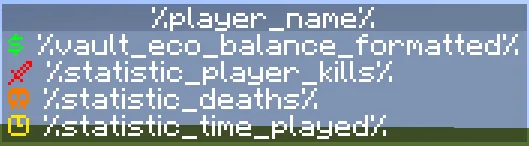
Scoreboard Settings (Plugin) ist für Server mit Paper / Spigot gedacht und stammt von andrey5650. A scoreboard where every player picks which rows they see, from a dialog menu.
Unterstützt wird Minecraft 1.21 – 26.x. Auf Modrinth gibt es 7 Downloads. Damit liegt es auf Platz 48 der 54 hier gelisteten Technik-Plugins. Das letzte Update erschien am 03.11.2026.
Die neueste ist 1.0.0, erschienen am 03.11.2026. Sie ist für Minecraft 1.21.7 – 26.3 gemacht. Sie läuft auf Folia und Paper. Der Download ist 43 KB groß.
| Version | Veröffentlicht | Minecraft | Typ |
|---|---|---|---|
1.0.0 | 03.11.2026 | 1.21.7 – 26.3 | Release |
Die Befehle, die auf der Modrinth-Seite von Scoreboard Settings stehen:
/sbsettings/papiDort genannte Berechtigungen, zu vergeben mit einem Plugin wie LuckPerms:
scoreboardsettings.reloadscoreboard.update-ticksscoreboard.linesScoreboard Settings ist Open Source. Die neueste Version auf GitHub ist First Release, veröffentlicht am 04.11.2026.
First release.
A sidebar scoreboard where every player chooses which rows they see, from a dialog menu.
Players open the menu with /sbsettings and turn rows on and off with one click. Hidden rows are removed and the rows
below move up. Each player's choices are saved in SQLite or MySQL.
The default config uses these PlaceholderAPI expansions:
/papi ecloud download Player
/papi ecloud download Vault
/papi ecloud download Statistic
Command · Permission · Description
/sbsettings · none · Opens the settings dialog
/sbsettings reload · scoreboardsettings.reload (op) · Reloads the config
The command name and aliases come from config.yml. Changing them, or changing storage, needs a restart.
command: sbsettings
aliases: []
storage:
type: sqlite
mysql:
host: localhost
port: 3306
database: minecraft
username: root
password: ""
scoreboard:
update-ticks: 20
title: "&f%player_name%"
lines:
dialog:
title: "Settings - Scoreboard"
on: "&aON"
off: "&cOFF"
columns: 1
button-width: 250
buttons:
scoreboard:
text: "Scoreboard: %state%"
row: all
money:
text: "Show Money: %state%"
row: 1
kills:
text: "Show Kills: %state%"
row: 2
deaths:
text: "Show Deaths: %state%"
row: 3
playtime:
text: "Show Playtime: %state%"
row: 4
close:
text: "Close"
command: ""
messages:
reloaded: "&aScoreboardSettings reloaded."
Key · Description
storage.type · sqlite (saved in plugins/ScoreboardSettings/data.db) or mysql
scoreboard.update-ticks · How often the scoreboard updates. 20 ticks = 1 second
scoreboard.lines · The first line is row 1, the second is row 2 and so on
dialog.buttons..text · Button text. %state% becomes the on or off text
dialog.buttons..row · The rows the button hides: a number (1), a list ([2, 3]) or all for the whole scoreboard
dialog.close.command · A command the player runs when they press Close, without the slash. Empty only closes the dialog
Each button's id (money, kills, ...) is what gets saved for the player. If you rename an id, players lose that
setting.
Requires JDK 25 or newer and Maven.
mvn package
The jar is written to target/.
Geschrieben von andrey5650. Mit Bildern auf Modrinth lesen.
Stelle sicher, dass dein Server Paper und Spigot auf Minecraft 1.21 – 26.x nutzt.
Lade die .jar-Datei von Modrinth herunter und lege sie in den plugins-Ordner deines Servers.
Starte den Server neu. Vermeide /reload, viele Plugins kommen damit nicht gut klar.
Gib /plugins in der Konsole ein: Scoreboard Settings sollte grün aufgelistet sein. Die Konfigurationsdateien werden beim ersten Start im plugins-Ordner angelegt.
Ausführliche Anleitung: So installierst du Plugins auf einem Minecraft-Server
| Ressource | Downloads | Versionen | Letztes Update | Preis |
|---|---|---|---|---|
| Scoreboard Settingsdie du angesehen hast | 7 | 1.21 – 26.x | vor 7 Tagen | Kostenlos |
| ProximaTunnelzephire | 37K | 1.16 – 1.21 | 7. Juni 2026 | Kostenlos |
 sCheckPlayerSnon_S | 28K | 1.12 – 26.x | 30. Juni 2026 | Kostenlos |
 Bedrock Simple VoicePietris | 1,342 | 1.20 – 26.x | vor 14 Tagen | Kostenlos |
Ja. Scoreboard Settings unterstützt Minecraft 26.x. Alle unterstützten Versionen: 26.x, 1.21.
Ja. Scoreboard Settings kannst du kostenlos bei Modrinth herunterladen.
Scoreboard Settings läuft auf Servern mit Paper und Spigot.
Ja. Das letzte Update kam innerhalb des letzten Tages.
Am ähnlichsten sind ProximaTunnel, sCheckPlayer und Bedrock Simple Voice. Alle Alternativen vergleichen
ProximaTunnelPlugins · 1.16 – 1.21A plugin that allows you to play with friends on a local server without opening ports.
sCheckPlayerPlugins · 1.12 – 26.x✅Plugin that allows checking players for cheats!✅
Bedrock Simple VoicePlugins · 1.20 – 26.xProximity voice chat for Bedrock & Java players via Simple Voice Chat. No client mods, easy setup, browser-based voice & Velocity support!
 GreaterTeamsPlugins · 1.21
Greater Teams is a powerful and easy-to-use Minecraft team management plugin designed to bring players together and make multiplayer gameplay more enjoyable.
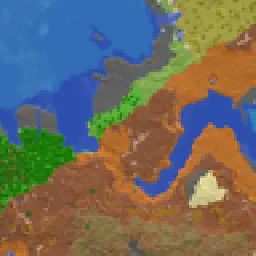 squaremapPlugins · 1.19 – 26.x
squaremap is a minimalistic & lightweight world map viewer for Minecraft servers, using the vanilla map rendering style
 TabListPingPlugins · 1.18 – 26.x
Shows players' ping times in the tab list
Logg dich ein, um eine Bewertung zu schreiben.