
 ProximaTunnelPlugins · 1.16 – 1.21
A plugin that allows you to play with friends on a local server without opening ports.
Gratis37,333 descargas
A scoreboard where every player picks which rows they see, from a dialog menu.
Descarga directa desde Modrinth · 7 descargas
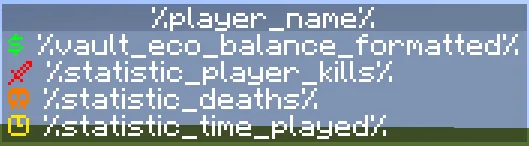
andrey5650 creó Scoreboard Settings (plugin) para servidores Paper / Spigot. A scoreboard where every player picks which rows they see, from a dialog menu.
Es compatible con Minecraft 1.21 – 26.x. Se ha descargado 7 veces en Modrinth. Eso lo sitúa en el puesto 48 de los 54 plugins de tecnología de esta lista. La última actualización salió el 03/11/2026.
La más reciente es 1.0.0, publicada el 03/11/2026. Está hecha para Minecraft 1.21.7 – 26.3. Funciona en Folia y Paper. La descarga ocupa 43 KB.
| Versión | Publicado | Minecraft | Tipo |
|---|---|---|---|
1.0.0 | 03/11/2026 | 1.21.7 – 26.3 | Estable |
Los comandos que aparecen en la página de Scoreboard Settings en Modrinth:
/sbsettings/papiPermisos que se nombran allí, para dar con un plugin como LuckPerms:
scoreboardsettings.reloadscoreboard.update-ticksscoreboard.linesScoreboard Settings es de código abierto. Su última versión en GitHub es First Release, publicada el 04/11/2026.
First release.
A sidebar scoreboard where every player chooses which rows they see, from a dialog menu.
Players open the menu with /sbsettings and turn rows on and off with one click. Hidden rows are removed and the rows
below move up. Each player's choices are saved in SQLite or MySQL.
The default config uses these PlaceholderAPI expansions:
/papi ecloud download Player
/papi ecloud download Vault
/papi ecloud download Statistic
Command · Permission · Description
/sbsettings · none · Opens the settings dialog
/sbsettings reload · scoreboardsettings.reload (op) · Reloads the config
The command name and aliases come from config.yml. Changing them, or changing storage, needs a restart.
command: sbsettings
aliases: []
storage:
type: sqlite
mysql:
host: localhost
port: 3306
database: minecraft
username: root
password: ""
scoreboard:
update-ticks: 20
title: "&f%player_name%"
lines:
dialog:
title: "Settings - Scoreboard"
on: "&aON"
off: "&cOFF"
columns: 1
button-width: 250
buttons:
scoreboard:
text: "Scoreboard: %state%"
row: all
money:
text: "Show Money: %state%"
row: 1
kills:
text: "Show Kills: %state%"
row: 2
deaths:
text: "Show Deaths: %state%"
row: 3
playtime:
text: "Show Playtime: %state%"
row: 4
close:
text: "Close"
command: ""
messages:
reloaded: "&aScoreboardSettings reloaded."
Key · Description
storage.type · sqlite (saved in plugins/ScoreboardSettings/data.db) or mysql
scoreboard.update-ticks · How often the scoreboard updates. 20 ticks = 1 second
scoreboard.lines · The first line is row 1, the second is row 2 and so on
dialog.buttons..text · Button text. %state% becomes the on or off text
dialog.buttons..row · The rows the button hides: a number (1), a list ([2, 3]) or all for the whole scoreboard
dialog.close.command · A command the player runs when they press Close, without the slash. Empty only closes the dialog
Each button's id (money, kills, ...) is what gets saved for the player. If you rename an id, players lose that
setting.
Requires JDK 25 or newer and Maven.
mvn package
The jar is written to target/.
Escrita por andrey5650. Léela con imágenes en Modrinth.
Asegúrate de que tu servidor use Paper y Spigot en Minecraft 1.21 – 26.x.
Descarga el archivo .jar desde Modrinth y ponlo en la carpeta plugins de tu servidor.
Reinicia el servidor. Evita /reload, muchos plugins no lo llevan bien.
Escribe /plugins en la consola: Scoreboard Settings debería aparecer en verde. Sus archivos de configuración se crean en la carpeta plugins al primer arranque.
Guía completa: Cómo instalar plugins en un servidor de Minecraft
| Recurso | Descargas | Versiones | Última actualización | Precio |
|---|---|---|---|---|
| Scoreboard Settingsel que estabas viendo | 7 | 1.21 – 26.x | hace 7 días | Gratis |
| ProximaTunnelzephire | 37K | 1.16 – 1.21 | 7 jun 2026 | Gratis |
 sCheckPlayerSnon_S | 28K | 1.12 – 26.x | 30 jun 2026 | Gratis |
 Bedrock Simple VoicePietris | 1,420 | 1.20 – 26.x | hace 14 días | Gratis |
Sí. Scoreboard Settings es compatible con Minecraft 26.x. Todas las versiones compatibles: 26.x, 1.21.
Sí. Scoreboard Settings se puede descargar gratis desde Modrinth.
Scoreboard Settings funciona en servidores Paper y Spigot.
Sí. La última actualización salió en el último día.
Los más parecidos son ProximaTunnel, sCheckPlayer y Bedrock Simple Voice. Comparar todas las alternativas
ProximaTunnelPlugins · 1.16 – 1.21A plugin that allows you to play with friends on a local server without opening ports.
sCheckPlayerPlugins · 1.12 – 26.x✅Plugin that allows checking players for cheats!✅
Bedrock Simple VoicePlugins · 1.20 – 26.xProximity voice chat for Bedrock & Java players via Simple Voice Chat. No client mods, easy setup, browser-based voice & Velocity support!
 GreaterTeamsPlugins · 1.21
Greater Teams is a powerful and easy-to-use Minecraft team management plugin designed to bring players together and make multiplayer gameplay more enjoyable.
 squaremapPlugins · 1.19 – 26.x
squaremap is a minimalistic & lightweight world map viewer for Minecraft servers, using the vanilla map rendering style
 TabListPingPlugins · 1.18 – 26.x
Shows players' ping times in the tab list
Inicia sesión para dejar una reseña.