NeuCraftRank SitesA free website and storeMake yours ›
1.10.41CraftRank Launcher is out Herunterladen ›AshlarFree server software built on Paper, with DDoS and backdoor protection See Ashlar ›Für ServerbesitzerYour own launcher with your name, logo and one click onto your server See themes ›
Ressourcen / Plugins / TabListPro

TabListPro

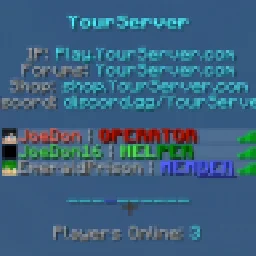
The all-in-one, feature complete, Tab plugin. Animation, sorting, prefixes, headers, and more!

PluginsKostenlos1.8 – 1.16
von Joedon · übernommen von SpigotMC · ★★★★★ 4.4
Herunterladen ›

Opens SpigotMC · 117,794 downloads there

Was er macht

The all-in-one, feature complete, Tab plugin. Animation, sorting, prefixes, headers, and more!

TabListPro (Plugin) ist für Server mit Paper / Spigot gedacht und stammt von Joedon. Unterstützt wird Minecraft 1.8 – 1.16. Auf SpigotMC gibt es 117,794 Downloads. Damit liegt es auf Platz 24 der 108 hier gelisteten Kosmetik- und Anzeige-Plugins. 61 Leute haben es im Schnitt mit 4.4 von 5 bewertet. Das letzte Update erschien am 03.02.2021.

Unterstützte Versionen

1.161.131.121.8

Versionsverlauf

TabListPro hat seit 09.04.2016 48 Versionen auf SpigotMC veröffentlicht. Keine davon erschien im letzten Jahr. Die neueste ist UPDATED-1.2.2, erschienen am 03.02.2021.

VersionVeröffentlichtTyp
UPDATED-1.2.203.02.2021Release
UPDATED-1.2.118.08.2020Release
UPDATED-1.2.007.08.2020Release
UPDATED-1.1.230.06.2020Release
UPDATED-1.0.317.03.2020Release

Befehle

Die Befehle, die auf der SpigotMC-Seite von TabListPro stehen:

/papi/tablistpro/tlp

Berechtigungen

Dort genannte Berechtigungen, zu vergeben mit einem Plugin wie LuckPerms:

tablistpro.settablistpro.reload
Beschreibung des Autors auf SpigotMC

TabListPro is the updated version of TabListEdit. Please make sure to update your config accordingly if you have used TabListEdit in the past!

[](iceline-hosting.com/billing/aff.php?aff=85)

Need a truly affordable host for your server that you'll be running TabListPro on? Check out Iceline Hosting! All servers are ready to go in minutes, and come with truly powerful CPUs and hardware!

Use code JOEDON at checkout for 20% off any order! Click the banner to be taken to their website.

Change the entire dynamic of your server with a great looking TabList! With just one lightweight plugin, you have the ability to animate player names, prefixes, suffixes, the header and footer, sort players cleanly through grouping, and utilize the powerful PlaceholderAPI in order to create the ultimate TabList.

Installation of PlaceholderAPI (OPTIONAL): You may need to run a few simple commands before you can start using PlaceholderAPI with TabListPro. If you haven't done this previously, type the following commands after installing PlaceholderAPI:

  • /papi ecloud download Server
  • /papi reload

These commands will allow you to utilize the placeholders in the template config.yml of TabListPro.

PlaceholderAPI Download Page
Placeholder Index

Note: For versions 1.16+, hexadecimal color codes are fully supported throughout this config!

Code (Text):

config.yml

#

Thank you for checking out TabListPro!

#

Change the entire dynamic of your server with a great-looking TabList!

#

  TabListPro allows you to easily and efficiently change how players are

sorted in your TabList, what animations specific Groups of players have,

how the header and footer looks, and more!

#

#

- All parts of this plugin are compatible with PlaceholderAPI! (Not required)

Link: spigotmc.org/resources/placeholderapi.6245/

Placeholders: github.com/PlaceholderAPI/PlaceholderAPI/wiki/P…

#

Please keep in mind you may have to run the following commands to get PlaceholderAPI working:

/papi ecloud download <plugin you want placeholders from>

/papi reload

#

(Ex. '/papi ecloud download Server' followed by '/papi reload')

#

#

- TabListPro Commands:

/tablistpro OR /tlp set <player> <group> | Set a player to a specified Group

/tablistpro OR /tlp reload | Reload TabListPro

#

- TabListPro Permissions:

tablistpro.set

tablistpro.reload

#

#

For any questions, suggestions, or issues regarding TabListPro, please make a post in the Discussion Page.

#

HEADER AND FOOTER:

#

Enable text above the player list in the TabList?

header-enabled: true

Animation sequence for the header. Use '\n' to create a new line, or edit the template below.

header:

  • '\n&b&lYourServer\n\n     &7IP: &bPlay.YourServer.com\n&7Forums: &bYourServer.com\n&7Shop: &bshop.YourServer.com\n&7Discord: &bdiscord.gg/YourServer\n'
  • '\n&9&lY&b&lourServer\n\n     &7IP: &bPlay.YourServer.com\n&7Forums: &bYourServer.com\n&7Shop: &bshop.YourServer.com\n&7Discord: &bdiscord.gg/YourServer\n'
  • '\n&9&lYo&b&lurServer\n\n     &7IP: &bPlay.YourServer.com\n&7Forums: &bYourServer.com\n&7Shop: &bshop.YourServer.com\n&7Discord: &bdiscord.gg/YourServer\n'
  • '\n&9&lYou&b&lrServer\n\n     &7IP: &bPlay.YourServer.com\n&7Forums: &bYourServer.com\n&7Shop: &bshop.YourServer.com\n&7Discord: &bdiscord.gg/YourServer\n'
  • '\n&9&lYour&b&lServer\n\n     &7IP: &bPlay.YourServer.com\n&7Forums: &bYourServer.com\n&7Shop: &bshop.YourServer.com\n&7Discord: &bdiscord.gg/YourServer\n'
  • '\n&9&lYourS&b&lerver\n\n     &7IP: &bPlay.YourServer.com\n&7Forums: &bYourServer.com\n&7Shop: &bshop.YourServer.com\n&7Discord: &bdiscord.gg/YourServer\n'
  • '\n&9&lYourSe&b&lrver\n\n     &7IP: &bPlay.YourServer.com\n&7Forums: &bYourServer.com\n&7Shop: &bshop.YourServer.com\n&7Discord: &bdiscord.gg/YourServer\n'
  • '\n&9&lYourSer&b&lver\n\n     &7IP: &bPlay.YourServer.com\n&7Forums: &bYourServer.com\n&7Shop: &bshop.YourServer.com\n&7Discord: &bdiscord.gg/YourServer\n'
  • '\n&9&lYourServ&b&ler\n\n     &7IP: &bPlay.YourServer.com\n&7Forums: &bYourServer.com\n&7Shop: &bshop.YourServer.com\n&7Discord: &bdiscord.gg/YourServer\n'
  • '\n&9&lYourServe&b&lr\n\n     &7IP: &bPlay.YourServer.com\n&7Forums: &bYourServer.com\n&7Shop: &bshop.YourServer.com\n&7Discord: &bdiscord.gg/YourServer\n'
  • '\n&9&lYourServer\n\n     &7IP: &bPlay.YourServer.com\n&7Forums: &bYourServer.com\n&7Shop: &bshop.YourServer.com\n&7Discord: &bdiscord.gg/YourServer\n'
  • '\n&9&lYourServer\n\n     &7IP: &bPlay.YourServer.com\n&7Forums: &bYourServer.com\n&7Shop: &bshop.YourServer.com\n&7Discord: &bdiscord.gg/YourServer\n'
  • '\n&9&lYourServe&b&lr\n\n     &7IP: &bPlay.YourServer.com\n&7Forums: &bYourServer.com\n&7Shop: &bshop.YourServer.com\n&7Discord: &bdiscord.gg/YourServer\n'
  • '\n&9&lYourServ&b&ler\n\n     &7IP: &bPlay.YourServer.com\n&7Forums: &bYourServer.com\n&7Shop: &bshop.YourServer.com\n&7Discord: &bdiscord.gg/YourServer\n'
  • '\n&9&lYourSer&b&lver\n\n     &7IP: &bPlay.YourServer.com\n&7Forums: &bYourServer.com\n&7Shop: &bshop.YourServer.com\n&7Discord: &bdiscord.gg/YourServer\n'
  • '\n&9&lYourSe&b&lrver\n\n     &7IP: &bPlay.YourServer.com\n&7Forums: &bYourServer.com\n&7Shop: &bshop.YourServer.com\n&7Discord: &bdiscord.gg/YourServer\n'
  • '\n&9&lYourS&b&lerver\n\n     &7IP: &bPlay.YourServer.com\n&7Forums: &bYourServer.com\n&7Shop: &bshop.YourServer.com\n&7Discord: &bdiscord.gg/YourServer\n'
  • '\n&9&lYour&b&lServer\n\n     &7IP: &bPlay.YourServer.com\n&7Forums: &bYourServer.com\n&7Shop: &bshop.YourServer.com\n&7Discord: &bdiscord.gg/YourServer\n'
  • '\n&9&lYou&b&lrServer\n\n     &7IP: &bPlay.YourServer.com\n&7Forums: &bYourServer.com\n&7Shop: &bshop.YourServer.com\n&7Discord: &bdiscord.gg/YourServer\n'
  • '\n&9&lYo&b&lurServer\n\n     &7IP: &bPlay.YourServer.com\n&7Forums: &bYourServer.com\n&7Shop: &bshop.YourServer.com\n&7Discord: &bdiscord.gg/YourServer\n'
  • '\n&9&lY&b&lourServer\n\n     &7IP: &bPlay.YourServer.com\n&7Forums: &bYourServer.com\n&7Shop: &bshop.YourServer.com\n&7Discord: &bdiscord.gg/YourServer\n'
  • '\n&b&lYourServer\n\n     &7IP: &bPlay.YourServer.com\n&7Forums: &bYourServer.com\n&7Shop: &bshop.YourServer.com\n&7Discord: &bdiscord.gg/YourServer\n'

The rate (in ticks) that the animation sequence above cycles. 20 ticks = 1 second.

header-interval: 5

#

Enable text below the player list in the tab?

footer-enabled: true

footer:

  • '\n&9&l-&b&l---------\n\n   &7Players Online: &b%server_online%\n'
  • '\n&9&l-&b&l---------\n\n   &7Players Online: &b%server_online%\n'
  • '\n&b&l-&9&l-&b&l--------\n\n   &7Players Online: &b%server_online%\n'
  • '\n&b&l--&9&l-&b&l-------\n\n   &7Players Online: &b%server_online%\n'
  • '\n&b&l---&9&l-&b&l------\n\n   &7Players Online: &b%server_online%\n'
  • '\n&b&l----&9&l-&b&l-----\n\n   &7Players Online: &b%server_online%\n'
  • '\n&b&l-----&9&l-&b&l----\n\n   &7Players Online: &b%server_online%\n'
  • '\n&b&l------&9&l-&b&l---\n\n   &7Players Online: &b%server_online%\n'
  • '\n&b&l-------&9&l-&b&l--\n\n   &7Players Online: &b%server_online%\n'
  • '\n&b&l--------&9&l-&b&l-\n\n   &7Players Online: &b%server_online%\n'
  • '\n&b&l---------&9&l-\n\n   &7Players Online: &b%server_online%\n'
  • '\n&b&l---------&9&l-\n\n   &7Players Online: &b%server_online%\n'
  • '\n&b&l--------&9&l-&b&l-\n\n   &7Players Online: &b%server_online%\n'
  • '\n&b&l-------&9&l-&b&l--\n\n   &7Players Online: &b%server_online%\n'
  • '\n&b&l------&9&l-&b&l---\n\n   &7Players Online: &b%server_online%\n'
  • '\n&b&l-----&9&l-&b&l----\n\n   &7Players Online: &b%server_online%\n'
  • '\n&b&l----&9&l-&b&l-----\n\n   &7Players Online: &b%server_online%\n'
  • '\n&b&l---&9&l-&b&l------\n\n   &7Players Online: &b%server_online%\n'
  • '\n&b&l--&9&l-&b&l-------\n\n   &7Players Online: &b%server_online%\n'
  • '\n&b&l-&9&l-&b&l--------\n\n   &7Players Online: &b%server_online%\n'
  • '\n&b&l&9&l-&b&l---------\n\n   &7Players Online: &b%server_online%\n'

footer-interval: 10

#

SORTING:

#

  The order of the permissions in the list below is the

order in which players with those permissions will be

sorted in the TabList.

#

For example,

#

sortByPerms:

- 'tlp.c'

- 'tlp.b'

- 'tlp.a'

#

  In the list above, all players with the permission 'tlp.c'

will be sorted above players with the permissions 'tlp.b', who

will be sorted above players with the 'tlp.a' permission. Anyone

without a permission is set to the bottom and is sorted by username.

#

sortByPerms:

  • 'tlp.c'
  • 'tlp.b'
  • 'tlp.a'

#

How often should the TabList sort players?

(Players are auto-sorted upon joining, this is meant cover all cases)

update-sorting: 100

#

DISPLAY NAMES:

#

Use players' display/chat names in the TabList?

(This will make a player's name in the TabList just like their chat name)

use-displayname: false

#

Add a prefix and/or suffix to the player's display name?

(Note: this only applies when 'use-displayname' is set to true)

MAKE SURE THAT THE FINAL (AFTER PLACEHOLDERS ARE SUBSTITUTED) PREFIX/SUFFIX LENGTH IS

16 OR LESS CHARACTERS IN LENGTH. MISTYPING A PLACEHOLDER MAY RESULT IN ACCIDENTALLY

GOING OVER THIS LIMIT.

prefix: '&8[&bCLAN&8] &f'

suffix: '&f | &7&lNOVICE'

#

GROUPS:

#

The default group players are placed in to

default-group: 'member'

#

  Groups give you an easy option to distinguish between players for your TabList!

Listed below are three example groups to help you get started.

#

  Assign players to Groups with: /tablistpro set <player> <group>,

  or by giving them the corresponding 'orHasPermission' permission.

#

(Note: Groups are not automatically sorted - you'll need to add your own

 permissions to the 'sortByPerms' section)

groups:

  # Group name

  op:

    # If a player has this permission, they will automatically be added to this Group

    # (This permission is not required! You can also use: /tablistpro set <player> <group>)

    # Remember: Since operators have all permissions, they will by default be assigned to this Group

    # (Higher Groups take priority over lower Groups when multiple permissions are assigned)

    orHasPermission: 'tlp.op'

    # Animation sequence specific to this Group

    # Placeholders: %player%, %player_displayname%, and all PlaceHolderAPI placeholders.

    # (Go to the top of this config.yml for more information on placeholders)

    display:

    - '%player_displayname%'

  helper:

    orHasPermission: 'tlp.helper'

    display:

    - '&a%player% &7| &2&lHELPER'

    - '&a%player% &7| &a&lH&2&lELPER'

    - '&a%player% &7| &a&lHE&2&lLPER'

    - '&a%player% &7| &a&lHEL&2&lPER'

    - '&a%player% &7| &a&lHELP&2&lER'

    - '&a%player% &7| &a&lHELPE&2&lR'

    - '&a%player% &7| &a&lHELPER'

    - '&a%player% &7| &a&lHELPER'

    - '&a%player% &7| &a&lHELPE&2&lR'

    - '&a%player% &7| &a&lHELP&2&lER'

    - '&a%player% &7| &a&lHEL&2&lPER'

    - '&a%player% &7| &a&lHE&2&lLPER'

    - '&a%player% &7| &a&lH&2&lELPER'

    - '&a%player% &7| &2&lHELPER'

  member:

    orHasPermission: 'tlp.member'

    display:

    - '&7%player% &7| &9&l&nMEMBER'

    - '&7%player% &7| &9&lM&l&nEMBER'

    - '&7%player% &7| &9&lME&l&nMBER'

    - '&7%player% &7| &9&lMEM&l&nBER'

    - '&7%player% &7| &9&lMEMB&l&nER'

    - '&7%player% &7| &9&lMEMBE&l&nR'

    - '&7%player% &7| &9&lMEMBER'

    - '&7%player% &7| &9&lMEMBER'

    - '&7%player% &7| &9&lMEMBE&l&nR'

    - '&7%player% &7| &9&lMEMB&l&nER'

    - '&7%player% &7| &9&lMEM&l&nBER'

    - '&7%player% &7| &9&lME&l&nMBER'

    - '&7%player% &7| &9&lM&l&nEMBER'

    - '&7%player% &7| &9&l&nMEMBER'

#

The rate (in ticks) that the animation sequence for each Group cycles per player. 20 ticks = 1 second.

name-animation: 10

#

Message sent to a p

Geschrieben von Joedon. Mit Bildern auf SpigotMC lesen.

So installierst du TabListPro

  1. Stelle sicher, dass dein Server Paper und Spigot auf Minecraft 1.8 – 1.16 nutzt.

  2. Lade die .jar-Datei von SpigotMC herunter und lege sie in den plugins-Ordner deines Servers.

  3. Starte den Server neu. Vermeide /reload, viele Plugins kommen damit nicht gut klar.

  4. Gib /plugins in der Konsole ein: TabListPro sollte grün aufgelistet sein. Die Konfigurationsdateien werden beim ersten Start im plugins-Ordner angelegt.

Kompatibilität

Minecraft-Versionen
1.16, 1.13, 1.12, 1.8
Läuft auf
Paper, Spigot
Edition
Java
Benötigt
Nichts weiter
Preis
Kostenlos
Pflege
Wird aktiv aktualisiert (10.11.2026)

TabListPro im Vergleich mit ähnlichen Alle Alternativen vergleichen

RessourceDownloadsBewertungVersionenLetztes UpdatePreis
TabListProdie du angesehen hast118K4.41.8 – 1.163. Feb. 2021Kostenlos
CommandWhitelistYouHaveTrouble99K–1.13 – 26.xvor 29 TagenKostenlos
LuckPrefixezTxmMC39K–1.8 – 1.2113. März 2026Kostenlos
ExploitFixeskennytv550–1.13 – 1.2018. Feb. 2024Kostenlos

Fragen

Funktioniert TabListPro mit Minecraft 26.x?

Noch nicht. Die neueste unterstützte Version ist Minecraft 1.16.

Ist TabListPro kostenlos?

Ja. TabListPro kannst du kostenlos bei SpigotMC herunterladen.

Auf welcher Server-Software läuft TabListPro?

TabListPro läuft auf Servern mit Paper und Spigot.

Wird TabListPro noch aktualisiert?

Ja. Das letzte Update kam innerhalb des letzten Tages.

Was sind die besten Alternativen zu TabListPro?

Am ähnlichsten sind CommandWhitelist, LuckPrefix und ExploitFixes. Alle Alternativen vergleichen

Alternativen zu TabListPro

Alle Alternativen vergleichen ›

Bewertungen

–★★★★★
0 Bewertungen
50
40
30
20
10

4.4 from 61 ratings on SpigotMC.

Logg dich ein, um eine Bewertung zu schreiben.