NouveauCraftRank SitesSite web et boutique gratuitsCrée la tienne ›
AshlarLogiciel serveur gratuit basé sur Paper, avec protection DDoS et anti-backdoor Voir Ashlar ›CommunautéPose des questions, partage tes constructions et trouve des joueurs Rejoindre le forum ›
Ressources / Plugins / TabListPro

TabListPro

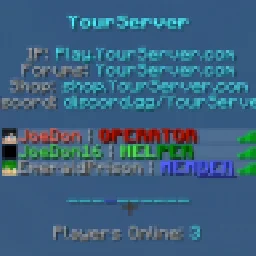
The all-in-one, feature complete, Tab plugin. Animation, sorting, prefixes, headers, and more!

PluginsGratuit1.8 – 1.16
par Joedon · repris depuis SpigotMC · ★★★★★ 4.4
Télécharger ›

Téléchargement direct depuis SpigotMC · 117,794 téléchargements

Ce qu'il fait

Joedon a créé TabListPro (plugin) pour les serveurs Paper / Spigot. The all-in-one, feature complete, Tab plugin. Animation, sorting, prefixes, headers, and more!

Versions prises en charge : Minecraft 1.8 – 1.16. On compte 117,794 téléchargements sur SpigotMC. Il arrive ainsi en position n° 25 sur les 118 plugins cosmétiques et d'affichage listés ici. 61 personnes lui ont donné en moyenne 4.4 sur 5. La dernière mise à jour date du 03/02/2021.

Versions prises en charge

1.161.131.121.8

Historique des versions

TabListPro a publié 48 versions sur SpigotMC depuis le 09/04/2016. Aucune n'est sortie au cours de l'année passée. La plus récente est UPDATED-1.2.2, sortie le 03/02/2021.

VersionPubliéType
UPDATED-1.2.203/02/2021Stable
UPDATED-1.2.118/08/2020Stable
UPDATED-1.2.007/08/2020Stable
UPDATED-1.1.230/06/2020Stable
UPDATED-1.0.317/03/2020Stable

Commandes

Les commandes citées sur la page SpigotMC de TabListPro :

/papi/tablistpro/tlp

Permissions

Permissions citées là-bas, à donner avec un plugin comme LuckPerms :

tablistpro.settablistpro.reload
Description de l'auteur sur SpigotMC

TabListPro is the updated version of TabListEdit. Please make sure to update your config accordingly if you have used TabListEdit in the past!

[](iceline-hosting.com/billing/aff.php?aff=85)

Need a truly affordable host for your server that you'll be running TabListPro on? Check out Iceline Hosting! All servers are ready to go in minutes, and come with truly powerful CPUs and hardware!

Use code JOEDON at checkout for 20% off any order! Click the banner to be taken to their website.

Change the entire dynamic of your server with a great looking TabList! With just one lightweight plugin, you have the ability to animate player names, prefixes, suffixes, the header and footer, sort players cleanly through grouping, and utilize the powerful PlaceholderAPI in order to create the ultimate TabList.

Installation of PlaceholderAPI (OPTIONAL): You may need to run a few simple commands before you can start using PlaceholderAPI with TabListPro. If you haven't done this previously, type the following commands after installing PlaceholderAPI:

  • /papi ecloud download Server
  • /papi reload

These commands will allow you to utilize the placeholders in the template config.yml of TabListPro.

PlaceholderAPI Download Page
Placeholder Index

Note: For versions 1.16+, hexadecimal color codes are fully supported throughout this config!

Code (Text):

config.yml

#

Thank you for checking out TabListPro!

#

Change the entire dynamic of your server with a great-looking TabList!

#

  TabListPro allows you to easily and efficiently change how players are

sorted in your TabList, what animations specific Groups of players have,

how the header and footer looks, and more!

#

#

- All parts of this plugin are compatible with PlaceholderAPI! (Not required)

Link: spigotmc.org/resources/placeholderapi.6245/

Placeholders: github.com/PlaceholderAPI/PlaceholderAPI/wiki/P…

#

Please keep in mind you may have to run the following commands to get PlaceholderAPI working:

/papi ecloud download <plugin you want placeholders from>

/papi reload

#

(Ex. '/papi ecloud download Server' followed by '/papi reload')

#

#

- TabListPro Commands:

/tablistpro OR /tlp set <player> <group> | Set a player to a specified Group

/tablistpro OR /tlp reload | Reload TabListPro

#

- TabListPro Permissions:

tablistpro.set

tablistpro.reload

#

#

For any questions, suggestions, or issues regarding TabListPro, please make a post in the Discussion Page.

#

HEADER AND FOOTER:

#

Enable text above the player list in the TabList?

header-enabled: true

Animation sequence for the header. Use '\n' to create a new line, or edit the template below.

header:

  • '\n&b&lYourServer\n\n     &7IP: &bPlay.YourServer.com\n&7Forums: &bYourServer.com\n&7Shop: &bshop.YourServer.com\n&7Discord: &bdiscord.gg/YourServer\n'
  • '\n&9&lY&b&lourServer\n\n     &7IP: &bPlay.YourServer.com\n&7Forums: &bYourServer.com\n&7Shop: &bshop.YourServer.com\n&7Discord: &bdiscord.gg/YourServer\n'
  • '\n&9&lYo&b&lurServer\n\n     &7IP: &bPlay.YourServer.com\n&7Forums: &bYourServer.com\n&7Shop: &bshop.YourServer.com\n&7Discord: &bdiscord.gg/YourServer\n'
  • '\n&9&lYou&b&lrServer\n\n     &7IP: &bPlay.YourServer.com\n&7Forums: &bYourServer.com\n&7Shop: &bshop.YourServer.com\n&7Discord: &bdiscord.gg/YourServer\n'
  • '\n&9&lYour&b&lServer\n\n     &7IP: &bPlay.YourServer.com\n&7Forums: &bYourServer.com\n&7Shop: &bshop.YourServer.com\n&7Discord: &bdiscord.gg/YourServer\n'
  • '\n&9&lYourS&b&lerver\n\n     &7IP: &bPlay.YourServer.com\n&7Forums: &bYourServer.com\n&7Shop: &bshop.YourServer.com\n&7Discord: &bdiscord.gg/YourServer\n'
  • '\n&9&lYourSe&b&lrver\n\n     &7IP: &bPlay.YourServer.com\n&7Forums: &bYourServer.com\n&7Shop: &bshop.YourServer.com\n&7Discord: &bdiscord.gg/YourServer\n'
  • '\n&9&lYourSer&b&lver\n\n     &7IP: &bPlay.YourServer.com\n&7Forums: &bYourServer.com\n&7Shop: &bshop.YourServer.com\n&7Discord: &bdiscord.gg/YourServer\n'
  • '\n&9&lYourServ&b&ler\n\n     &7IP: &bPlay.YourServer.com\n&7Forums: &bYourServer.com\n&7Shop: &bshop.YourServer.com\n&7Discord: &bdiscord.gg/YourServer\n'
  • '\n&9&lYourServe&b&lr\n\n     &7IP: &bPlay.YourServer.com\n&7Forums: &bYourServer.com\n&7Shop: &bshop.YourServer.com\n&7Discord: &bdiscord.gg/YourServer\n'
  • '\n&9&lYourServer\n\n     &7IP: &bPlay.YourServer.com\n&7Forums: &bYourServer.com\n&7Shop: &bshop.YourServer.com\n&7Discord: &bdiscord.gg/YourServer\n'
  • '\n&9&lYourServer\n\n     &7IP: &bPlay.YourServer.com\n&7Forums: &bYourServer.com\n&7Shop: &bshop.YourServer.com\n&7Discord: &bdiscord.gg/YourServer\n'
  • '\n&9&lYourServe&b&lr\n\n     &7IP: &bPlay.YourServer.com\n&7Forums: &bYourServer.com\n&7Shop: &bshop.YourServer.com\n&7Discord: &bdiscord.gg/YourServer\n'
  • '\n&9&lYourServ&b&ler\n\n     &7IP: &bPlay.YourServer.com\n&7Forums: &bYourServer.com\n&7Shop: &bshop.YourServer.com\n&7Discord: &bdiscord.gg/YourServer\n'
  • '\n&9&lYourSer&b&lver\n\n     &7IP: &bPlay.YourServer.com\n&7Forums: &bYourServer.com\n&7Shop: &bshop.YourServer.com\n&7Discord: &bdiscord.gg/YourServer\n'
  • '\n&9&lYourSe&b&lrver\n\n     &7IP: &bPlay.YourServer.com\n&7Forums: &bYourServer.com\n&7Shop: &bshop.YourServer.com\n&7Discord: &bdiscord.gg/YourServer\n'
  • '\n&9&lYourS&b&lerver\n\n     &7IP: &bPlay.YourServer.com\n&7Forums: &bYourServer.com\n&7Shop: &bshop.YourServer.com\n&7Discord: &bdiscord.gg/YourServer\n'
  • '\n&9&lYour&b&lServer\n\n     &7IP: &bPlay.YourServer.com\n&7Forums: &bYourServer.com\n&7Shop: &bshop.YourServer.com\n&7Discord: &bdiscord.gg/YourServer\n'
  • '\n&9&lYou&b&lrServer\n\n     &7IP: &bPlay.YourServer.com\n&7Forums: &bYourServer.com\n&7Shop: &bshop.YourServer.com\n&7Discord: &bdiscord.gg/YourServer\n'
  • '\n&9&lYo&b&lurServer\n\n     &7IP: &bPlay.YourServer.com\n&7Forums: &bYourServer.com\n&7Shop: &bshop.YourServer.com\n&7Discord: &bdiscord.gg/YourServer\n'
  • '\n&9&lY&b&lourServer\n\n     &7IP: &bPlay.YourServer.com\n&7Forums: &bYourServer.com\n&7Shop: &bshop.YourServer.com\n&7Discord: &bdiscord.gg/YourServer\n'
  • '\n&b&lYourServer\n\n     &7IP: &bPlay.YourServer.com\n&7Forums: &bYourServer.com\n&7Shop: &bshop.YourServer.com\n&7Discord: &bdiscord.gg/YourServer\n'

The rate (in ticks) that the animation sequence above cycles. 20 ticks = 1 second.

header-interval: 5

#

Enable text below the player list in the tab?

footer-enabled: true

footer:

  • '\n&9&l-&b&l---------\n\n   &7Players Online: &b%server_online%\n'
  • '\n&9&l-&b&l---------\n\n   &7Players Online: &b%server_online%\n'
  • '\n&b&l-&9&l-&b&l--------\n\n   &7Players Online: &b%server_online%\n'
  • '\n&b&l--&9&l-&b&l-------\n\n   &7Players Online: &b%server_online%\n'
  • '\n&b&l---&9&l-&b&l------\n\n   &7Players Online: &b%server_online%\n'
  • '\n&b&l----&9&l-&b&l-----\n\n   &7Players Online: &b%server_online%\n'
  • '\n&b&l-----&9&l-&b&l----\n\n   &7Players Online: &b%server_online%\n'
  • '\n&b&l------&9&l-&b&l---\n\n   &7Players Online: &b%server_online%\n'
  • '\n&b&l-------&9&l-&b&l--\n\n   &7Players Online: &b%server_online%\n'
  • '\n&b&l--------&9&l-&b&l-\n\n   &7Players Online: &b%server_online%\n'
  • '\n&b&l---------&9&l-\n\n   &7Players Online: &b%server_online%\n'
  • '\n&b&l---------&9&l-\n\n   &7Players Online: &b%server_online%\n'
  • '\n&b&l--------&9&l-&b&l-\n\n   &7Players Online: &b%server_online%\n'
  • '\n&b&l-------&9&l-&b&l--\n\n   &7Players Online: &b%server_online%\n'
  • '\n&b&l------&9&l-&b&l---\n\n   &7Players Online: &b%server_online%\n'
  • '\n&b&l-----&9&l-&b&l----\n\n   &7Players Online: &b%server_online%\n'
  • '\n&b&l----&9&l-&b&l-----\n\n   &7Players Online: &b%server_online%\n'
  • '\n&b&l---&9&l-&b&l------\n\n   &7Players Online: &b%server_online%\n'
  • '\n&b&l--&9&l-&b&l-------\n\n   &7Players Online: &b%server_online%\n'
  • '\n&b&l-&9&l-&b&l--------\n\n   &7Players Online: &b%server_online%\n'
  • '\n&b&l&9&l-&b&l---------\n\n   &7Players Online: &b%server_online%\n'

footer-interval: 10

#

SORTING:

#

  The order of the permissions in the list below is the

order in which players with those permissions will be

sorted in the TabList.

#

For example,

#

sortByPerms:

- 'tlp.c'

- 'tlp.b'

- 'tlp.a'

#

  In the list above, all players with the permission 'tlp.c'

will be sorted above players with the permissions 'tlp.b', who

will be sorted above players with the 'tlp.a' permission. Anyone

without a permission is set to the bottom and is sorted by username.

#

sortByPerms:

  • 'tlp.c'
  • 'tlp.b'
  • 'tlp.a'

#

How often should the TabList sort players?

(Players are auto-sorted upon joining, this is meant cover all cases)

update-sorting: 100

#

DISPLAY NAMES:

#

Use players' display/chat names in the TabList?

(This will make a player's name in the TabList just like their chat name)

use-displayname: false

#

Add a prefix and/or suffix to the player's display name?

(Note: this only applies when 'use-displayname' is set to true)

MAKE SURE THAT THE FINAL (AFTER PLACEHOLDERS ARE SUBSTITUTED) PREFIX/SUFFIX LENGTH IS

16 OR LESS CHARACTERS IN LENGTH. MISTYPING A PLACEHOLDER MAY RESULT IN ACCIDENTALLY

GOING OVER THIS LIMIT.

prefix: '&8[&bCLAN&8] &f'

suffix: '&f | &7&lNOVICE'

#

GROUPS:

#

The default group players are placed in to

default-group: 'member'

#

  Groups give you an easy option to distinguish between players for your TabList!

Listed below are three example groups to help you get started.

#

  Assign players to Groups with: /tablistpro set <player> <group>,

  or by giving them the corresponding 'orHasPermission' permission.

#

(Note: Groups are not automatically sorted - you'll need to add your own

 permissions to the 'sortByPerms' section)

groups:

  # Group name

  op:

    # If a player has this permission, they will automatically be added to this Group

    # (This permission is not required! You can also use: /tablistpro set <player> <group>)

    # Remember: Since operators have all permissions, they will by default be assigned to this Group

    # (Higher Groups take priority over lower Groups when multiple permissions are assigned)

    orHasPermission: 'tlp.op'

    # Animation sequence specific to this Group

    # Placeholders: %player%, %player_displayname%, and all PlaceHolderAPI placeholders.

    # (Go to the top of this config.yml for more information on placeholders)

    display:

    - '%player_displayname%'

  helper:

    orHasPermission: 'tlp.helper'

    display:

    - '&a%player% &7| &2&lHELPER'

    - '&a%player% &7| &a&lH&2&lELPER'

    - '&a%player% &7| &a&lHE&2&lLPER'

    - '&a%player% &7| &a&lHEL&2&lPER'

    - '&a%player% &7| &a&lHELP&2&lER'

    - '&a%player% &7| &a&lHELPE&2&lR'

    - '&a%player% &7| &a&lHELPER'

    - '&a%player% &7| &a&lHELPER'

    - '&a%player% &7| &a&lHELPE&2&lR'

    - '&a%player% &7| &a&lHELP&2&lER'

    - '&a%player% &7| &a&lHEL&2&lPER'

    - '&a%player% &7| &a&lHE&2&lLPER'

    - '&a%player% &7| &a&lH&2&lELPER'

    - '&a%player% &7| &2&lHELPER'

  member:

    orHasPermission: 'tlp.member'

    display:

    - '&7%player% &7| &9&l&nMEMBER'

    - '&7%player% &7| &9&lM&l&nEMBER'

    - '&7%player% &7| &9&lME&l&nMBER'

    - '&7%player% &7| &9&lMEM&l&nBER'

    - '&7%player% &7| &9&lMEMB&l&nER'

    - '&7%player% &7| &9&lMEMBE&l&nR'

    - '&7%player% &7| &9&lMEMBER'

    - '&7%player% &7| &9&lMEMBER'

    - '&7%player% &7| &9&lMEMBE&l&nR'

    - '&7%player% &7| &9&lMEMB&l&nER'

    - '&7%player% &7| &9&lMEM&l&nBER'

    - '&7%player% &7| &9&lME&l&nMBER'

    - '&7%player% &7| &9&lM&l&nEMBER'

    - '&7%player% &7| &9&l&nMEMBER'

#

The rate (in ticks) that the animation sequence for each Group cycles per player. 20 ticks = 1 second.

name-animation: 10

#

Message sent to a p

Écrite par Joedon. À lire avec les images sur SpigotMC.

Comment installer TabListPro

  1. Vérifie que ton serveur tourne sous Paper et Spigot en Minecraft 1.8 – 1.16.

  2. Télécharge le fichier .jar depuis SpigotMC et place-le dans le dossier plugins de ton serveur.

  3. Redémarre le serveur. Évite /reload, beaucoup de plugins le supportent mal.

  4. Tape /plugins dans la console : TabListPro doit apparaître en vert. Ses fichiers de config sont créés dans le dossier plugins au premier démarrage.

Guide complet: Comment installer des plugins sur un serveur Minecraft

Compatibilité

Versions de Minecraft
1.16, 1.13, 1.12, 1.8
Fonctionne sur
Paper, Spigot
Édition
Java
Nécessite
Rien d'autre
Prix
Gratuit
Suivi
Mis à jour activement (10/11/2026)

TabListPro comparé à des ressources similaires Comparer toutes les alternatives

RessourceTéléchargementsNoteVersionsMise à jourPrix
TabListProcelle que tu regardais118K4.41.8 – 1.163 févr. 2021Gratuit
CommandWhitelistYouHaveTrouble99K–1.13 – 26.x11 oct. 2026Gratuit
LuckPrefixezTxmMC39K–1.8 – 1.2113 mars 2026Gratuit
AntiCrashersmashyalts27K–1.12 – 26.x13 juin 2026Gratuit

Questions

Est-ce que TabListPro fonctionne sur Minecraft 26.x ?

Pas encore. La version la plus récente prise en charge est Minecraft 1.16.

Est-ce que TabListPro est gratuit ?

Oui. TabListPro se télécharge gratuitement sur SpigotMC.

Sur quel logiciel serveur fonctionne TabListPro ?

TabListPro fonctionne sur les serveurs Paper et Spigot.

TabListPro est-il encore mis à jour ?

Oui. La dernière mise à jour date des dernières 24 heures.

Quelles sont les meilleures alternatives à TabListPro ?

Les plus proches sont CommandWhitelist, LuckPrefix et AntiCrasher. Comparer toutes les alternatives

Alternatives à TabListPro

Comparer toutes les alternatives ›

Avis

–★★★★★
0 avis
50
40
30
20
10

4.4 from 61 ratings on SpigotMC.

Connecte-toi pour laisser un avis.