
 Particle EffectsMods · 1.20 – 26.x
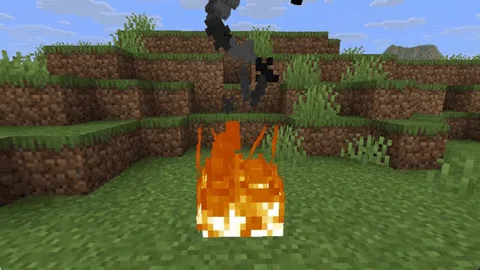
Visual Mod which adds unique textured particles for every effect in vanilla Minecraft!
Kostenlos7,939,865 Downloads

Makes every particle 3D, even modded ones
Direkter Download von Modrinth · 80 Downloads
Voxel Particles (Mod) stammt von addavriance. Makes every particle 3D, even modded ones.
Unterstützt wird Minecraft 1.20 – 26.x. Auf Modrinth gibt es 80 Downloads. Das letzte Update erschien am 24.10.2026.
Voxel Particles hat seit 13.10.2026 23 Versionen auf Modrinth veröffentlicht. 23 davon erschienen im letzten Jahr. Die neueste ist 0.2.0, erschienen am 24.10.2026. Sie ist für Minecraft 1.20.1 gemacht. Sie läuft auf Forge und NeoForge. Der Download ist 206 KB groß.
| Version | Veröffentlicht | Minecraft | Typ |
|---|---|---|---|
0.2.0 | 24.10.2026 | 1.20.1 | Release |
0.2.0 | 23.10.2026 | 1.21.1 | Release |
0.2.0 | 23.10.2026 | 1.21.1 | Release |
0.2.0 | 23.10.2026 | 1.20.4 | Release |
0.2.0 | 23.10.2026 | 1.20.4 | Release |
[](modrinth.com/mod/voxelparticles)
[](curseforge.com/minecraft/mc-mods/voxelparticles)
[](github.com/addavriance/VoxelParticles)
Vanilla particles are flat cards that always face the camera. Voxel Particles turns each one into a small
3D model built from the sprite's own pixels.
Every sprite particle, vanilla or modded, is picked up automatically (even resourcepacks).
pauses the effect for a few seconds if it ever gets too expensive.
Mod or content · Status
Sodium · Works
Iris and shader packs · Works
Custom resource packs · Works
Particles from other mods · Works
One exception: particles that draw their own geometry instead of a sprite stay as they are.
For example, the slash effects of Better Combat remain flat.
Configuration
Change settings in game through Mod Menu, or edit config/voxelparticles.json.
Option · Default · What it does
enabled · true · Turns the whole effect on and off
maxResolution · 16 · Detail: the largest model size per side, 4 to 64
lodDistance · 64 · Particles farther than this many blocks are drawn flat, 0 for no limit
excludedSprites · see below · Sprite ids that always stay flat, * works as a wildcard
Block, item and other particles each have their own section: blocks, items and particles. They take the same options:
Option · Default · What it does
enabled · true · Makes this kind of particle 3D
motion · SWAY · BILLBOARD (faces the camera like vanilla), SWAY, SPIN or TUMBLE
depth · 1.0 (3.0 for blocks) · Thickness, 0.1 to 4. At 1.0 every pixel is a cube
shading · 1.0 · How much darker the sides are than the front, 0 to 1
motionSpeed · 1.0 · Speed of sway, spin and tumble, 0 to 5
tumbleDebris · true · Crumbs tumble in the air and land flat (blocks and items only)
{
"blocks": { "depth": 3.0, "motion": "TUMBLE" },
"items": { "depth": 1.0, "motion": "TUMBLE" },
"particles": { "depth": 0.3, "motion": "SWAY" }
}
Keeping a particle flat
Big effects like sweeps and explosions look better flat, so a few sprites are excluded out of the box:
"excludedSprites": [
"minecraft:sweep_*",
"minecraft:sonic_boom_*",
"minecraft:flash",
"minecraft:explosion_*",
"minecraft:shriek",
"minecraft:vibration",
"minecraft:missingno"
]
Add the id of any other particle sprite you want to keep flat, for example "somemod:glow".
Build from source
Gradle has to run on Java 25 (the Loom version used requires it). The mod itself targets Java 21 or 25
depending on the Minecraft version.
./gradlew dist # every target, jars go to dist/
./gradlew build -Ptargets=1.21.4-fabric # a single target
Project layout:
Path · Contents
core/ · Code that does not touch Minecraft
mc// · API layers shared by several Minecraft versions
loader/ · Loader entry points
versions// · One target each; version.properties lists the layers it uses
Geschrieben von addavriance. Mit Bildern auf Modrinth lesen.
Diese Mod läuft nur in deinem eigenen Spiel. Server brauchen sie nicht, du kannst sie also auf jedem Server nutzen.
Installiere Fabric, Forge und NeoForge für Minecraft 1.20 – 26.x.
Lade die .jar-Datei von Modrinth herunter und lege sie in den mods-Ordner deines .minecraft-Verzeichnisses.
Starte Minecraft mit dem Fabric-Profil.
Einfacher: Suche in Prism Launcher oder der Modrinth App in den Mods deiner Instanz nach Voxel Particles und klicke auf Install. Loader und benötigte Mods werden für dich hinzugefügt.
| Ressource | Downloads | Versionen | Letztes Update | Preis |
|---|---|---|---|---|
| Voxel Particlesdie du angesehen hast | 80 | 1.20 – 26.x | vor 18 Tagen | Kostenlos |
| Particle EffectsKlashRaick | 7.9M | 1.20 – 26.x | 22. Sept. 2026 | Kostenlos |
 Inventory ParticlesLopyMine | 3.7M | 1.20 – 26.x | 10. Okt. 2026 | Kostenlos |
 VisualityPinkGoosik | 31M | 1.17 – 26.x | 20. Sept. 2026 | Kostenlos |
Ja. Voxel Particles unterstützt Minecraft 26.x. Alle unterstützten Versionen: 26.x, 1.21, 1.20.
Ja. Voxel Particles kannst du kostenlos bei Modrinth herunterladen.
Clientseitig. Voxel Particles kommt in deinen eigenen mods-Ordner und funktioniert auf jedem Server, auch auf Servern ohne Mods.
Ja. Das letzte Update kam innerhalb des letzten Tages.
Am ähnlichsten sind Particle Effects, Inventory Particles und Visuality. Alle Alternativen vergleichen
Particle EffectsMods · 1.20 – 26.xVisual Mod which adds unique textured particles for every effect in vanilla Minecraft!
Inventory ParticlesMods · 1.20 – 26.xBeautiful particles for your inventory items! Make your inventory more alive and dynamic! ✨ Now with modded items support! ✨
VisualityMods · 1.17 – 26.xLittle visual improvements by adding a bunch of new particles.
 Falling LeavesMods · 1.16 – 26.x
Adds a neat little particle effect to leaf blocks
 ChippedMods · 1.18 – 1.21
Every block deserves a friend.
 Particle RainMods · 1.19 – 26.x
Replaces weather with prettier particle effects
Logg dich ein, um eine Bewertung zu schreiben.