
 Particle EffectsMods · 1.20 – 26.x
Visual Mod which adds unique textured particles for every effect in vanilla Minecraft!
Gratuit7,987,423 téléchargements

Makes every particle 3D, even modded ones
Téléchargement direct depuis Modrinth · 80 téléchargements
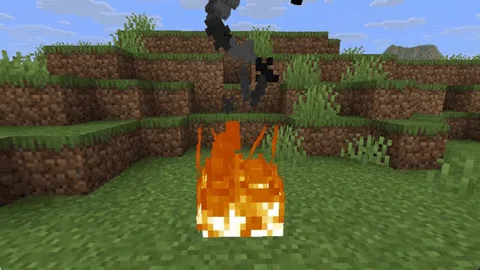
Voxel Particles (mod) est une création de addavriance. Makes every particle 3D, even modded ones.
Versions prises en charge : Minecraft 1.20 – 26.x. On compte 80 téléchargements sur Modrinth. La dernière mise à jour date du 24/10/2026.
Voxel Particles a publié 23 versions sur Modrinth depuis le 13/10/2026. 23 sont sorties au cours de l'année passée. La plus récente est 0.2.0, sortie le 24/10/2026. Elle est faite pour Minecraft 1.20.1. Elle fonctionne sur Forge et NeoForge. Le téléchargement fait 206 KB.
| Version | Publié | Minecraft | Type |
|---|---|---|---|
0.2.0 | 24/10/2026 | 1.20.1 | Stable |
0.2.0 | 23/10/2026 | 1.21.1 | Stable |
0.2.0 | 23/10/2026 | 1.21.1 | Stable |
0.2.0 | 23/10/2026 | 1.20.4 | Stable |
0.2.0 | 23/10/2026 | 1.20.4 | Stable |
[](modrinth.com/mod/voxelparticles)
[](curseforge.com/minecraft/mc-mods/voxelparticles)
[](github.com/addavriance/VoxelParticles)
Vanilla particles are flat cards that always face the camera. Voxel Particles turns each one into a small
3D model built from the sprite's own pixels.
Every sprite particle, vanilla or modded, is picked up automatically (even resourcepacks).
pauses the effect for a few seconds if it ever gets too expensive.
Mod or content · Status
Sodium · Works
Iris and shader packs · Works
Custom resource packs · Works
Particles from other mods · Works
One exception: particles that draw their own geometry instead of a sprite stay as they are.
For example, the slash effects of Better Combat remain flat.
Configuration
Change settings in game through Mod Menu, or edit config/voxelparticles.json.
Option · Default · What it does
enabled · true · Turns the whole effect on and off
maxResolution · 16 · Detail: the largest model size per side, 4 to 64
lodDistance · 64 · Particles farther than this many blocks are drawn flat, 0 for no limit
excludedSprites · see below · Sprite ids that always stay flat, * works as a wildcard
Block, item and other particles each have their own section: blocks, items and particles. They take the same options:
Option · Default · What it does
enabled · true · Makes this kind of particle 3D
motion · SWAY · BILLBOARD (faces the camera like vanilla), SWAY, SPIN or TUMBLE
depth · 1.0 (3.0 for blocks) · Thickness, 0.1 to 4. At 1.0 every pixel is a cube
shading · 1.0 · How much darker the sides are than the front, 0 to 1
motionSpeed · 1.0 · Speed of sway, spin and tumble, 0 to 5
tumbleDebris · true · Crumbs tumble in the air and land flat (blocks and items only)
{
"blocks": { "depth": 3.0, "motion": "TUMBLE" },
"items": { "depth": 1.0, "motion": "TUMBLE" },
"particles": { "depth": 0.3, "motion": "SWAY" }
}
Keeping a particle flat
Big effects like sweeps and explosions look better flat, so a few sprites are excluded out of the box:
"excludedSprites": [
"minecraft:sweep_*",
"minecraft:sonic_boom_*",
"minecraft:flash",
"minecraft:explosion_*",
"minecraft:shriek",
"minecraft:vibration",
"minecraft:missingno"
]
Add the id of any other particle sprite you want to keep flat, for example "somemod:glow".
Build from source
Gradle has to run on Java 25 (the Loom version used requires it). The mod itself targets Java 21 or 25
depending on the Minecraft version.
./gradlew dist # every target, jars go to dist/
./gradlew build -Ptargets=1.21.4-fabric # a single target
Project layout:
Path · Contents
core/ · Code that does not touch Minecraft
mc// · API layers shared by several Minecraft versions
loader/ · Loader entry points
versions// · One target each; version.properties lists the layers it uses
Écrite par addavriance. À lire avec les images sur Modrinth.
Ce mod fonctionne uniquement dans ton jeu. Les serveurs n'en ont pas besoin, tu peux donc l'utiliser sur n'importe quel serveur.
Installe Fabric, Forge et NeoForge pour Minecraft 1.20 – 26.x.
Télécharge le fichier .jar depuis Modrinth et place-le dans le dossier mods de ton répertoire .minecraft.
Lance Minecraft avec le profil Fabric.
Plus simple : dans Prism Launcher ou la Modrinth App, cherche Voxel Particles dans les mods de ton instance et clique sur Install. Le loader et les mods requis sont ajoutés pour toi.
| Ressource | Téléchargements | Versions | Mise à jour | Prix |
|---|---|---|---|---|
| Voxel Particlescelle que tu regardais | 80 | 1.20 – 26.x | il y a 19 jours | Gratuit |
| Particle EffectsKlashRaick | 8M | 1.20 – 26.x | 22 sept. 2026 | Gratuit |
 Inventory ParticlesLopyMine | 3.7M | 1.20 – 26.x | 10 oct. 2026 | Gratuit |
 VisualityPinkGoosik | 31M | 1.17 – 26.x | 20 sept. 2026 | Gratuit |
Oui. Voxel Particles prend en charge Minecraft 26.x. Toutes les versions prises en charge : 26.x, 1.21, 1.20.
Oui. Voxel Particles se télécharge gratuitement sur Modrinth.
Côté client. Voxel Particles se place dans ton propre dossier mods et fonctionne sur n'importe quel serveur, même sans mods.
Oui. La dernière mise à jour date des dernières 24 heures.
Les plus proches sont Particle Effects, Inventory Particles et Visuality. Comparer toutes les alternatives
Particle EffectsMods · 1.20 – 26.xVisual Mod which adds unique textured particles for every effect in vanilla Minecraft!
Inventory ParticlesMods · 1.20 – 26.xBeautiful particles for your inventory items! Make your inventory more alive and dynamic! ✨ Now with modded items support! ✨
VisualityMods · 1.17 – 26.xLittle visual improvements by adding a bunch of new particles.
 Falling LeavesMods · 1.16 – 26.x
Adds a neat little particle effect to leaf blocks
 ChippedMods · 1.18 – 1.21
Every block deserves a friend.
 Particle RainMods · 1.19 – 26.x
Replaces weather with prettier particle effects
Connecte-toi pour laisser un avis.