
 Visual WorkbenchMods · 1.19 – 26.x
Items stay inside of crafting tables and are also rendered on top. It's really fancy!
Kostenlos27,148,929 Downloads

Flashback Containers An addon for Flashback that records the containers you open (chests, furnaces, crafting tables, your own inventory...) and shows them in…
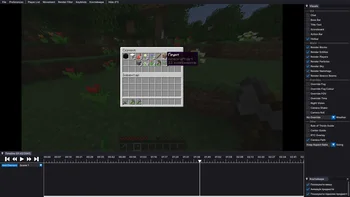
Flashback Containers An addon for Flashback that records the containers you open (chests, furnaces, crafting tables, your own inventory...) and shows them in…
FlashbackContainers (Ressource) stammt von Dinaster85. Unterstützt wird Minecraft 26.x. Auf Modrinth gibt es 8 Downloads. Das letzte Update erschien am 30.09.2026.
FlashbackContainers hat seit 26.09.2026 2 Versionen auf Modrinth veröffentlicht. 2 davon erschienen im letzten Jahr. Die neueste ist 0.4.0, erschienen am 30.09.2026. Sie ist für Minecraft 26.2 gemacht. Sie läuft auf Fabric. Der Download ist 68 KB groß.
| Version | Veröffentlicht | Minecraft | Typ |
|---|---|---|---|
0.4.0 | 30.09.2026 | 26.2 | Alpha |
0.3.0 | 26.09.2026 | 26.2 | Alpha |
FlashbackContainers ist Open Source. Die neueste Version auf GitHub ist 0.4.0, veröffentlicht am 30.09.2026.
sold out trades, the selected trade and its result, the scroll position of the list, the
villager's level and experience bar.
the same way Flashback records the camera. At 60 or 120, fast mouse movements are replayed much
more precisely. Flashback's "Disable increased first person updates" option applies to it too.
Alle Release Notes auf GitHub lesen
Davor: 0.3.0 (26.09.2026).
An addon for Flashback that records the containers you open
(chests, furnaces, crafting tables, your own inventory...) and shows them in the replay.
Flashback does not record open containers, so in a replay you only see the player standing in
front of a chest. With this addon, when the camera is in first person as the recording player,
the container window appears on screen just like it did in the game, with the items moving as
they were moved.
and every other container with a vanilla-style screen, including your own inventory (E).
resource packs are the same as when you played.
costs, anvil cost, beacon level and so on.
follows it, smoothly between ticks.
moves that don't go through the cursor fly (shift-click, number keys), the rest is shown by the
cursor itself.
together with the hotbar, so the "Hotbar" option in the editor and "No GUI" in the export
also hide it.
Flashback just skips the extra data.
docked as a tab next to the other editor windows.
Setting · Default · What it does
Show mouse · on · Slot highlight and the item held on the cursor
Animate items · on · Items fly between slots
Show item tooltips · off · Tooltip of the item under the mouse (needs "Show mouse")
Settings only change how replays are drawn, everything is always recorded.
They are stored in config/flashback_containers.json.
person as that player.
server sends, so the replay doesn't know which recipes the server had.
[GPL-3.0](LICENSE). Not affiliated with Flashback or its author.
Geschrieben von Dinaster85. Mit Bildern auf Modrinth lesen.
Diese Mod läuft nur in deinem eigenen Spiel. Server brauchen sie nicht, du kannst sie also auf jedem Server nutzen.
Installiere Fabric für Minecraft 26.x.
Füge die benötigten Mods hinzu: Flashback.
Lade die .jar-Datei von Modrinth herunter und lege sie in den mods-Ordner deines .minecraft-Verzeichnisses.
Starte Minecraft mit dem Fabric-Profil.
Mit dem CraftRank Launcher sparst du dir diese Schritte: Öffne Mods, suche nach FlashbackContainers und klicke auf Installieren.
| Ressource | Downloads | Versionen | Letztes Update | Preis |
|---|---|---|---|---|
| FlashbackContainersdie du angesehen hast | 8 | 26.x | 30. Sept. 2026 | Kostenlos |
| Visual WorkbenchFuzs | 27.1M | 1.19 – 26.x | 23. Sept. 2026 | Kostenlos |
 No Drop HotbarATOMIIX | 247 | 1.21 – 26.x | vor 17 Tagen | Kostenlos |
 Iron FurnacesQelifern | 10.2M | 1.20 – 26.x | 26. Juni 2026 | Kostenlos |
Ja. FlashbackContainers unterstützt Minecraft 26.x. Alle unterstützten Versionen: 26.x.
Ja. FlashbackContainers kannst du kostenlos bei Modrinth herunterladen.
Clientseitig. FlashbackContainers kommt in deinen eigenen mods-Ordner und funktioniert auf jedem Server, auch auf Servern ohne Mods.
Ja: Mod Menu, Flashback. Installiere es vor FlashbackContainers.
Ja. Das letzte Update kam innerhalb des letzten Tages.
Am ähnlichsten sind Visual Workbench, No Drop Hotbar und Iron Furnaces. Alle Alternativen vergleichen
Visual WorkbenchMods · 1.19 – 26.xItems stay inside of crafting tables and are also rendered on top. It's really fancy!
No Drop HotbarMods · 1.21 – 26.xStops you from dropping items by accident while playing. The drop key does nothing in game, but still works normally in your inventory and chests…
Iron FurnacesMods · 1.20 – 26.xInspired by cpw's Iron Chests mod, adds a few different tiers of furnace.
 Joy of PaintingMods · 1.12 – 26.x
This mod lets you craft a blank canvas and a palette, with which you can paint your own pictures and hang them on a wall like the vanilla paintings.
 WayLinkMods · 1.21 – 26.x
Makes waypoints shared in chat work across JourneyMap, Xaero's Minimap and NoRisk Client. Add them with one click and share your own. Client-side.
 StickShiftMods · 26.x
Full controller support built on SDL3: analog movement, controller-driven menus and inventory, an on-screen keyboard, button glyphs in your pad's own labels…
Logg dich ein, um eine Bewertung zu schreiben.