
 TalkBubblesMods · 1.19 – 26.x
adds bubbles above your head when you chat
Kostenlos4,022,953 Downloads
Shows each player’s Aurora Tiers rank, from HT1 to LT5, with an icon in front of their name in chat, the tab list and above their head.
Direkter Download von Modrinth · 25 Downloads
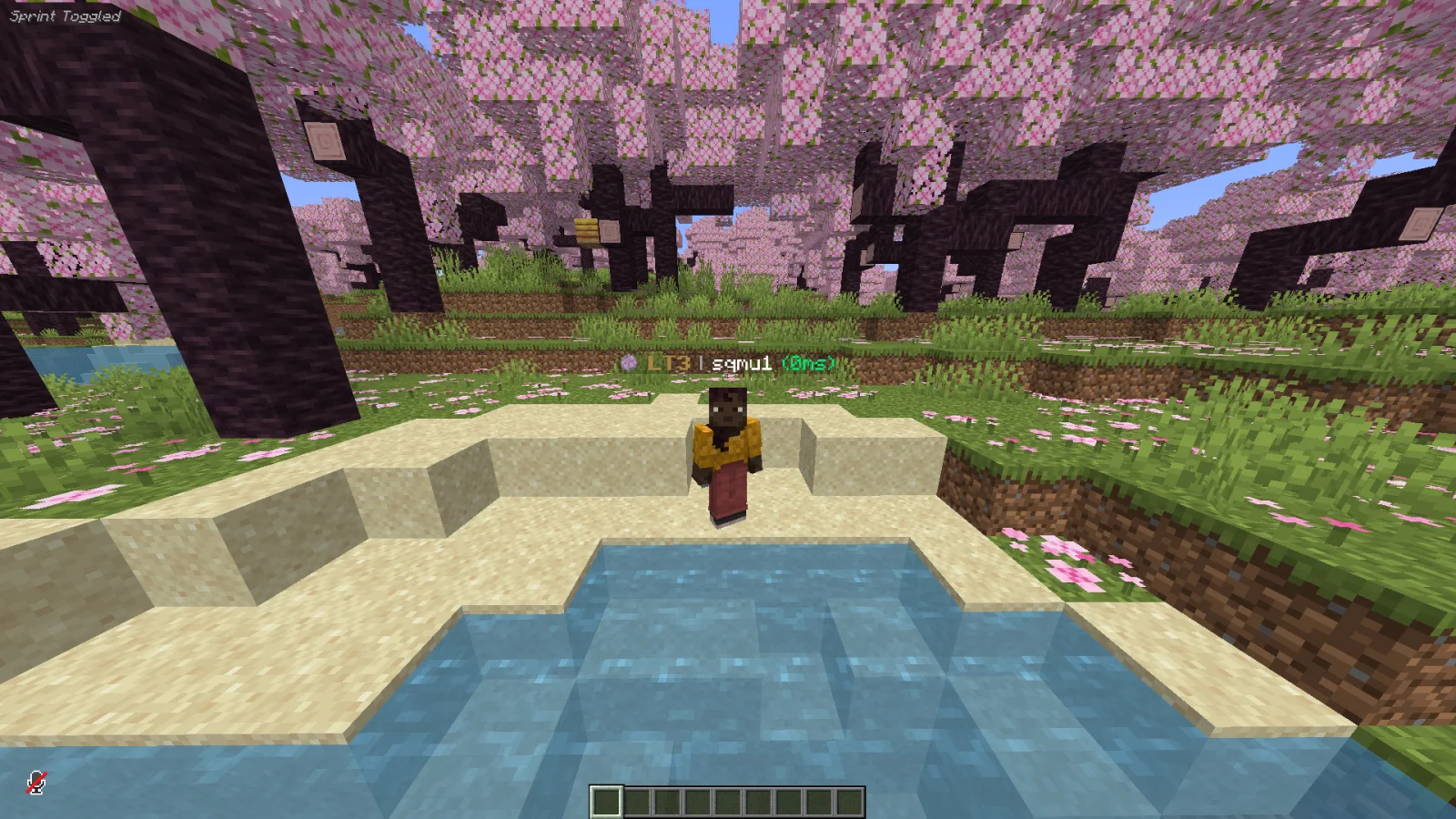
Aurora Tiers (Mod) stammt von sqmu1.. Shows each player’s Aurora Tiers rank, from HT1 to LT5, with an icon in front of their name in chat, the tab list and above their head.
Unterstützt wird Minecraft 1.21. Auf Modrinth gibt es 25 Downloads. Das letzte Update erschien am 29.10.2026.
Aurora Tiers hat seit 23.10.2026 3 Versionen auf Modrinth veröffentlicht. 3 davon erschienen im letzten Jahr. Die neueste ist 1.0.0, erschienen am 29.10.2026. Sie ist für Minecraft 1.21.4 gemacht. Sie läuft auf Fabric. Der Download ist 74 KB groß.
| Version | Veröffentlicht | Minecraft | Typ |
|---|---|---|---|
1.0.0 | 29.10.2026 | 1.21.4 | Release |
1.0.0 | 23.10.2026 | 1.21.11 | Release |
1.0.0 | 23.10.2026 | 1.21, 1.21.1 | Release |
Aurora Tiers Tags
Aurora Tiers Tags is a client-side Fabric mod that shows a player's Aurora Tiers rank directly next to their name. Ranks range from HT1 down to LT5. Each rank is displayed with the Aurora Tiers icon and its own tier colour, for example: [icon] LT3 | PlayerName
Instead of looking up rankings on the website or asking around in chat, you see at a glance how a player is ranked, in chat, in the player list and above their head.
The mod runs completely on your side. It works on any server, needs nothing installed on the server, and does not give you any gameplay advantage.
What is Aurora Tiers?
Aurora Tiers is a Minecraft PvP ranking community. Players are tested and placed into tiers, from HT1 (highest) to LT5 (lowest), and the rankings are kept in the Aurora Tiers database.
This mod brings those rankings into the game. You can recognise ranked players while you play, spectate, queue for fights or just chat, without extra tools, overlays or tabbing out to a website.
Where ranks are shown
Players without a rank are displayed exactly as before and are not changed in any way.
Chat support covers normal vanilla chat as well as the common chat formats of server plugins, where the name is followed by a ">", a "»" or a ":". If a message cannot be matched to a ranked player, it is shown unchanged.
Tier colours
Every tier has its own colour, taken from the Aurora Tiers website, and the tier text is shown in bold so it stands out next to the name.
Order from highest to lowest:
HT1, LT1, HT2, LT2, HT3, LT3, HT4, LT4, HT5, LT5
HT1 is gold, LT1 is orange, HT2 and LT2 are blue and slate, HT3 and LT3 are bronze tones, and HT4 to LT5 use cooler blue and teal shades. HT4 and LT4 are slightly brightened so they stay readable on the dark nametag background.
How it works
When the game starts, the mod downloads the current Aurora Tiers rankings and keeps them in memory. Every lookup afterwards is instant. The download runs in a separate background thread, so it never causes lag or freezes, even with a large number of ranked players.
The rankings are refreshed automatically every 5 minutes. If you want the newest data right now, use /auroratiers reload.
Players are matched by their Minecraft UUID. This means a rank always belongs to the right account, even after a name change. On servers without UUID support, such as offline-mode servers, the mod falls back to matching by username (not case sensitive).
If the rankings cannot be loaded, for example because you are offline, the mod simply shows no ranks and tries again at the next refresh. It will not crash your game or break your chat.
Privacy and safety
Compatibility
Installation
The config file is created on the first start. You do not have to change anything for the mod to work.
Configuration
Settings are stored in config/auroratiers.json, which is created on the first start:
Changes apply after /auroratiers reload or after restarting the game.
Commands
/auroratiers reload reloads the config file and downloads the rankings again
Requirements
Supported rankings
Currently the Vanilla game mode rankings are displayed. Other game modes may be added in future updates.
FAQ
Why do I not see any ranks?
Only players who are ranked on Aurora Tiers get a tag. Make sure you are online and that Fabric API is installed. You can force a fresh download with /auroratiers reload and check your game log for lines starting with "Aurora Tiers".
Can I get banned for using this mod?
The mod only changes how text is displayed on your own screen. It does not read or send game data, does not modify packets and gives no gameplay advantage. As with any mod, the rules of the server you play on always apply.
Does it work with other mods?
Yes. It only touches the displayed names in chat, the player list and nametags. If another mod changes the same things, the rank is simply added in front.
Can I hide the icon or turn off single places?
Yes, every place and the icon can be turned off separately in config/auroratiers.json.
Geschrieben von sqmu1.. Mit Bildern auf Modrinth lesen.
Diese Mod läuft nur in deinem eigenen Spiel. Server brauchen sie nicht, du kannst sie also auf jedem Server nutzen.
Installiere Fabric für Minecraft 1.21.
Lade die .jar-Datei von Modrinth herunter und lege sie in den mods-Ordner deines .minecraft-Verzeichnisses.
Starte Minecraft mit dem Fabric-Profil.
Einfacher: Suche in Prism Launcher oder der Modrinth App in den Mods deiner Instanz nach Aurora Tiers und klicke auf Install. Loader und benötigte Mods werden für dich hinzugefügt.
| Ressource | Downloads | Versionen | Letztes Update | Preis |
|---|---|---|---|---|
| Aurora Tiersdie du angesehen hast | 25 | 1.21 | vor 14 Tagen | Kostenlos |
| TalkBubblesGlobox1997 | 4M | 1.19 – 26.x | 18. Sept. 2026 | Kostenlos |
 Chat PatchesOBro1961 | 7.3M | 1.18 – 26.x | 4. Okt. 2026 | Kostenlos |
 Chat Headsdzwdz | 53M | 1.16 – 26.x | 4. Okt. 2026 | Kostenlos |
Noch nicht. Die neueste unterstützte Version ist Minecraft 1.21.
Ja. Aurora Tiers kannst du kostenlos bei Modrinth herunterladen.
Clientseitig. Aurora Tiers kommt in deinen eigenen mods-Ordner und funktioniert auf jedem Server, auch auf Servern ohne Mods.
Ja. Das letzte Update kam innerhalb des letzten Tages.
Am ähnlichsten sind TalkBubbles, Chat Patches und Chat Heads. Alle Alternativen vergleichen
TalkBubblesMods · 1.19 – 26.xadds bubbles above your head when you chat
Chat PatchesMods · 1.18 – 26.xA Minecraft Fabric client-side mod that touches up a few aspects of Minecraft's mundane chat, with as much configurability as possible!
Chat HeadsMods · 1.16 – 26.xSee who you're chatting with!
 Chat AnimationMods · 1.20 – 26.x
Makes chat messages appear with a smooth animation.
 Smooth ScrollingMods · 1.20 – 26.x
Customize the scrolling smoothness or speed in various places like chat, hotbar, creative screen...
 HyChatterMods · 1.8 – 26.x
Minecraft mod for Hypixel adding chat related features like autogg, chat coordinates waypoints and more!
Logg dich ein, um eine Bewertung zu schreiben.