
 Red CrosshairsTexturenpakete · 1.13 – 26.x
Replaces the standard reticle with a vibrant, red crosshair for enhanced visibility in PvP and dim environments.
Kostenlos34 Downloads

Replaces the default plus-sign reticle with a clean, minimal "X" crosshair.
Direkter Download von Modrinth · 12 Downloads
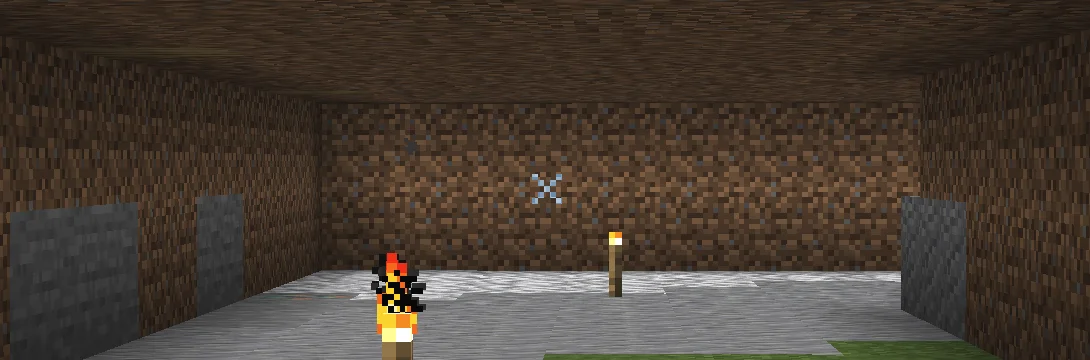
X Crosshairs (Texturenpaket) stammt von qlttqb. Replaces the default plus-sign reticle with a clean, minimal "X" crosshair.
Unterstützt wird Minecraft 1.13 – 26.x. Auf Modrinth gibt es 12 Downloads. Das letzte Update erschien am 05.11.2026.
Die neueste ist 1.0, erschienen am 05.11.2026. Sie ist für Minecraft 1.13 – 1.20.2 gemacht. Sie läuft auf Minecraft. Der Download ist 16 KB groß.
| Version | Veröffentlicht | Minecraft | Typ |
|---|---|---|---|
1.0 | 05.11.2026 | 1.13 – 1.20.2 | Release |
Tired of the bulky default reticle cluttering your screen? Precision "X" Crosshair swaps out the standard + reticle for a sharp, minimal X design, giving you a cleaner sightline for both ranged combat and everyday building.
Geschrieben von qlttqb. Mit Bildern auf Modrinth lesen.
Lade die .zip-Datei von Modrinth herunter. Entpacke sie nicht.
Öffne in Minecraft Optionen, dann Ressourcenpakete, dann Paketordner öffnen.
Lege die .zip-Datei in diesen Ordner und gehe zurück ins Spiel.
Schiebe X Crosshairs in die rechte Liste und klicke auf Fertig.
Es ist für Minecraft 1.13 – 26.x gemacht. Auf anderen Versionen markiert Minecraft es als inkompatibel, oft funktioniert es aber trotzdem.
| Ressource | Downloads | Versionen | Letztes Update | Preis |
|---|---|---|---|---|
| X Crosshairsdie du angesehen hast | 12 | 1.13 – 26.x | vor 8 Tagen | Kostenlos |
| Red Crosshairsqlttqb | 34 | 1.13 – 26.x | vor 8 Tagen | Kostenlos |
 MiniX Crosshairsqlttqb | 20 | 1.13 – 26.x | vor 8 Tagen | Kostenlos |
 SpacedX Crosshairsqlttqb | 11 | 1.8 – 26.x | vor 8 Tagen | Kostenlos |
Ja. X Crosshairs unterstützt Minecraft 26.x. Alle unterstützten Versionen: 26.x, 1.21, 1.20, 1.19, 1.18, 1.17, 1.16, 1.13.
Ja. X Crosshairs kannst du kostenlos bei Modrinth herunterladen.
Ja. Das letzte Update kam innerhalb des letzten Tages.
Am ähnlichsten sind Red Crosshairs, MiniX Crosshairs und SpacedX Crosshairs. Alle Alternativen vergleichen
Red CrosshairsTexturenpakete · 1.13 – 26.xReplaces the standard reticle with a vibrant, red crosshair for enhanced visibility in PvP and dim environments.
MiniX CrosshairsTexturenpakete · 1.13 – 26.xReplaces the standard reticle with an ultra-compact, minimalist "x" crosshair
SpacedX CrosshairsTexturenpakete · 1.8 – 26.xReplaces the standard crosshair with a detached, spaced-dot reticle featuring a center aim point surrounded by four isolated guide pixels.
 Target CrosshairsTexturenpakete · 1.13 – 26.x
Replaces the standard reticle with a sleek target sight.
 PVP zegarn+Anime skyTexturenpakete · 1.8 – 26.x
[UPD 1.3.6] Minimalistic PvP resource pack with dark UI, custom sky, clean HUD & crosshair, small fire, and refined visuals (see description)
A clean, sharp X-shaped crosshair designed for competitive Minecraft PvP. Minimal distractions with precise aiming and a sleek look.
Logg dich ein, um eine Bewertung zu schreiben.