
 Red CrosshairsTexture packs · 1.13 – 26.x
Replaces the standard reticle with a vibrant, red crosshair for enhanced visibility in PvP and dim environments.
Free34 downloads

Replaces the default plus-sign reticle with a clean, minimal "X" crosshair.
Direct download from Modrinth · 12 downloads
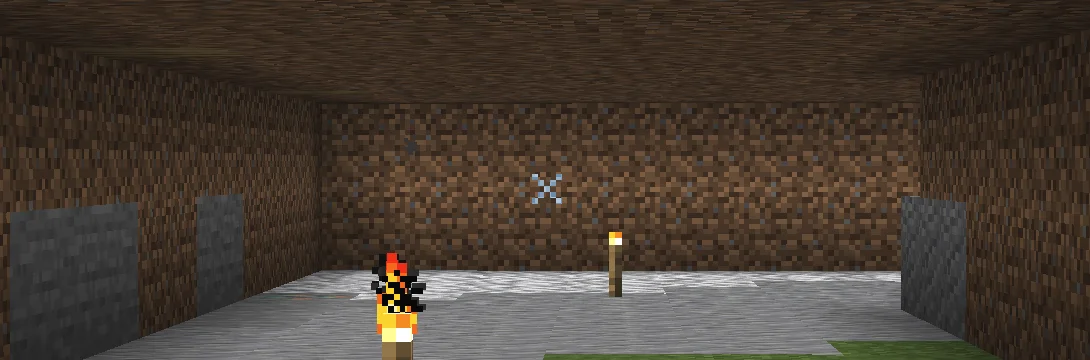
X Crosshairs is a texture pack made by qlttqb. Replaces the default plus-sign reticle with a clean, minimal "X" crosshair.
It supports Minecraft 1.13 – 26.x. It has been downloaded 12 times on Modrinth. The last update came out on Nov 5, 2026.
The newest is 1.0, released on Nov 5, 2026. It is made for Minecraft 1.13 – 1.20.2. It runs on Minecraft. The download is 16 KB.
| Version | Released | Minecraft | Type |
|---|---|---|---|
1.0 | Nov 5, 2026 | 1.13 – 1.20.2 | Release |
Tired of the bulky default reticle cluttering your screen? Precision "X" Crosshair swaps out the standard + reticle for a sharp, minimal X design, giving you a cleaner sightline for both ranged combat and everyday building.
Written by qlttqb. Read it with pictures on Modrinth.
Download the .zip file from Modrinth. Do not unzip it.
In Minecraft, open Options, then Resource Packs, then Open Pack Folder.
Drop the .zip file into that folder and go back to the game.
Move X Crosshairs to the right-hand list and click Done.
It is made for Minecraft 1.13 – 26.x. On other versions Minecraft marks it as incompatible, but it often still works.
Full guide: How to install Minecraft resource packs
| Resource | Downloads | Versions | Last update | Price |
|---|---|---|---|---|
| X Crosshairsthe one you looked at | 12 | 1.13 – 26.x | 7 days ago | Free |
| Red Crosshairsqlttqb | 34 | 1.13 – 26.x | 7 days ago | Free |
 MiniX Crosshairsqlttqb | 20 | 1.13 – 26.x | 7 days ago | Free |
 SpacedX Crosshairsqlttqb | 11 | 1.8 – 26.x | 7 days ago | Free |
Yes. X Crosshairs supports Minecraft 26.x. All supported versions: 26.x, 1.21, 1.20, 1.19, 1.18, 1.17, 1.16, 1.13.
Yes. X Crosshairs is free to download from Modrinth.
Yes. The last update came out in the past day.
The closest ones are Red Crosshairs, MiniX Crosshairs and SpacedX Crosshairs. Compare all alternatives
Red CrosshairsTexture packs · 1.13 – 26.xReplaces the standard reticle with a vibrant, red crosshair for enhanced visibility in PvP and dim environments.
MiniX CrosshairsTexture packs · 1.13 – 26.xReplaces the standard reticle with an ultra-compact, minimalist "x" crosshair
SpacedX CrosshairsTexture packs · 1.8 – 26.xReplaces the standard crosshair with a detached, spaced-dot reticle featuring a center aim point surrounded by four isolated guide pixels.
 Target CrosshairsTexture packs · 1.13 – 26.x
Replaces the standard reticle with a sleek target sight.
 PVP zegarn+Anime skyTexture packs · 1.8 – 26.x
[UPD 1.3.6] Minimalistic PvP resource pack with dark UI, custom sky, clean HUD & crosshair, small fire, and refined visuals (see description)
A clean, sharp X-shaped crosshair designed for competitive Minecraft PvP. Minimal distractions with precise aiming and a sleek look.
Log in to leave a review.