
 ChorusEnderchestPlugins · 26.x
Advanced multi-page EnderChest for Paper 26.2: permission-based sizes, custom page names and icons, hex colors, fully editable messages and menus, admin tools…
Kostenlos5 Downloads

A cool minecraft plugin which allows you to fully manage enderchests on your server!
Direkter Download von Modrinth · 10 Downloads
hucznyEnderChest (Plugin) ist für Server mit Paper / Spigot gedacht und stammt von _hxnrys. A cool minecraft plugin which allows you to fully manage enderchests on your server!
Unterstützt wird Minecraft 1.21 – 26.x. Auf Modrinth gibt es 10 Downloads. Damit liegt es auf Platz 24 der 35 hier gelisteten Speicher-Plugins. Das letzte Update erschien am 06.11.2026.
Die neueste ist 1.0, erschienen am 05.11.2026. Sie ist für Minecraft 1.21 – 26.3 gemacht. Sie läuft auf Bukkit, Paper, Purpur und Spigot. Der Download ist 2.6 MB groß.
| Version | Veröffentlicht | Minecraft | Typ |
|---|---|---|---|
1.0 | 05.11.2026 | 1.21 – 26.3 | Release |
Die Befehle, die auf der Modrinth-Seite von hucznyEnderChest stehen:
/reload/enderchest/aenderchest/ec/hucznyec/hucznyenderchest/aec/ahucznyec/ahucznyenderchestDort genannte Berechtigungen, zu vergeben mit einem Plugin wie LuckPerms:
hucznyenderchest.commandhucznyenderchest.othershucznyenderchest.others.modifyhucznyenderchest.others.exempthucznyenderchest.others.exempt.modifyhucznyenderchest.adminhucznyenderchest.playerhucznyenderchest.viphucznyenderchest.sviphucznyenderchest.mviphucznyenderchest.gviphucznyenderchest.uvipA fully customizable plugin that allows you to manage enderchests on your server!
Command · Description
/enderchest · Fast access to the Enderchests Menu
/enderchest [player] · Admin access to view other players' enderchests
/aenderchest migration [old format] [new format] · Easily migrate between different storage formats
/aenderchest reload · Reload plugin's configuration
Aliases: /ec, /hucznyec, /hucznyenderchest & /aec, /ahucznyec, /ahucznyenderchest
Permission · Description
hucznyenderchest.command · Access to /enderchest command
hucznyenderchest.others · View other players' enderchests
hucznyenderchest.others.modify · Modify other players' enderchests
hucznyenderchest.others.exempt · Bypass players from having other admins to view their enderchests
hucznyenderchest.others.exempt.modify · Bypass players from having other admins to modify their enderchests
hucznyenderchest.admin · Access to /aenderchest and all sub-commands
protect:
switch-cooldown: 250
blacklist:
databases:
type: H2 # Your database type: H2, SQLite, MySQL
file: "storage.db" # for SQLite
connection: # for MySql connection
address: 'localhost'
port: 3306
database: 'hucznyenderchest'
user: 'root'
password: 'password'
settings:
listen-to-block: true
pages:
selector:
actions:
back:
first:
material: BARRIER
displayname: "&cThis is the first page!"
lore: []
glowing: false
default:
material: ARROW
displayname: "&cPrevious page!"
lore:
glowing: false
next:
last:
material: BARRIER
displayname: "&cThis is the last page!"
lore: []
glowing: false
default:
material: ARROW
displayname: "&aNext Page!"
lore:
glowing: false
pages:
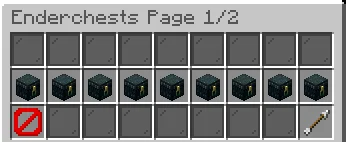
title: "&8Enderchests Page 1/2" # the title of this page
size: 3 # size of the page
slots: # and the actuall slots! (items)
actions: # items with type "actions"
18: PREVIOUS
26: NEXT
decoration: # items with type "decoration"
0;8: BLACK_STAINED_GLASS_PANE
19;25: BLACK_STAINED_GLASS_PANE
enderchests: # items with type "enderchests"
9: 1
10: 2
11: 3
12: 4
13: 5
14: 6
15: 7
16: 8
17: 9
title: "&8Enderchests Page 2/2"
size: 3
slots:
actions:
18: PREVIOUS
26: NEXT
decoration:
0;8: BLACK_STAINED_GLASS_PANE
19;25: BLACK_STAINED_GLASS_PANE
enderchests:
9: 10
10: 11
11: 12
12: 13
13: 14
14: 15
15: 16
16: 17
17: 18
enderchests:
actions:
back:
first:
material: BARRIER
displayname: "&cThis is the first page!"
lore: []
glowing: false
default:
material: ARROW
displayname: "&cPrevious page!"
lore:
glowing: false
next:
first:
material: BARRIER
displayname: "&cThis is the last page!"
lore: []
glowing: false
default:
material: ARROW
displayname: "&aNext page!"
lore:
glowing: false
mainmenu:
material: NETHER_STAR
displayname: "&eMain menu"
lore:
glowing: false
placeholders:
status:
storage:
full: "&cFULL"
mid: "&e{COUNT}x ITEM(S)"
empty: "&aEMPTY"
1;3:
displayname: "&7Enderchest &fPLAYER" # displayname when you hover the item in the selector menu
title: "&7Opened: Enderchest #{ID}" # title when you actually open this(those) enderchest(s)
lore:
unlocked:
locked:
permission-node: "hucznyenderchest.player"
size: 6
slots:
items:
decoration:
46;48: BLACK_STAINED_GLASS_PANE
50;53: BLACK_STAINED_GLASS_PANE
actions:
45: "previous"
49: "mainmenu"
53: "next"
4;6:
displayname: "&7Enderchest &eVIP"
title: "&7Opened: Enderchest #{ID}"
lore:
unlocked:
locked:
permission-node: "hucznyenderchest.vip"
size: 6
slots:
items:
decoration:
46;48: BLACK_STAINED_GLASS_PANE
50;53: BLACK_STAINED_GLASS_PANE
actions:
45: "previous"
49: "mainmenu"
53: "next"
7;9:
displayname: "&7Enderchest &6SVIP"
title: "&7Opened: Enderchest #{ID}"
lore:
unlocked:
locked:
permission-node: "hucznyenderchest.svip"
size: 6
slots:
items:
decoration:
46;48: BLACK_STAINED_GLASS_PANE
50;53: BLACK_STAINED_GLASS_PANE
actions:
45: "previous"
49: "mainmenu"
53: "next"
10;12:
displayname: "&7Enderchest &dMVIP"
title: "&7Opened: Enderchest #{ID}"
lore:
unlocked:
locked:
permission-node: "hucznyenderchest.mvip"
size: 6
slots:
items:
decoration:
46;48: BLACK_STAINED_GLASS_PANE
50;53: BLACK_STAINED_GLASS_PANE
actions:
45: "previous"
49: "mainmenu"
53: "next"
13;15:
displayname: "&7Enderchest &bGVIP"
title: "&7Opened: Enderchest #{ID}"
lore:
unlocked:
locked:
permission-node: "hucznyenderchest.gvip"
size: 6
slots:
items:
decoration:
46;48: BLACK_STAINED_GLASS_PANE
50;53: BLACK_STAINED_GLASS_PANE
actions:
45: "previous"
49: "mainmenu"
53: "next"
16;18:
displayname: "&7Enderchest &5UVIP"
title: "&7Opened: Enderchest #{ID}"
lore:
unlocked:
locked:
permission-node: "hucznyenderchest.uvip"
size: 6
slots:
items:
decoration:
46;48: BLACK_STAINED_GLASS_PANE
50;53: BLACK_STAINED_GLASS_PANE
actions:
45: "previous"
49: "mainmenu"
53: "next"
messages:
help:
usage:
unknow-player: "&8» &7This player has not been found in the database!"
unknow-argument: "&8» &7Unknow argument. Type &c/aec help &7to see some more info."
database-not-loaded: "&8» &7Database is configured wrong, we cant access your enderchest, sorry."
blacklist: "&8» &7You can't put this item in the enderchest."
reload: "&8» &7Succesfully reloaded the plugin &f&lHucznyEnderchest&r&7."
migration:
success: "&8» &7Succesfully migrated files from &c%previous% format &7to &a%new% format"
failed: "&8» &7While doing the migration something went wrong.. check the console for more info!"
usage: "&8» &7Correct ussage: &c/aec migration [old format] [new format]"
known-errors:
same_databases: "&8» &7The database formats you typed as &cold &7and &cnew &7are &cthe same&7!"
unknow: "&8» &7The database format you typed &f{arg} &7has not been found!"
permission:
cant-see-others: "&8» &
Geschrieben von _hxnrys. Mit Bildern auf Modrinth lesen.
Stelle sicher, dass dein Server Paper und Spigot auf Minecraft 1.21 – 26.x nutzt.
Lade die .jar-Datei von Modrinth herunter und lege sie in den plugins-Ordner deines Servers.
Starte den Server neu. Vermeide /reload, viele Plugins kommen damit nicht gut klar.
Gib /plugins in der Konsole ein: hucznyEnderChest sollte grün aufgelistet sein. Die Konfigurationsdateien werden beim ersten Start im plugins-Ordner angelegt.
Ausführliche Anleitung: So installierst du Plugins auf einem Minecraft-Server
| Ressource | Downloads | Versionen | Letztes Update | Preis |
|---|---|---|---|---|
| hucznyEnderChestdie du angesehen hast | 10 | 1.21 – 26.x | vor 8 Tagen | Kostenlos |
| ChorusEnderchestControll3r24 | 5 | 26.x | vor 10 Tagen | Kostenlos |
 Advanced BackupsHeatherWhite | 426K | 1.12 – 1.21 | 2. Feb. 2025 | Kostenlos |
 Multiverse-Inventoriesdumptruckman | 291K | 1.13 – 26.x | 21. Sept. 2026 | Kostenlos |
Ja. hucznyEnderChest unterstützt Minecraft 26.x. Alle unterstützten Versionen: 26.x, 1.21.
Ja. hucznyEnderChest kannst du kostenlos bei Modrinth herunterladen.
hucznyEnderChest läuft auf Servern mit Paper und Spigot.
Ja. Das letzte Update kam innerhalb des letzten Tages.
Am ähnlichsten sind ChorusEnderchest, Advanced Backups und Multiverse-Inventories. Alle Alternativen vergleichen
ChorusEnderchestPlugins · 26.xAdvanced multi-page EnderChest for Paper 26.2: permission-based sizes, custom page names and icons, hex colors, fully editable messages and menus, admin tools…
Advanced BackupsPlugins · 1.12 – 1.21The backup mod to solve all your problems - actively maintained for almost any minecraft version!
Multiverse-InventoriesPlugins · 1.13 – 26.xAn inventory management plugin created to intertwine with Multiverse-Core
 InventoryRollbackPlusPlugins · 1.8 – 26.x
Inventory Backup Plugin for Spigot / Paper / Purpur - 1.8 - 26.3 - Backup, Restore, Rollback Inventories!
 Take It OutPlugins · 1.20 – 26.x
Minecraft mod that lets you pick blocks from shulker boxes using mouse wheel, Easy Place, or right-click — perfect for Litematica schematics and printers.
 Backpack PlusPlugins · 1.19 – 26.x
This adds backpacks to your Minecraft server. By default, there are three types of backpacks: Basic, Golden, and Diamond, each with a specific number of slots…
Logg dich ein, um eine Bewertung zu schreiben.