
 ChorusEnderchestPlugins · 26.x
Advanced multi-page EnderChest for Paper 26.2: permission-based sizes, custom page names and icons, hex colors, fully editable messages and menus, admin tools…
Gratuit5 téléchargements

A cool minecraft plugin which allows you to fully manage enderchests on your server!
Téléchargement direct depuis Modrinth · 10 téléchargements
_hxnrys a créé hucznyEnderChest (plugin) pour les serveurs Paper / Spigot. A cool minecraft plugin which allows you to fully manage enderchests on your server!
Versions prises en charge : Minecraft 1.21 – 26.x. On compte 10 téléchargements sur Modrinth. Il arrive ainsi en position n° 24 sur les 38 plugins de stockage listés ici. La dernière mise à jour date du 06/11/2026.
La plus récente est 1.0, sortie le 05/11/2026. Elle est faite pour Minecraft 1.21 – 26.3. Elle fonctionne sur Bukkit, Paper, Purpur et Spigot. Le téléchargement fait 2.6 MB.
| Version | Publié | Minecraft | Type |
|---|---|---|---|
1.0 | 05/11/2026 | 1.21 – 26.3 | Stable |
Les commandes citées sur la page Modrinth de hucznyEnderChest :
/reload/enderchest/aenderchest/ec/hucznyec/hucznyenderchest/aec/ahucznyec/ahucznyenderchestPermissions citées là-bas, à donner avec un plugin comme LuckPerms :
hucznyenderchest.commandhucznyenderchest.othershucznyenderchest.others.modifyhucznyenderchest.others.exempthucznyenderchest.others.exempt.modifyhucznyenderchest.adminhucznyenderchest.playerhucznyenderchest.viphucznyenderchest.sviphucznyenderchest.mviphucznyenderchest.gviphucznyenderchest.uvipA fully customizable plugin that allows you to manage enderchests on your server!
Command · Description
/enderchest · Fast access to the Enderchests Menu
/enderchest [player] · Admin access to view other players' enderchests
/aenderchest migration [old format] [new format] · Easily migrate between different storage formats
/aenderchest reload · Reload plugin's configuration
Aliases: /ec, /hucznyec, /hucznyenderchest & /aec, /ahucznyec, /ahucznyenderchest
Permission · Description
hucznyenderchest.command · Access to /enderchest command
hucznyenderchest.others · View other players' enderchests
hucznyenderchest.others.modify · Modify other players' enderchests
hucznyenderchest.others.exempt · Bypass players from having other admins to view their enderchests
hucznyenderchest.others.exempt.modify · Bypass players from having other admins to modify their enderchests
hucznyenderchest.admin · Access to /aenderchest and all sub-commands
protect:
switch-cooldown: 250
blacklist:
databases:
type: H2 # Your database type: H2, SQLite, MySQL
file: "storage.db" # for SQLite
connection: # for MySql connection
address: 'localhost'
port: 3306
database: 'hucznyenderchest'
user: 'root'
password: 'password'
settings:
listen-to-block: true
pages:
selector:
actions:
back:
first:
material: BARRIER
displayname: "&cThis is the first page!"
lore: []
glowing: false
default:
material: ARROW
displayname: "&cPrevious page!"
lore:
glowing: false
next:
last:
material: BARRIER
displayname: "&cThis is the last page!"
lore: []
glowing: false
default:
material: ARROW
displayname: "&aNext Page!"
lore:
glowing: false
pages:
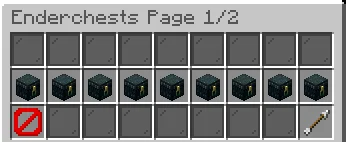
title: "&8Enderchests Page 1/2" # the title of this page
size: 3 # size of the page
slots: # and the actuall slots! (items)
actions: # items with type "actions"
18: PREVIOUS
26: NEXT
decoration: # items with type "decoration"
0;8: BLACK_STAINED_GLASS_PANE
19;25: BLACK_STAINED_GLASS_PANE
enderchests: # items with type "enderchests"
9: 1
10: 2
11: 3
12: 4
13: 5
14: 6
15: 7
16: 8
17: 9
title: "&8Enderchests Page 2/2"
size: 3
slots:
actions:
18: PREVIOUS
26: NEXT
decoration:
0;8: BLACK_STAINED_GLASS_PANE
19;25: BLACK_STAINED_GLASS_PANE
enderchests:
9: 10
10: 11
11: 12
12: 13
13: 14
14: 15
15: 16
16: 17
17: 18
enderchests:
actions:
back:
first:
material: BARRIER
displayname: "&cThis is the first page!"
lore: []
glowing: false
default:
material: ARROW
displayname: "&cPrevious page!"
lore:
glowing: false
next:
first:
material: BARRIER
displayname: "&cThis is the last page!"
lore: []
glowing: false
default:
material: ARROW
displayname: "&aNext page!"
lore:
glowing: false
mainmenu:
material: NETHER_STAR
displayname: "&eMain menu"
lore:
glowing: false
placeholders:
status:
storage:
full: "&cFULL"
mid: "&e{COUNT}x ITEM(S)"
empty: "&aEMPTY"
1;3:
displayname: "&7Enderchest &fPLAYER" # displayname when you hover the item in the selector menu
title: "&7Opened: Enderchest #{ID}" # title when you actually open this(those) enderchest(s)
lore:
unlocked:
locked:
permission-node: "hucznyenderchest.player"
size: 6
slots:
items:
decoration:
46;48: BLACK_STAINED_GLASS_PANE
50;53: BLACK_STAINED_GLASS_PANE
actions:
45: "previous"
49: "mainmenu"
53: "next"
4;6:
displayname: "&7Enderchest &eVIP"
title: "&7Opened: Enderchest #{ID}"
lore:
unlocked:
locked:
permission-node: "hucznyenderchest.vip"
size: 6
slots:
items:
decoration:
46;48: BLACK_STAINED_GLASS_PANE
50;53: BLACK_STAINED_GLASS_PANE
actions:
45: "previous"
49: "mainmenu"
53: "next"
7;9:
displayname: "&7Enderchest &6SVIP"
title: "&7Opened: Enderchest #{ID}"
lore:
unlocked:
locked:
permission-node: "hucznyenderchest.svip"
size: 6
slots:
items:
decoration:
46;48: BLACK_STAINED_GLASS_PANE
50;53: BLACK_STAINED_GLASS_PANE
actions:
45: "previous"
49: "mainmenu"
53: "next"
10;12:
displayname: "&7Enderchest &dMVIP"
title: "&7Opened: Enderchest #{ID}"
lore:
unlocked:
locked:
permission-node: "hucznyenderchest.mvip"
size: 6
slots:
items:
decoration:
46;48: BLACK_STAINED_GLASS_PANE
50;53: BLACK_STAINED_GLASS_PANE
actions:
45: "previous"
49: "mainmenu"
53: "next"
13;15:
displayname: "&7Enderchest &bGVIP"
title: "&7Opened: Enderchest #{ID}"
lore:
unlocked:
locked:
permission-node: "hucznyenderchest.gvip"
size: 6
slots:
items:
decoration:
46;48: BLACK_STAINED_GLASS_PANE
50;53: BLACK_STAINED_GLASS_PANE
actions:
45: "previous"
49: "mainmenu"
53: "next"
16;18:
displayname: "&7Enderchest &5UVIP"
title: "&7Opened: Enderchest #{ID}"
lore:
unlocked:
locked:
permission-node: "hucznyenderchest.uvip"
size: 6
slots:
items:
decoration:
46;48: BLACK_STAINED_GLASS_PANE
50;53: BLACK_STAINED_GLASS_PANE
actions:
45: "previous"
49: "mainmenu"
53: "next"
messages:
help:
usage:
unknow-player: "&8» &7This player has not been found in the database!"
unknow-argument: "&8» &7Unknow argument. Type &c/aec help &7to see some more info."
database-not-loaded: "&8» &7Database is configured wrong, we cant access your enderchest, sorry."
blacklist: "&8» &7You can't put this item in the enderchest."
reload: "&8» &7Succesfully reloaded the plugin &f&lHucznyEnderchest&r&7."
migration:
success: "&8» &7Succesfully migrated files from &c%previous% format &7to &a%new% format"
failed: "&8» &7While doing the migration something went wrong.. check the console for more info!"
usage: "&8» &7Correct ussage: &c/aec migration [old format] [new format]"
known-errors:
same_databases: "&8» &7The database formats you typed as &cold &7and &cnew &7are &cthe same&7!"
unknow: "&8» &7The database format you typed &f{arg} &7has not been found!"
permission:
cant-see-others: "&8» &
Écrite par _hxnrys. À lire avec les images sur Modrinth.
Vérifie que ton serveur tourne sous Paper et Spigot en Minecraft 1.21 – 26.x.
Télécharge le fichier .jar depuis Modrinth et place-le dans le dossier plugins de ton serveur.
Redémarre le serveur. Évite /reload, beaucoup de plugins le supportent mal.
Tape /plugins dans la console : hucznyEnderChest doit apparaître en vert. Ses fichiers de config sont créés dans le dossier plugins au premier démarrage.
Guide complet: Comment installer des plugins sur un serveur Minecraft
| Ressource | Téléchargements | Versions | Mise à jour | Prix |
|---|---|---|---|---|
| hucznyEnderChestcelle que tu regardais | 10 | 1.21 – 26.x | il y a 8 jours | Gratuit |
| ChorusEnderchestControll3r24 | 5 | 26.x | il y a 11 jours | Gratuit |
 Advanced BackupsHeatherWhite | 427K | 1.12 – 1.21 | 2 févr. 2025 | Gratuit |
 Multiverse-Inventoriesdumptruckman | 291K | 1.13 – 26.x | 21 sept. 2026 | Gratuit |
Oui. hucznyEnderChest prend en charge Minecraft 26.x. Toutes les versions prises en charge : 26.x, 1.21.
Oui. hucznyEnderChest se télécharge gratuitement sur Modrinth.
hucznyEnderChest fonctionne sur les serveurs Paper et Spigot.
Oui. La dernière mise à jour date des dernières 24 heures.
Les plus proches sont ChorusEnderchest, Advanced Backups et Multiverse-Inventories. Comparer toutes les alternatives
ChorusEnderchestPlugins · 26.xAdvanced multi-page EnderChest for Paper 26.2: permission-based sizes, custom page names and icons, hex colors, fully editable messages and menus, admin tools…
Advanced BackupsPlugins · 1.12 – 1.21The backup mod to solve all your problems - actively maintained for almost any minecraft version!
Multiverse-InventoriesPlugins · 1.13 – 26.xAn inventory management plugin created to intertwine with Multiverse-Core
 InventoryRollbackPlusPlugins · 1.8 – 26.x
Inventory Backup Plugin for Spigot / Paper / Purpur - 1.8 - 26.3 - Backup, Restore, Rollback Inventories!
 Take It OutPlugins · 1.20 – 26.x
Minecraft mod that lets you pick blocks from shulker boxes using mouse wheel, Easy Place, or right-click — perfect for Litematica schematics and printers.
 Backpack PlusPlugins · 1.19 – 26.x
This adds backpacks to your Minecraft server. By default, there are three types of backpacks: Basic, Golden, and Diamond, each with a specific number of slots…
Connecte-toi pour laisser un avis.