
 PaxiMods · 1.19 – 26.x
Automatic data & resource pack loading made easy.
Kostenlos11,406,706 Downloads

Automatic snapshots of your config folder with a line-by-line diff and one-click restore. Undo any config change, on the client or on a server.
Direkter Download von Modrinth · 5 Downloads
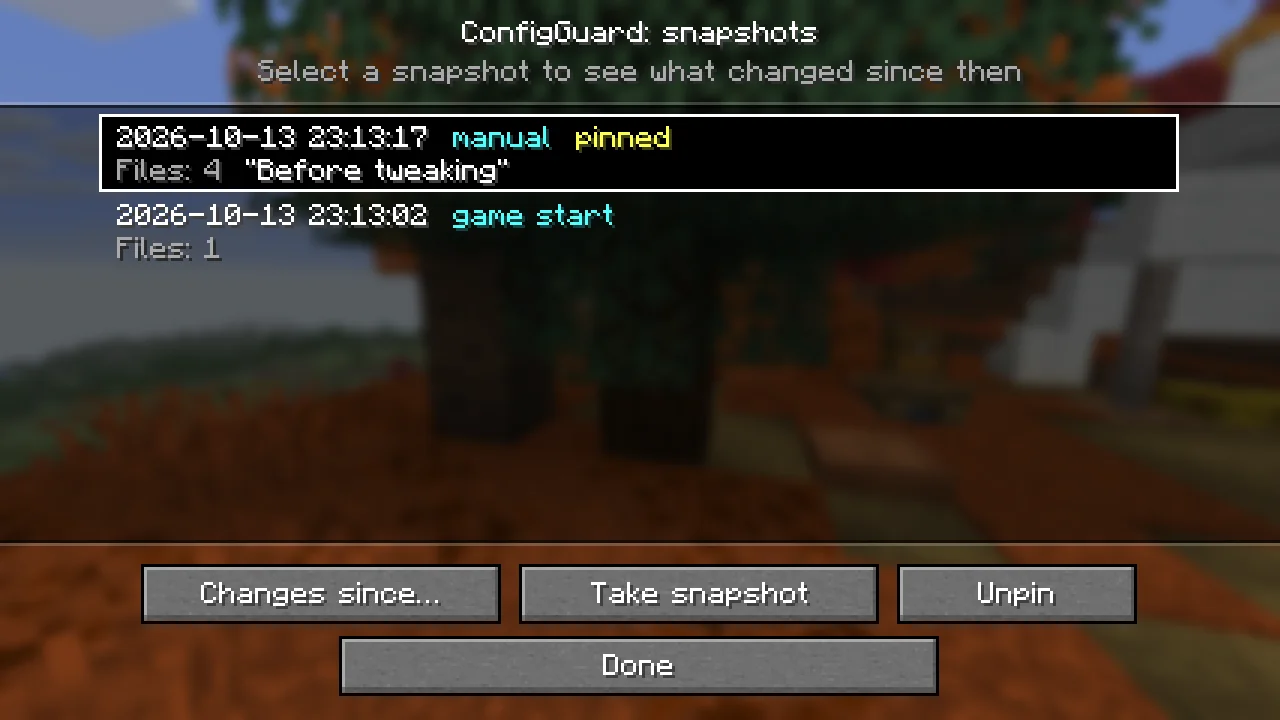
ConfigGuard (Mod) stammt von FNT_1. Automatic snapshots of your config folder with a line-by-line diff and one-click restore. Undo any config change, on the client or on a server.
Unterstützt wird Minecraft 26.x. Auf Modrinth gibt es 5 Downloads. Das letzte Update erschien am 16.10.2026.
ConfigGuard hat seit 16.10.2026 2 Versionen auf Modrinth veröffentlicht. 2 davon erschienen im letzten Jahr. Die neueste ist 1.0.0+neoforge, erschienen am 16.10.2026. Sie ist für Minecraft 26.3 gemacht. Sie läuft auf NeoForge. Der Download ist 77 KB groß.
| Version | Veröffentlicht | Minecraft | Typ |
|---|---|---|---|
1.0.0+neoforge | 16.10.2026 | 26.3 | Release |
1.0.0+fabric | 16.10.2026 | 26.3 | Release |
Broke your configs? Roll them back in two clicks.
ConfigGuard keeps automatic snapshots of your config files and shows exactly what changed between them. Any file, or the whole folder, can be restored from a snapshot. It is made for players who tweak modpacks, pack makers who test updates and server owners who edit configs by hand.
For operators (permission level 4), on dedicated servers and in single player with cheats enabled:
Command · What it does
/configguard snapshot [label] · Take a snapshot now
/configguard list · List snapshots, newest first (click an id to see its changes)
/configguard changes · Files that changed since the snapshot
/configguard diff · Line diff of one file in chat
/configguard restore [path] · Restore one file or all changed files
/configguard pin / unpin · Keep a snapshot forever, or release it
Snapshot ids and file paths are suggested with Tab. Restart the game or server after a restore so mods read the restored files.
config/configguard.json (created on first launch):
Key · Default · What it does
trackedPaths · config, defaultconfigs, options.txt, server.properties · Files and folders in the game folder that are captured
excludedGlobs · *.log, *.tmp, *.bak, *.lock, **.old · Files that are skipped
maxFileSizeKb · 1024 · Larger files are skipped
maxSnapshots · 40 · How many unpinned snapshots are kept
snapshotOnStartup · true · Snapshot when the game starts
snapshotOnShutdown · true · Snapshot when the game closes
notifyExternalChanges · true · Notify about changes made while the game was closed
MIT. You are welcome to include ConfigGuard in modpacks.
Geschrieben von FNT_1. Mit Bildern auf Modrinth lesen.
Diese Mod läuft nur in deinem eigenen Spiel. Server brauchen sie nicht, du kannst sie also auf jedem Server nutzen.
Installiere Fabric und NeoForge für Minecraft 26.x.
Lade die .jar-Datei von Modrinth herunter und lege sie in den mods-Ordner deines .minecraft-Verzeichnisses.
Starte Minecraft mit dem Fabric-Profil.
Einfacher: Suche in Prism Launcher oder der Modrinth App in den Mods deiner Instanz nach ConfigGuard und klicke auf Install. Loader und benötigte Mods werden für dich hinzugefügt.
| Ressource | Downloads | Versionen | Letztes Update | Preis |
|---|---|---|---|---|
| ConfigGuarddie du angesehen hast | 5 | 26.x | vor 26 Tagen | Kostenlos |
| PaxiYUNGNICKYOUNG | 11.4M | 1.19 – 26.x | 24. Juni 2026 | Kostenlos |
 MoreCobblemonTweaksjustahuman-xd | 8.1M | 1.20 – 1.21 | vor 23 Tagen | Kostenlos |
 Config ManagerTheBossMagnus | 7.8M | 1.20 – 26.x | 10. Okt. 2026 | Kostenlos |
Ja. ConfigGuard unterstützt Minecraft 26.x. Alle unterstützten Versionen: 26.x.
Ja. ConfigGuard kannst du kostenlos bei Modrinth herunterladen.
Clientseitig. ConfigGuard kommt in deinen eigenen mods-Ordner und funktioniert auf jedem Server, auch auf Servern ohne Mods.
Ja. Das letzte Update kam innerhalb des letzten Tages.
Am ähnlichsten sind Paxi, MoreCobblemonTweaks und Config Manager. Alle Alternativen vergleichen
PaxiMods · 1.19 – 26.xAutomatic data & resource pack loading made easy.
MoreCobblemonTweaksMods · 1.20 – 1.21A qol cobblemon client mod introducing various qol improvements!
Config ManagerMods · 1.20 – 26.xConfig Manager is a Minecraft mod that allows modpack developers to ship configuration files without messing with the user's preferences
 In-Game Account SwitcherMods · 1.8 – 26.x
This mod allows you to change your logged in account in-game, without restarting Minecraft
 Item ScrollerMods · 1.8 – 26.x
A client mod that adds many shortcuts to move items easier and craft faster in inventory screens
 Rebind NarratorMods · 1.16 – 26.x
it's 2021 and you can't change the narrator key UPDATE: it's 2022 and you still can't change the narrator key UPDATE: it's 2023 and you still can't change the…
Logg dich ein, um eine Bewertung zu schreiben.