
 PaxiMods · 1.19 – 26.x
Automatic data & resource pack loading made easy.
Gratis11,406,706 descargas

Automatic snapshots of your config folder with a line-by-line diff and one-click restore. Undo any config change, on the client or on a server.
Descarga directa desde Modrinth · 5 descargas
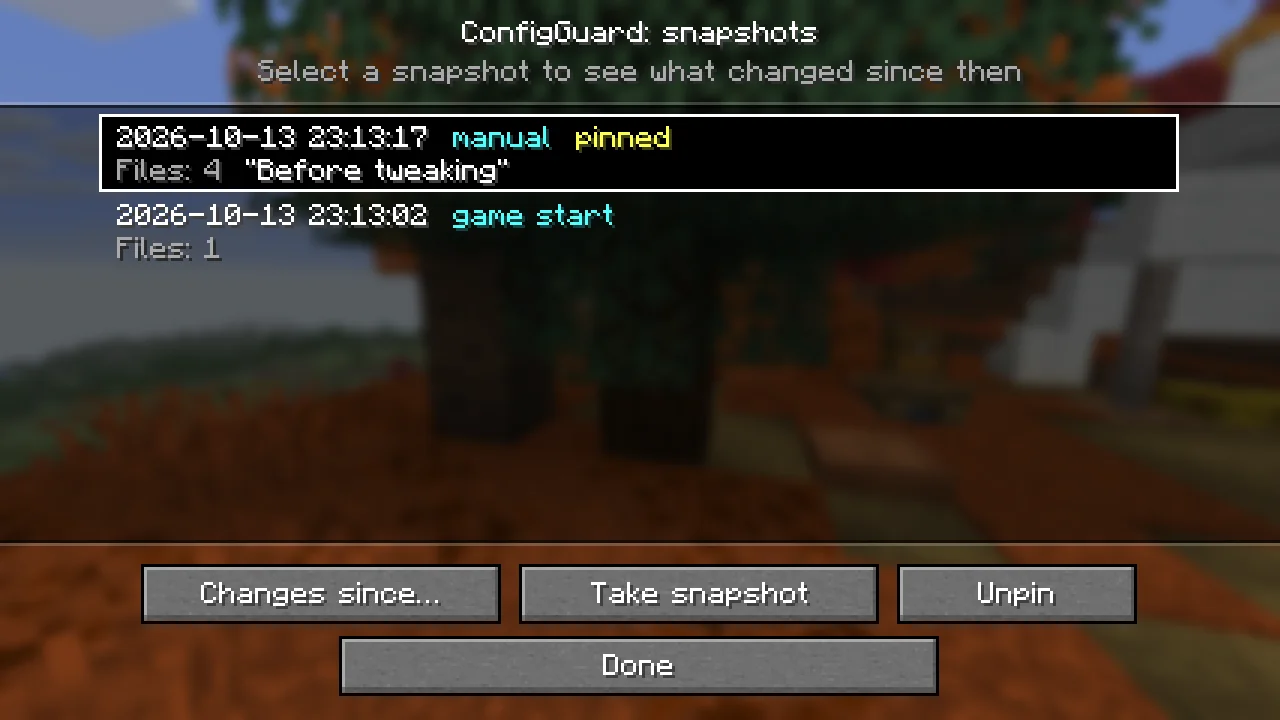
ConfigGuard (mod) es obra de FNT_1. Automatic snapshots of your config folder with a line-by-line diff and one-click restore. Undo any config change, on the client or on a server.
Es compatible con Minecraft 26.x. Se ha descargado 5 veces en Modrinth. La última actualización salió el 16/10/2026.
ConfigGuard ha publicado 2 versiones en Modrinth desde el 16/10/2026. 2 salieron en el último año. La más reciente es 1.0.0+neoforge, publicada el 16/10/2026. Está hecha para Minecraft 26.3. Funciona en NeoForge. La descarga ocupa 77 KB.
| Versión | Publicado | Minecraft | Tipo |
|---|---|---|---|
1.0.0+neoforge | 16/10/2026 | 26.3 | Estable |
1.0.0+fabric | 16/10/2026 | 26.3 | Estable |
Broke your configs? Roll them back in two clicks.
ConfigGuard keeps automatic snapshots of your config files and shows exactly what changed between them. Any file, or the whole folder, can be restored from a snapshot. It is made for players who tweak modpacks, pack makers who test updates and server owners who edit configs by hand.
For operators (permission level 4), on dedicated servers and in single player with cheats enabled:
Command · What it does
/configguard snapshot [label] · Take a snapshot now
/configguard list · List snapshots, newest first (click an id to see its changes)
/configguard changes · Files that changed since the snapshot
/configguard diff · Line diff of one file in chat
/configguard restore [path] · Restore one file or all changed files
/configguard pin / unpin · Keep a snapshot forever, or release it
Snapshot ids and file paths are suggested with Tab. Restart the game or server after a restore so mods read the restored files.
config/configguard.json (created on first launch):
Key · Default · What it does
trackedPaths · config, defaultconfigs, options.txt, server.properties · Files and folders in the game folder that are captured
excludedGlobs · *.log, *.tmp, *.bak, *.lock, **.old · Files that are skipped
maxFileSizeKb · 1024 · Larger files are skipped
maxSnapshots · 40 · How many unpinned snapshots are kept
snapshotOnStartup · true · Snapshot when the game starts
snapshotOnShutdown · true · Snapshot when the game closes
notifyExternalChanges · true · Notify about changes made while the game was closed
MIT. You are welcome to include ConfigGuard in modpacks.
Escrita por FNT_1. Léela con imágenes en Modrinth.
Este mod funciona solo en tu propio juego. Los servidores no lo necesitan, así que puedes usarlo en cualquier servidor.
Instala Fabric y NeoForge para Minecraft 26.x.
Descarga el archivo .jar desde Modrinth y ponlo en la carpeta mods de tu directorio .minecraft.
Inicia Minecraft con el perfil de Fabric.
Más fácil: en Prism Launcher o la Modrinth App, busca ConfigGuard en los mods de tu instancia y haz clic en Install. Añade el loader y los mods que necesita por ti.
| Recurso | Descargas | Versiones | Última actualización | Precio |
|---|---|---|---|---|
| ConfigGuardel que estabas viendo | 5 | 26.x | hace 26 días | Gratis |
| PaxiYUNGNICKYOUNG | 11.4M | 1.19 – 26.x | 24 jun 2026 | Gratis |
 MoreCobblemonTweaksjustahuman-xd | 8.1M | 1.20 – 1.21 | hace 23 días | Gratis |
 Config ManagerTheBossMagnus | 7.8M | 1.20 – 26.x | 10 oct 2026 | Gratis |
Sí. ConfigGuard es compatible con Minecraft 26.x. Todas las versiones compatibles: 26.x.
Sí. ConfigGuard se puede descargar gratis desde Modrinth.
Del lado del cliente. ConfigGuard va en tu propia carpeta mods y funciona en cualquier servidor, incluso en servidores sin mods.
Sí. La última actualización salió en el último día.
Los más parecidos son Paxi, MoreCobblemonTweaks y Config Manager. Comparar todas las alternativas
PaxiMods · 1.19 – 26.xAutomatic data & resource pack loading made easy.
MoreCobblemonTweaksMods · 1.20 – 1.21A qol cobblemon client mod introducing various qol improvements!
Config ManagerMods · 1.20 – 26.xConfig Manager is a Minecraft mod that allows modpack developers to ship configuration files without messing with the user's preferences
 In-Game Account SwitcherMods · 1.8 – 26.x
This mod allows you to change your logged in account in-game, without restarting Minecraft
 Item ScrollerMods · 1.8 – 26.x
A client mod that adds many shortcuts to move items easier and craft faster in inventory screens
 Rebind NarratorMods · 1.16 – 26.x
it's 2021 and you can't change the narrator key UPDATE: it's 2022 and you still can't change the narrator key UPDATE: it's 2023 and you still can't change the…
Inicia sesión para dejar una reseña.