
 PlayerKits 2Plugins · 1.8 – 26.x
An easy to use but powerful plugin to create survival kits and claim them on a GUI.
Kostenlos339,275 Downloads
Custom Kits Plugin
Direkter Download von Modrinth · 23,237 Downloads
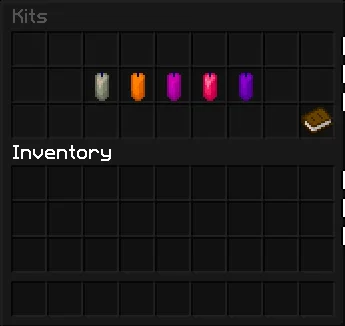
Kits (Plugin) ist für Server mit Paper / Spigot gedacht und stammt von PrIyme. Custom Kits Plugin.
Unterstützt wird Minecraft 1.21 – 26.x. Auf Modrinth gibt es 23,237 Downloads. Damit liegt es auf Platz 129 der 457 hier gelisteten Admin- und Rechte-Plugins. Das letzte Update erschien am 16.07.2026.
Kits hat seit 13.02.2026 7 Versionen auf Modrinth veröffentlicht. 7 davon erschienen im letzten Jahr. Die neueste ist 3.2, erschienen am 16.07.2026. Sie ist für Minecraft 1.21 – 26.2 gemacht. Sie läuft auf Bukkit, Paper, Purpur und Spigot. Der Download ist 129 KB groß.
| Version | Veröffentlicht | Minecraft | Typ |
|---|---|---|---|
3.2 | 16.07.2026 | 1.21 – 26.2 | Release |
3.1 | 16.07.2026 | 1.21 – 26.2 | Release |
3.0.0 | 11.07.2026 | 1.21 – 26.2 | Release |
2.2 | 24.05.2026 | 1.21 – 26.1.2 | Release |
2.1 | 14.05.2026 | 1.21 – 26.1.2 | Release |
Die Befehle, die auf der Modrinth-Seite von Kits stehen:
/kit/kitsDort genannte Berechtigungen, zu vergeben mit einem Plugin wie LuckPerms:
kits.adminkits.reloadkits.bypasskits.no.cooldownkitsbypriyme.claimKitsByPriyme is a modern kit plugin with a clean GUI, full in-game kit management, cooldowns, permissions, previews, and personal kit sorting for players.
/kit
Opens the main kit menu.
/kits
Opens the main kit menu.
/k
Opens the main kit menu.
Click an item
Selects the item.
Click another slot
Moves or swaps the selected item.
Green Candle
Saves your personal sorting.
Chest
Resets your personal sorting.
Red Candle
Cancels without saving.
/kit admin
Opens the admin GUI.
/kit reload
Reloads config, messages, kits, cooldowns, and menus.
/kit edit
Opens the kit item editor.
/kit admin create
Creates a new kit from your current inventory.
Example: /kit admin create vip 15min 3
/kit admin delete
Opens the delete confirmation menu.
/kit admin delete confirm
Deletes a kit instantly.
/kit admin rename
Renames a kit.
/kit admin clone
Copies an existing kit into a new kit.
/kit admin cooldown
Changes the kit cooldown.
Examples: 60s, 15min, 1h, 1d
/kit admin rarity
Changes the rarity stars of a kit.
/kit admin permission
Changes the required permission for a kit.
/kit admin permission default
Restores the default permission.
/kit admin permission none
Removes the required permission.
/kit admin slot
Changes the kit position in the menu.
/kit admin icon
Sets the kit icon to the item in your hand.
/kit admin glow
Toggles the glow effect on the kit icon.
/kit admin action
Changes the action text shown in the kit lore.
/kit admin edit
Opens the kit item editor.
kits.admin
Access to admin features.
kits.reload
Access to /kit reload.
kits.bypass
Claim every kit and ignore cooldowns.
kits.no.cooldown
Ignore kit cooldowns.
kitsbypriyme.claim.
Permission for a specific kit.
Geschrieben von PrIyme. Mit Bildern auf Modrinth lesen.
Stelle sicher, dass dein Server Paper und Spigot auf Minecraft 1.21 – 26.x nutzt.
Lade die .jar-Datei von Modrinth herunter und lege sie in den plugins-Ordner deines Servers.
Starte den Server neu. Vermeide /reload, viele Plugins kommen damit nicht gut klar.
Gib /plugins in der Konsole ein: Kits sollte grün aufgelistet sein. Die Konfigurationsdateien werden beim ersten Start im plugins-Ordner angelegt.
Ausführliche Anleitung: So installierst du Plugins auf einem Minecraft-Server
| Ressource | Downloads | Versionen | Letztes Update | Preis |
|---|---|---|---|---|
| Kitsdie du angesehen hast | 23K | 1.21 – 26.x | 16. Juli 2026 | Kostenlos |
| PlayerKits 2Ajneb97 | 339K | 1.8 – 26.x | vor 20 Tagen | Kostenlos |
 CustomCraftingWolfyScript | 242K | 1.16 – 26.x | vor 5 Tagen | Kostenlos |
 SmartSpawnerNightter | 232K | 1.20 – 26.x | vor 15 Tagen | Kostenlos |
Ja. Kits unterstützt Minecraft 26.x. Alle unterstützten Versionen: 26.x, 1.21.
Ja. Kits kannst du kostenlos bei Modrinth herunterladen.
Kits läuft auf Servern mit Paper und Spigot.
Ja. Das letzte Update kam innerhalb des letzten Tages.
Am ähnlichsten sind PlayerKits 2, CustomCrafting und SmartSpawner. Alle Alternativen vergleichen
PlayerKits 2Plugins · 1.8 – 26.xAn easy to use but powerful plugin to create survival kits and claim them on a GUI.
CustomCraftingPlugins · 1.16 – 26.xEasily create custom recipes via an in-game GUI, including Crafting, Cooking, Smithing, etc. Use advanced config features to merge/copy NBT from ingredients…
SmartSpawnerPlugins · 1.20 – 26.xAdd custom GUI spawners that generate items and XP instead of spawning mobs.
 CraftEnginePlugins · 1.20 – 26.x
serverside mod framework for custom items, blocks, recipes and more
 Custom Mob AttributesPlugins · 1.20 – 26.x
Configure health, attack damage, movement speed and scale of every mob.
 PerPlayerKitPlugins · 1.19 – 26.x
PerPlayerKit lets players create their own custom kits (personal kits) for practicing PvP.
Logg dich ein, um eine Bewertung zu schreiben.