
 PlayerKits 2Plugins · 1.8 – 26.x
An easy to use but powerful plugin to create survival kits and claim them on a GUI.
Free339,275 downloads
Custom Kits Plugin
Direct download from Modrinth · 23,237 downloads
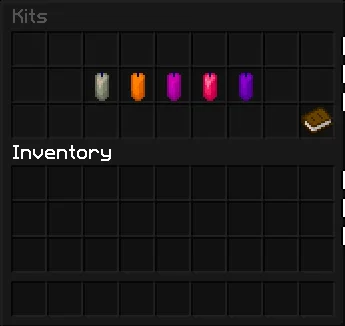
Kits is a plugin for Paper / Spigot servers, made by PrIyme. Custom Kits Plugin.
It supports Minecraft 1.21 – 26.x. It has been downloaded 23,237 times on Modrinth. That puts it at #129 of the 457 admin and permission plugins listed here. The last update came out on Jul 16, 2026.
Kits has had 7 releases on Modrinth since Feb 13, 2026. 7 of them came out in the past year. The newest is 3.2, released on Jul 16, 2026. It is made for Minecraft 1.21 – 26.2. It runs on Bukkit, Paper, Purpur and Spigot. The download is 129 KB.
| Version | Released | Minecraft | Type |
|---|---|---|---|
3.2 | Jul 16, 2026 | 1.21 – 26.2 | Release |
3.1 | Jul 16, 2026 | 1.21 – 26.2 | Release |
3.0.0 | Jul 11, 2026 | 1.21 – 26.2 | Release |
2.2 | May 24, 2026 | 1.21 – 26.1.2 | Release |
2.1 | May 14, 2026 | 1.21 – 26.1.2 | Release |
The commands named on the Modrinth page of Kits:
/kit/kitsPermission nodes named there, to give with a plugin like LuckPerms:
kits.adminkits.reloadkits.bypasskits.no.cooldownkitsbypriyme.claimKitsByPriyme is a modern kit plugin with a clean GUI, full in-game kit management, cooldowns, permissions, previews, and personal kit sorting for players.
/kit
Opens the main kit menu.
/kits
Opens the main kit menu.
/k
Opens the main kit menu.
Click an item
Selects the item.
Click another slot
Moves or swaps the selected item.
Green Candle
Saves your personal sorting.
Chest
Resets your personal sorting.
Red Candle
Cancels without saving.
/kit admin
Opens the admin GUI.
/kit reload
Reloads config, messages, kits, cooldowns, and menus.
/kit edit
Opens the kit item editor.
/kit admin create
Creates a new kit from your current inventory.
Example: /kit admin create vip 15min 3
/kit admin delete
Opens the delete confirmation menu.
/kit admin delete confirm
Deletes a kit instantly.
/kit admin rename
Renames a kit.
/kit admin clone
Copies an existing kit into a new kit.
/kit admin cooldown
Changes the kit cooldown.
Examples: 60s, 15min, 1h, 1d
/kit admin rarity
Changes the rarity stars of a kit.
/kit admin permission
Changes the required permission for a kit.
/kit admin permission default
Restores the default permission.
/kit admin permission none
Removes the required permission.
/kit admin slot
Changes the kit position in the menu.
/kit admin icon
Sets the kit icon to the item in your hand.
/kit admin glow
Toggles the glow effect on the kit icon.
/kit admin action
Changes the action text shown in the kit lore.
/kit admin edit
Opens the kit item editor.
kits.admin
Access to admin features.
kits.reload
Access to /kit reload.
kits.bypass
Claim every kit and ignore cooldowns.
kits.no.cooldown
Ignore kit cooldowns.
kitsbypriyme.claim.
Permission for a specific kit.
Written by PrIyme. Read it with pictures on Modrinth.
Make sure your server runs Paper and Spigot on Minecraft 1.21 – 26.x.
Download the .jar file from Modrinth and put it in the plugins folder of your server.
Restart the server. Avoid /reload, many plugins do not handle it well.
Type /plugins in the console: Kits should be listed in green. Its config files are created in the plugins folder on the first start.
Full guide: How to install plugins on a Minecraft server
| Resource | Downloads | Versions | Last update | Price |
|---|---|---|---|---|
| Kitsthe one you looked at | 23K | 1.21 – 26.x | Jul 16, 2026 | Free |
| PlayerKits 2Ajneb97 | 339K | 1.8 – 26.x | 20 days ago | Free |
 CustomCraftingWolfyScript | 242K | 1.16 – 26.x | 5 days ago | Free |
 SmartSpawnerNightter | 232K | 1.20 – 26.x | 15 days ago | Free |
Yes. Kits supports Minecraft 26.x. All supported versions: 26.x, 1.21.
Yes. Kits is free to download from Modrinth.
Kits runs on Paper and Spigot servers.
Yes. The last update came out in the past day.
The closest ones are PlayerKits 2, CustomCrafting and SmartSpawner. Compare all alternatives
PlayerKits 2Plugins · 1.8 – 26.xAn easy to use but powerful plugin to create survival kits and claim them on a GUI.
CustomCraftingPlugins · 1.16 – 26.xEasily create custom recipes via an in-game GUI, including Crafting, Cooking, Smithing, etc. Use advanced config features to merge/copy NBT from ingredients…
SmartSpawnerPlugins · 1.20 – 26.xAdd custom GUI spawners that generate items and XP instead of spawning mobs.
 CraftEnginePlugins · 1.20 – 26.x
serverside mod framework for custom items, blocks, recipes and more
 Custom Mob AttributesPlugins · 1.20 – 26.x
Configure health, attack damage, movement speed and scale of every mob.
 PerPlayerKitPlugins · 1.19 – 26.x
PerPlayerKit lets players create their own custom kits (personal kits) for practicing PvP.
Log in to leave a review.