
 BetterGeyserSkinsPlugins · 1.21 – 26.x
A simple addon plugin for GeyserMC to improve Bedrock Skin conversion. Supports 3D skins via Customizable Player Models
Kostenlos45 Downloads
Change your skin instantly with a customizable GUI, no relog needed. Supports premium skins, a skin gallery and persistent storage for Paper 1.21.1.
Direkter Download von Modrinth · 2 Downloads
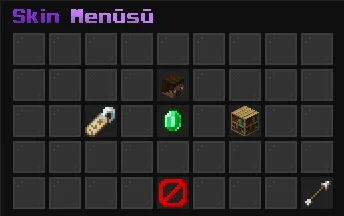
SkinChanger (Plugin) ist für Server mit Paper / Spigot gedacht und stammt von andrewist. Change your skin instantly with a customizable GUI, no relog needed. Supports premium skins, a skin gallery and persistent storage for Paper 1.21.1.
Unterstützt wird Minecraft 1.21. Auf Modrinth gibt es 2 Downloads. Damit liegt es auf Platz 131 der 134 hier gelisteten Kosmetik- und Anzeige-Plugins. Das letzte Update erschien am 07.11.2026.
Die neueste ist 1.0.0, erschienen am 07.11.2026. Sie ist für Minecraft 1.21 – 1.21.11 gemacht. Sie läuft auf Paper. Der Download ist 53 KB groß.
| Version | Veröffentlicht | Minecraft | Typ |
|---|---|---|---|
1.0.0 | 07.11.2026 | 1.21 – 1.21.11 | Release |
Die Befehle, die auf der Modrinth-Seite von SkinChanger stehen:
/skinchanger/skin/skinsDort genannte Berechtigungen, zu vergeben mit einem Plugin wie LuckPerms:
skinchanger.useskinchanger.adminskinchanger.bypass.cooldownA modern, GUI-based skin changer for Paper 1.21.1. Players can change their skin to any premium player's skin with a clean menu or a single command, with no relog required.
Command · Description · Permission
/skinchanger · Open the skin menu · skinchanger.use
/skinchanger · Apply a premium player's skin · skinchanger.use
/skinchanger reset · Restore your original skin · skinchanger.use
/skinchanger reload · Reload the configuration · skinchanger.admin
Aliases: /skin, /skins
Extra permission: skinchanger.bypass.cooldown skips the skin change cooldown.
No ProtocolLib or other plugin dependencies are needed.
Made by Andrewist.
Geschrieben von andrewist. Mit Bildern auf Modrinth lesen.
Stelle sicher, dass dein Server Paper und Spigot auf Minecraft 1.21 nutzt.
Lade die .jar-Datei von Modrinth herunter und lege sie in den plugins-Ordner deines Servers.
Starte den Server neu. Vermeide /reload, viele Plugins kommen damit nicht gut klar.
Gib /plugins in der Konsole ein: SkinChanger sollte grün aufgelistet sein. Die Konfigurationsdateien werden beim ersten Start im plugins-Ordner angelegt.
Ausführliche Anleitung: So installierst du Plugins auf einem Minecraft-Server
| Ressource | Downloads | Versionen | Letztes Update | Preis |
|---|---|---|---|---|
| SkinChangerdie du angesehen hast | 2 | 1.21 | vor 5 Tagen | Kostenlos |
| BetterGeyserSkinsFootpath6094 | 45 | 1.21 – 26.x | 12. Okt. 2026 | Kostenlos |
 NeuroNPCqventymr | 19 | 1.21 | 29. Aug. 2026 | Kostenlos |
 Customizable Player Modelstom5454 | 3.2M | 1.8 – 26.x | vor 28 Tagen | Kostenlos |
Noch nicht. Die neueste unterstützte Version ist Minecraft 1.21.
Ja. SkinChanger kannst du kostenlos bei Modrinth herunterladen.
SkinChanger läuft auf Servern mit Paper und Spigot.
Ja. Das letzte Update kam innerhalb des letzten Tages.
Am ähnlichsten sind BetterGeyserSkins, NeuroNPC und Customizable Player Models. Alle Alternativen vergleichen
BetterGeyserSkinsPlugins · 1.21 – 26.xA simple addon plugin for GeyserMC to improve Bedrock Skin conversion. Supports 3D skins via Customizable Player Models
NeuroNPCPlugins · 1.21AI-powered interactive NPCs for Paper servers with customizable personalities, persistent storage, async LLM conversations, skins, localization, permissions…
Customizable Player ModelsPlugins · 1.8 – 26.xCustomize your minecraft avatar!
 CrystalPracticeBotPlugins · 1.21 – 26.x
A passive crystal PvP practice bot with a settings menu, customizable armor, shields, totems, simulated ping, names, and skins. Supports Paper 1.21.11 and 26.2.
 EmotecraftPlugins · 1.16 – 26.x
Create your own emotes in Minecraft.
 SkinsRestorerPlugins · 1.8 – 26.x
Ability to restore/change skins on servers! (Offline and Online Mode)
Logg dich ein, um eine Bewertung zu schreiben.