
 BetterGeyserSkinsPlugins · 1.21 – 26.x
A simple addon plugin for GeyserMC to improve Bedrock Skin conversion. Supports 3D skins via Customizable Player Models
Gratis45 descargas
Change your skin instantly with a customizable GUI, no relog needed. Supports premium skins, a skin gallery and persistent storage for Paper 1.21.1.
Descarga directa desde Modrinth · 2 descargas
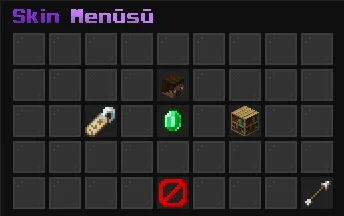
andrewist creó SkinChanger (plugin) para servidores Paper / Spigot. Change your skin instantly with a customizable GUI, no relog needed. Supports premium skins, a skin gallery and persistent storage for Paper 1.21.1.
Es compatible con Minecraft 1.21. Se ha descargado 2 veces en Modrinth. Eso lo sitúa en el puesto 131 de los 134 plugins cosméticos y de visualización de esta lista. La última actualización salió el 07/11/2026.
La más reciente es 1.0.0, publicada el 07/11/2026. Está hecha para Minecraft 1.21 – 1.21.11. Funciona en Paper. La descarga ocupa 53 KB.
| Versión | Publicado | Minecraft | Tipo |
|---|---|---|---|
1.0.0 | 07/11/2026 | 1.21 – 1.21.11 | Estable |
Los comandos que aparecen en la página de SkinChanger en Modrinth:
/skinchanger/skin/skinsPermisos que se nombran allí, para dar con un plugin como LuckPerms:
skinchanger.useskinchanger.adminskinchanger.bypass.cooldownA modern, GUI-based skin changer for Paper 1.21.1. Players can change their skin to any premium player's skin with a clean menu or a single command, with no relog required.
Command · Description · Permission
/skinchanger · Open the skin menu · skinchanger.use
/skinchanger · Apply a premium player's skin · skinchanger.use
/skinchanger reset · Restore your original skin · skinchanger.use
/skinchanger reload · Reload the configuration · skinchanger.admin
Aliases: /skin, /skins
Extra permission: skinchanger.bypass.cooldown skips the skin change cooldown.
No ProtocolLib or other plugin dependencies are needed.
Made by Andrewist.
Escrita por andrewist. Léela con imágenes en Modrinth.
Asegúrate de que tu servidor use Paper y Spigot en Minecraft 1.21.
Descarga el archivo .jar desde Modrinth y ponlo en la carpeta plugins de tu servidor.
Reinicia el servidor. Evita /reload, muchos plugins no lo llevan bien.
Escribe /plugins en la consola: SkinChanger debería aparecer en verde. Sus archivos de configuración se crean en la carpeta plugins al primer arranque.
Guía completa: Cómo instalar plugins en un servidor de Minecraft
| Recurso | Descargas | Versiones | Última actualización | Precio |
|---|---|---|---|---|
| SkinChangerel que estabas viendo | 2 | 1.21 | hace 5 días | Gratis |
| BetterGeyserSkinsFootpath6094 | 45 | 1.21 – 26.x | 12 oct 2026 | Gratis |
 NeuroNPCqventymr | 19 | 1.21 | 29 ago 2026 | Gratis |
 Customizable Player Modelstom5454 | 3.2M | 1.8 – 26.x | hace 28 días | Gratis |
Todavía no. La versión más reciente que admite es Minecraft 1.21.
Sí. SkinChanger se puede descargar gratis desde Modrinth.
SkinChanger funciona en servidores Paper y Spigot.
Sí. La última actualización salió en el último día.
Los más parecidos son BetterGeyserSkins, NeuroNPC y Customizable Player Models. Comparar todas las alternativas
BetterGeyserSkinsPlugins · 1.21 – 26.xA simple addon plugin for GeyserMC to improve Bedrock Skin conversion. Supports 3D skins via Customizable Player Models
NeuroNPCPlugins · 1.21AI-powered interactive NPCs for Paper servers with customizable personalities, persistent storage, async LLM conversations, skins, localization, permissions…
Customizable Player ModelsPlugins · 1.8 – 26.xCustomize your minecraft avatar!
 CrystalPracticeBotPlugins · 1.21 – 26.x
A passive crystal PvP practice bot with a settings menu, customizable armor, shields, totems, simulated ping, names, and skins. Supports Paper 1.21.11 and 26.2.
 EmotecraftPlugins · 1.16 – 26.x
Create your own emotes in Minecraft.
 SkinsRestorerPlugins · 1.8 – 26.x
Ability to restore/change skins on servers! (Offline and Online Mode)
Inicia sesión para dejar una reseña.