
 RelishEconomyPlugins · 1.19 – 26.x
[MASSIVE UPDATE] 🪙 Multi-Currency Economy • Shop • Sell GUI • Physical Currency • ATM • Natural Source Currency • Personal Vault ⭐
Kostenlos1,497 Downloads

A default selling gui for each economy servers in the world
Direkter Download von Modrinth · 1 Downloads
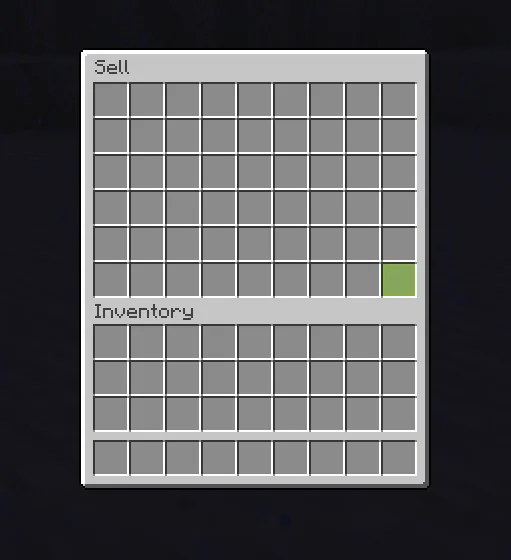
Sell-GUI (Plugin) ist für Server mit Paper / Spigot gedacht und stammt von HitShift. A default selling gui for each economy servers in the world.
Unterstützt wird Minecraft 26.x. Auf Modrinth gibt es 1 Downloads. Damit liegt es auf Platz 156 der 164 hier gelisteten Wirtschafts- und Shop-Plugins. Das letzte Update erschien am 08.11.2026.
Die neueste ist 1.0, erschienen am 08.11.2026. Sie ist für Minecraft 26.2, 26.3 gemacht. Sie läuft auf Paper und Purpur. Der Download ist 14 KB groß.
| Version | Veröffentlicht | Minecraft | Typ |
|---|---|---|---|
1.0 | 08.11.2026 | 26.2, 26.3 | Release |
Die Befehle, die auf der Modrinth-Seite von Sell-GUI stehen:
/sell/setprice/price/sellguiA simple, lightweight sell GUI for Paper servers, with in-game price setting and Vault support.
SellGUI gives your players a clean, easy way to sell items. Run /sell, drop items into the menu, and get paid instantly, either by clicking the green Sell button or just by closing the menu. Admins can set prices in-game with a single command, with no need to restart or hand-edit files.
Features:
Optionally alert the player,
Optionally broadcast to the whole server,
Optionally delete the item or return it to the player
Commands
Commands:
Configurations:
Requirements:
Coming soon:
Geschrieben von HitShift. Mit Bildern auf Modrinth lesen.
Stelle sicher, dass dein Server Paper und Spigot auf Minecraft 26.x nutzt.
Installiere zuerst, was es braucht: Vault 2.0 economy plugins.
Lade die .jar-Datei von Modrinth herunter und lege sie in den plugins-Ordner deines Servers.
Starte den Server neu. Vermeide /reload, viele Plugins kommen damit nicht gut klar.
Gib /plugins in der Konsole ein: Sell-GUI sollte grün aufgelistet sein. Die Konfigurationsdateien werden beim ersten Start im plugins-Ordner angelegt.
Ausführliche Anleitung: So installierst du Plugins auf einem Minecraft-Server
| Ressource | Downloads | Versionen | Letztes Update | Preis |
|---|---|---|---|---|
| Sell-GUIdie du angesehen hast | 1 | 26.x | vor 5 Tagen | Kostenlos |
| RelishEconomyiM5LB1 | 1,497 | 1.19 – 26.x | vor 27 Tagen | Kostenlos |
 King AdmincoreKingNeverDie_ | 15 | 1.21 | 29. Sept. 2026 | Kostenlos |
 AfkShopNgotra | 13 | 26.x | vor 8 Tagen | Kostenlos |
Ja. Sell-GUI unterstützt Minecraft 26.x. Alle unterstützten Versionen: 26.x.
Ja. Sell-GUI kannst du kostenlos bei Modrinth herunterladen.
Sell-GUI läuft auf Servern mit Paper und Spigot.
Ja: Vault 2.0 economy plugins. Installiere es vor Sell-GUI.
Ja. Das letzte Update kam innerhalb des letzten Tages.
Am ähnlichsten sind RelishEconomy, King Admincore und AfkShop. Alle Alternativen vergleichen
RelishEconomyPlugins · 1.19 – 26.x[MASSIVE UPDATE] 🪙 Multi-Currency Economy • Shop • Sell GUI • Physical Currency • ATM • Natural Source Currency • Personal Vault ⭐
King AdmincorePlugins · 1.21King AdminCore is an all-in-one Minecraft staff management plugin with a clean GUI for player management, investigations, punishments, economy tracking…
AfkShopPlugins · 26.xA secure, exploit-proof GUI coin shop for Paper. Build it entirely in game and sell vanilla or custom items (ItemsAdder, Nexo, Amethyst Tools). Fail-closed…
 AutoGivePlugins · 1.21 – 26.x
AutoGive is a Paper plugin that lets you manage player rewards using a GUI. You can add multiple commands for each player and queue rewards for offline…
 Shopkeepers AddonPlugins · 1.16 – 26.x
Navigation & Economy » No more searching the shopkeepers marketplace to buy your favorite items.
 ExcellentEconomyPlugins · 1.19 – 26.x
A modern and lightweight economy system with unlimited virtual currencies.
Logg dich ein, um eine Bewertung zu schreiben.