
 RelishEconomyPlugins · 1.19 – 26.x
[MASSIVE UPDATE] 🪙 Multi-Currency Economy • Shop • Sell GUI • Physical Currency • ATM • Natural Source Currency • Personal Vault ⭐
Gratis1,497 descargas

A default selling gui for each economy servers in the world
Descarga directa desde Modrinth · 1 descargas
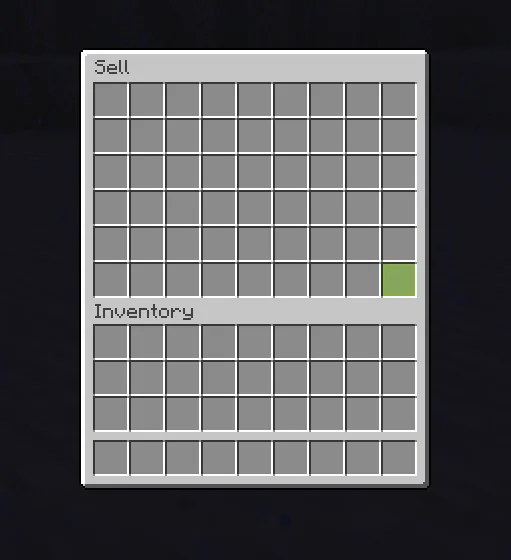
HitShift creó Sell-GUI (plugin) para servidores Paper / Spigot. A default selling gui for each economy servers in the world.
Es compatible con Minecraft 26.x. Se ha descargado 1 veces en Modrinth. Eso lo sitúa en el puesto 156 de los 164 plugins de economía y tiendas de esta lista. La última actualización salió el 08/11/2026.
La más reciente es 1.0, publicada el 08/11/2026. Está hecha para Minecraft 26.2, 26.3. Funciona en Paper y Purpur. La descarga ocupa 14 KB.
| Versión | Publicado | Minecraft | Tipo |
|---|---|---|---|
1.0 | 08/11/2026 | 26.2, 26.3 | Estable |
Los comandos que aparecen en la página de Sell-GUI en Modrinth:
/sell/setprice/price/sellguiA simple, lightweight sell GUI for Paper servers, with in-game price setting and Vault support.
SellGUI gives your players a clean, easy way to sell items. Run /sell, drop items into the menu, and get paid instantly, either by clicking the green Sell button or just by closing the menu. Admins can set prices in-game with a single command, with no need to restart or hand-edit files.
Features:
Optionally alert the player,
Optionally broadcast to the whole server,
Optionally delete the item or return it to the player
Commands
Commands:
Configurations:
Requirements:
Coming soon:
Escrita por HitShift. Léela con imágenes en Modrinth.
Asegúrate de que tu servidor use Paper y Spigot en Minecraft 26.x.
Instala primero lo que necesita: Vault 2.0 economy plugins.
Descarga el archivo .jar desde Modrinth y ponlo en la carpeta plugins de tu servidor.
Reinicia el servidor. Evita /reload, muchos plugins no lo llevan bien.
Escribe /plugins en la consola: Sell-GUI debería aparecer en verde. Sus archivos de configuración se crean en la carpeta plugins al primer arranque.
Guía completa: Cómo instalar plugins en un servidor de Minecraft
| Recurso | Descargas | Versiones | Última actualización | Precio |
|---|---|---|---|---|
| Sell-GUIel que estabas viendo | 1 | 26.x | hace 5 días | Gratis |
| RelishEconomyiM5LB1 | 1,497 | 1.19 – 26.x | hace 27 días | Gratis |
 King AdmincoreKingNeverDie_ | 15 | 1.21 | 29 sept 2026 | Gratis |
 AfkShopNgotra | 13 | 26.x | hace 8 días | Gratis |
Sí. Sell-GUI es compatible con Minecraft 26.x. Todas las versiones compatibles: 26.x.
Sí. Sell-GUI se puede descargar gratis desde Modrinth.
Sell-GUI funciona en servidores Paper y Spigot.
Sí: Vault 2.0 economy plugins. Instálalo antes de Sell-GUI.
Sí. La última actualización salió en el último día.
Los más parecidos son RelishEconomy, King Admincore y AfkShop. Comparar todas las alternativas
RelishEconomyPlugins · 1.19 – 26.x[MASSIVE UPDATE] 🪙 Multi-Currency Economy • Shop • Sell GUI • Physical Currency • ATM • Natural Source Currency • Personal Vault ⭐
King AdmincorePlugins · 1.21King AdminCore is an all-in-one Minecraft staff management plugin with a clean GUI for player management, investigations, punishments, economy tracking…
AfkShopPlugins · 26.xA secure, exploit-proof GUI coin shop for Paper. Build it entirely in game and sell vanilla or custom items (ItemsAdder, Nexo, Amethyst Tools). Fail-closed…
 AutoGivePlugins · 1.21 – 26.x
AutoGive is a Paper plugin that lets you manage player rewards using a GUI. You can add multiple commands for each player and queue rewards for offline…
 Shopkeepers AddonPlugins · 1.16 – 26.x
Navigation & Economy » No more searching the shopkeepers marketplace to buy your favorite items.
 ExcellentEconomyPlugins · 1.19 – 26.x
A modern and lightweight economy system with unlimited virtual currencies.
Inicia sesión para dejar una reseña.