
 Simple RanksPlugins · 1.20 – 26.x
Simple rank plugin allowing for custom-colored, ordered ranks in tab list, name tags, chat, and Placeholder API placeholders!
Kostenlos31,962 Downloads
Paper plugin showing player country flags in tab list and chat.
Direkter Download von Modrinth · 4 Downloads
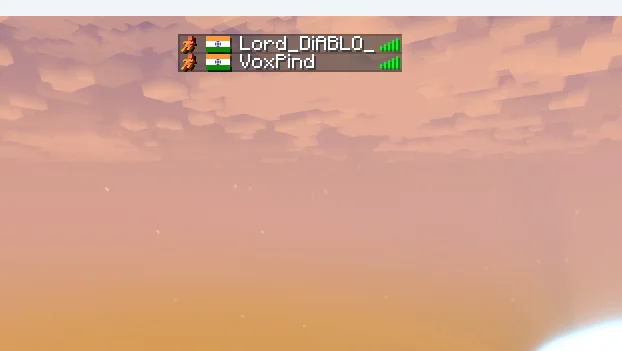
GeoFlags (Plugin) ist für Server mit Paper / Spigot gedacht und stammt von Lord_Diablo. Paper plugin showing player country flags in tab list and chat.
Unterstützt wird Minecraft 1.21 – 26.x. Auf Modrinth gibt es 4 Downloads. Damit liegt es auf Platz 130 der 148 hier gelisteten Kosmetik- und Anzeige-Plugins. Das letzte Update erschien am 05.11.2026.
Die neueste ist 1.0.0, erschienen am 04.11.2026. Sie ist für Minecraft 1.21 – 26.2 gemacht. Sie läuft auf Bukkit, Paper und Spigot. Der Download ist 21 KB groß.
| Version | Veröffentlicht | Minecraft | Typ |
|---|---|---|---|
1.0.0 | 04.11.2026 | 1.21 – 26.2 | Release |
Die Befehle, die auf der Modrinth-Seite von GeoFlags stehen:
/geoflag/flagtopDort genannte Berechtigungen, zu vergeben mit einem Plugin wie LuckPerms:
geoflags.admingeoflags.topgeoflags-hideip-log4j2.xmlCreated by Lord Diablo.
Paper plugin (api-version 26.1). Finds each player's country from their IP and shows the country flag.
The plugin can only use the address the server sees. If your server is behind a tunnel, shared-IP or proxy host, the server sees the proxy's address, so the flag is wrong or missing. Fix it on the server side:
Add the resource pack settings to your server.properties file:
resource-pack= download.mc-packs.net/pack/fc2b64467e70f8c5e970…
resource-pack-sha1=fc2b64467e70f8c5e9705782aab65bbefe730c0f
resource-pack-id=45f92f96-6937-43a8-af80-ccc3edbf5599
resource-pack-prompt={"text":"Our server uses a custom resource pack!", "color":"gold"}
require-resource-pack=true
Geschrieben von Lord_Diablo. Mit Bildern auf Modrinth lesen.
Stelle sicher, dass dein Server Paper und Spigot auf Minecraft 1.21 – 26.x nutzt.
Lade die .jar-Datei von Modrinth herunter und lege sie in den plugins-Ordner deines Servers.
Starte den Server neu. Vermeide /reload, viele Plugins kommen damit nicht gut klar.
Gib /plugins in der Konsole ein: GeoFlags sollte grün aufgelistet sein. Die Konfigurationsdateien werden beim ersten Start im plugins-Ordner angelegt.
Ausführliche Anleitung: So installierst du Plugins auf einem Minecraft-Server
| Ressource | Downloads | Versionen | Letztes Update | Preis |
|---|---|---|---|---|
| GeoFlagsdie du angesehen hast | 4 | 1.21 – 26.x | vor 9 Tagen | Kostenlos |
| Simple RanksTomMustBe12 | 32K | 1.20 – 26.x | 7. Juni 2026 | Kostenlos |
 FakePlayerPluginJanky-Development | 3,035 | 1.21 – 26.x | vor 4 Tagen | Kostenlos |
 ChromaTagJelly-Pudding | 994 | 1.21 – 26.x | 19. Sept. 2026 | Kostenlos |
Ja. GeoFlags unterstützt Minecraft 26.x. Alle unterstützten Versionen: 26.x, 1.21.
Ja. GeoFlags kannst du kostenlos bei Modrinth herunterladen.
GeoFlags läuft auf Servern mit Paper und Spigot.
Ja. Das letzte Update kam innerhalb des letzten Tages.
Am ähnlichsten sind Simple Ranks, FakePlayerPlugin und ChromaTag. Alle Alternativen vergleichen
Simple RanksPlugins · 1.20 – 26.xSimple rank plugin allowing for custom-colored, ordered ranks in tab list, name tags, chat, and Placeholder API placeholders!
FakePlayerPluginPlugins · 1.21 – 26.xSpawn realistic fake players on Paper/Purpur servers with skins, chat, tab-list, and full hot-reload
ChromaTagPlugins · 1.21 – 26.xLets you customise player name colors across chat, tab list, and in-game nametags (i.e. the names above players' heads).
 LuckPrefixPlugins · 1.8 – 1.21
The luckperms addon for tab- and chat-prefixes on the market.
 SlimeRanksPlugins · 1.21
Design your own Minecraft ranks, shown in tab, chat & above players' heads. Total control, total flex.
 Animated Scoreboard and Tablist, NameTag, ChatPlugins · 1.8 – 1.19
★ Scoreboard, Tablist, NameTag, Chat, 1200+ Placeholders, WorldSupport...! ★
Logg dich ein, um eine Bewertung zu schreiben.