
 Simple RanksPlugins · 1.20 – 26.x
Simple rank plugin allowing for custom-colored, ordered ranks in tab list, name tags, chat, and Placeholder API placeholders!
Gratuit31,962 téléchargements
Paper plugin showing player country flags in tab list and chat.
Téléchargement direct depuis Modrinth · 4 téléchargements
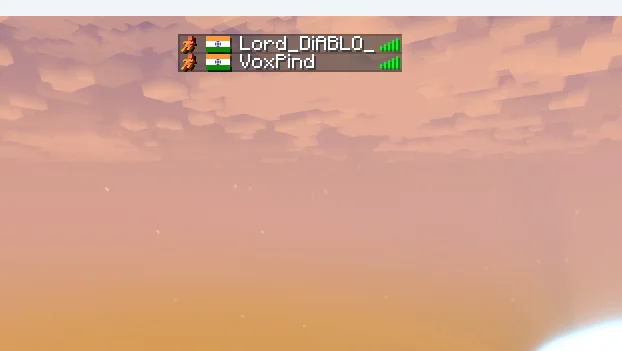
Lord_Diablo a créé GeoFlags (plugin) pour les serveurs Paper / Spigot. Paper plugin showing player country flags in tab list and chat.
Versions prises en charge : Minecraft 1.21 – 26.x. On compte 4 téléchargements sur Modrinth. Il arrive ainsi en position n° 130 sur les 148 plugins cosmétiques et d'affichage listés ici. La dernière mise à jour date du 05/11/2026.
La plus récente est 1.0.0, sortie le 04/11/2026. Elle est faite pour Minecraft 1.21 – 26.2. Elle fonctionne sur Bukkit, Paper et Spigot. Le téléchargement fait 21 KB.
| Version | Publié | Minecraft | Type |
|---|---|---|---|
1.0.0 | 04/11/2026 | 1.21 – 26.2 | Stable |
Les commandes citées sur la page Modrinth de GeoFlags :
/geoflag/flagtopPermissions citées là-bas, à donner avec un plugin comme LuckPerms :
geoflags.admingeoflags.topgeoflags-hideip-log4j2.xmlCreated by Lord Diablo.
Paper plugin (api-version 26.1). Finds each player's country from their IP and shows the country flag.
The plugin can only use the address the server sees. If your server is behind a tunnel, shared-IP or proxy host, the server sees the proxy's address, so the flag is wrong or missing. Fix it on the server side:
Add the resource pack settings to your server.properties file:
resource-pack= download.mc-packs.net/pack/fc2b64467e70f8c5e970…
resource-pack-sha1=fc2b64467e70f8c5e9705782aab65bbefe730c0f
resource-pack-id=45f92f96-6937-43a8-af80-ccc3edbf5599
resource-pack-prompt={"text":"Our server uses a custom resource pack!", "color":"gold"}
require-resource-pack=true
Écrite par Lord_Diablo. À lire avec les images sur Modrinth.
Vérifie que ton serveur tourne sous Paper et Spigot en Minecraft 1.21 – 26.x.
Télécharge le fichier .jar depuis Modrinth et place-le dans le dossier plugins de ton serveur.
Redémarre le serveur. Évite /reload, beaucoup de plugins le supportent mal.
Tape /plugins dans la console : GeoFlags doit apparaître en vert. Ses fichiers de config sont créés dans le dossier plugins au premier démarrage.
Guide complet: Comment installer des plugins sur un serveur Minecraft
| Ressource | Téléchargements | Versions | Mise à jour | Prix |
|---|---|---|---|---|
| GeoFlagscelle que tu regardais | 4 | 1.21 – 26.x | il y a 9 jours | Gratuit |
| Simple RanksTomMustBe12 | 32K | 1.20 – 26.x | 7 juin 2026 | Gratuit |
 FakePlayerPluginJanky-Development | 3,035 | 1.21 – 26.x | il y a 4 jours | Gratuit |
 ChromaTagJelly-Pudding | 994 | 1.21 – 26.x | 19 sept. 2026 | Gratuit |
Oui. GeoFlags prend en charge Minecraft 26.x. Toutes les versions prises en charge : 26.x, 1.21.
Oui. GeoFlags se télécharge gratuitement sur Modrinth.
GeoFlags fonctionne sur les serveurs Paper et Spigot.
Oui. La dernière mise à jour date des dernières 24 heures.
Les plus proches sont Simple Ranks, FakePlayerPlugin et ChromaTag. Comparer toutes les alternatives
Simple RanksPlugins · 1.20 – 26.xSimple rank plugin allowing for custom-colored, ordered ranks in tab list, name tags, chat, and Placeholder API placeholders!
FakePlayerPluginPlugins · 1.21 – 26.xSpawn realistic fake players on Paper/Purpur servers with skins, chat, tab-list, and full hot-reload
ChromaTagPlugins · 1.21 – 26.xLets you customise player name colors across chat, tab list, and in-game nametags (i.e. the names above players' heads).
 LuckPrefixPlugins · 1.8 – 1.21
The luckperms addon for tab- and chat-prefixes on the market.
 SlimeRanksPlugins · 1.21
Design your own Minecraft ranks, shown in tab, chat & above players' heads. Total control, total flex.
 Animated Scoreboard and Tablist, NameTag, ChatPlugins · 1.8 – 1.19
★ Scoreboard, Tablist, NameTag, Chat, 1200+ Placeholders, WorldSupport...! ★
Connecte-toi pour laisser un avis.