
 Essential ModMods · 1.8 – 26.x
Enhance your Minecraft with one simple mod. Host worlds for free, chat with friends, and so much more!
Gratis48,417,888 descargas

Making modded servers easier to find by finding them in game!
Making modded servers easier to find by finding them in game!
Server Browser (recurso) es obra de TheThonk. Es compatible con Minecraft 1.18 – 1.21. Se ha descargado 3,393,096 veces en Modrinth. La última actualización salió el 04/04/2025.
Server Browser ha publicado 20 versiones en Modrinth desde el 18/03/2023. Ninguna salió en el último año. La más reciente es 1.4.0, publicada el 04/04/2025. Está hecha para Minecraft 1.21.2. Funciona en NeoForge. La descarga ocupa 59 KB.
| Versión | Publicado | Minecraft | Tipo |
|---|---|---|---|
1.4.0 | 04/04/2025 | 1.21.2 | Estable |
1.4.0 | 04/04/2025 | 1.21.2 | Estable |
1.4.0 | 03/04/2025 | 1.21.1 | Estable |
1.4.0 | 03/04/2025 | 1.20 – 1.21.5 | Estable |
1.4.0 | 03/04/2025 | 1.20 – 1.21.5 | Estable |
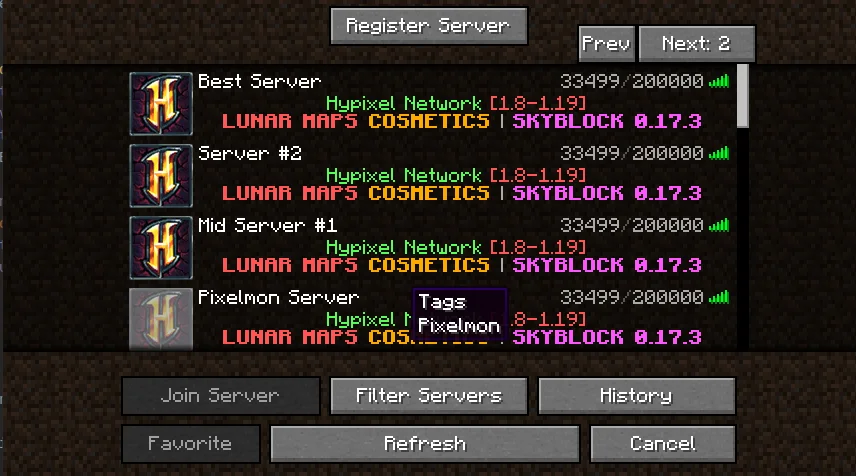
Are you looking for a modded server to play on for the pack you just downloaded? Server Browser makes it easy to find a server to play on!
A mod designed for modpack authors to make it easier for their users to find servers to play on!
If you are a server owner, you can register it here
If you'd like to make a tag request for a modpack (recommended only if you have community servers), do it here
This menu can be gotten to by going to the multiplayer screen, and in the top left clicking 'Server Browser'
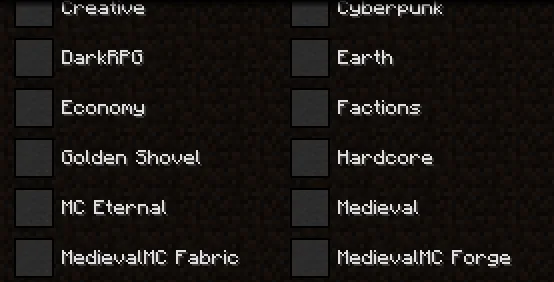
if you wanted to filter a server by various types, you can do that!
ServerBrowser includes features for Modpack authors to make it easier to manage as well! Blacklisted servers will prevent what was entered into the array from appearing in the ServerBrowser, it will not remove anything from a players 'favorite' servers (the regular multiplayer screen)
The config allows for a pre determined modpack filter that will remove any other modpacks from the tag list. resulting in something like this:
Finally, if you run official servers for your modpack, you can also add them to appear at the top of the players 'favorites' list.
Escrita por TheThonk. Léela con imágenes en Modrinth.
Este mod funciona solo en tu propio juego. Los servidores no lo necesitan, así que puedes usarlo en cualquier servidor.
Instala Fabric, Forge y NeoForge para Minecraft 1.18 – 1.21.
Añade los mods que necesita: EpheroLib.
Descarga el archivo .jar desde Modrinth y ponlo en la carpeta mods de tu directorio .minecraft.
Inicia Minecraft con el perfil de Fabric.
Con el CraftRank Launcher te saltas estos pasos: abre Mods, busca Server Browser y pulsa Instalar.
| Recurso | Descargas | Versiones | Última actualización | Precio |
|---|---|---|---|---|
| Server Browserel que estabas viendo | 3.4M | 1.18 – 1.21 | 4 abr 2025 | Gratis |
| Essential ModSparkUniverse | 48.4M | 1.8 – 26.x | hace 7 días | Gratis |
 ResourcifyDeDiamondPro | 13.8M | 1.8 – 26.x | hace 17 días | Gratis |
| FESVoiceSplitterFiLKoNd | 17 | 1.21 – 26.x | hace 2 días | Gratis |
Todavía no. La versión más reciente que admite es Minecraft 1.21.
Sí. Server Browser se puede descargar gratis desde Modrinth.
Del lado del cliente. Server Browser va en tu propia carpeta mods y funciona en cualquier servidor, incluso en servidores sin mods.
Sí: EpheroLib. Instálalo antes de Server Browser.
Sí. La última actualización salió en el último día.
Los más parecidos son Essential Mod, Resourcify y FESVoiceSplitter. Comparar todas las alternativas
Essential ModMods · 1.8 – 26.xEnhance your Minecraft with one simple mod. Host worlds for free, chat with friends, and so much more!
ResourcifyMods · 1.8 – 26.xIn-game resource pack, data pack and shader browser and updater.
An addon for SimpleVoiceChat that allows you to output voice chat to a separate audio track in OBS.
 Slate CraftingMods · 1.20 – 1.21
Fork of EMI with a modern restyle and neat features
 fishstiz' Game RulesMods · 26.x
Changes the game rules screen to make it a little easier to navigate.
 No Chat RestrictionsMods · 1.16 – 26.x
Restores access to game chat for all accounts
Inicia sesión para dejar una reseña.