
 Essential ModMods · 1.8 – 26.x
Enhance your Minecraft with one simple mod. Host worlds for free, chat with friends, and so much more!
Free48,417,888 downloads

Making modded servers easier to find by finding them in game!
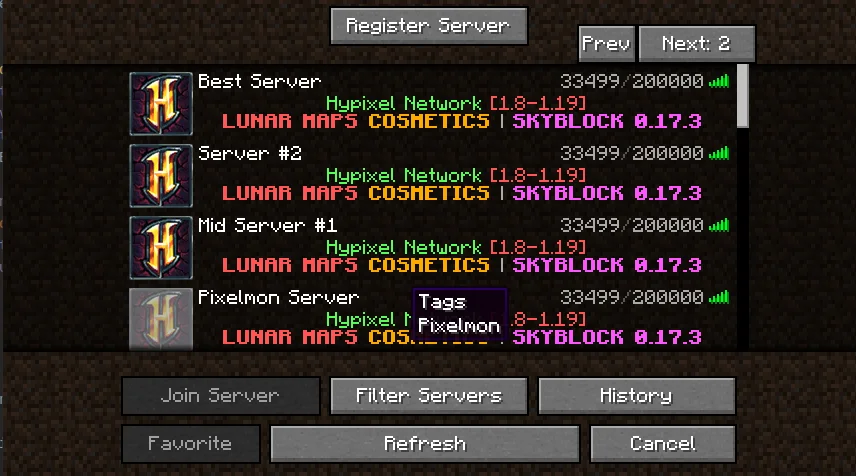
Making modded servers easier to find by finding them in game!
Server Browser is a resource made by TheThonk. It supports Minecraft 1.18 – 1.21. It has been downloaded 3,393,096 times on Modrinth. The last update came out on Apr 4, 2025.
Server Browser has had 20 releases on Modrinth since Mar 18, 2023. None of them came out in the past year. The newest is 1.4.0, released on Apr 4, 2025. It is made for Minecraft 1.21.2. It runs on NeoForge. The download is 59 KB.
| Version | Released | Minecraft | Type |
|---|---|---|---|
1.4.0 | Apr 4, 2025 | 1.21.2 | Release |
1.4.0 | Apr 4, 2025 | 1.21.2 | Release |
1.4.0 | Apr 3, 2025 | 1.21.1 | Release |
1.4.0 | Apr 3, 2025 | 1.20 – 1.21.5 | Release |
1.4.0 | Apr 3, 2025 | 1.20 – 1.21.5 | Release |
Are you looking for a modded server to play on for the pack you just downloaded? Server Browser makes it easy to find a server to play on!
A mod designed for modpack authors to make it easier for their users to find servers to play on!
If you are a server owner, you can register it here
If you'd like to make a tag request for a modpack (recommended only if you have community servers), do it here
This menu can be gotten to by going to the multiplayer screen, and in the top left clicking 'Server Browser'
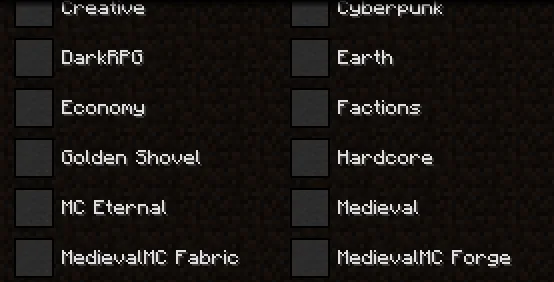
if you wanted to filter a server by various types, you can do that!
ServerBrowser includes features for Modpack authors to make it easier to manage as well! Blacklisted servers will prevent what was entered into the array from appearing in the ServerBrowser, it will not remove anything from a players 'favorite' servers (the regular multiplayer screen)
The config allows for a pre determined modpack filter that will remove any other modpacks from the tag list. resulting in something like this:
Finally, if you run official servers for your modpack, you can also add them to appear at the top of the players 'favorites' list.
Written by TheThonk. Read it with pictures on Modrinth.
This mod runs only on your own game. Servers do not need it, so you can use it on any server.
Install Fabric, Forge and NeoForge for Minecraft 1.18 – 1.21.
Add the mods it needs: EpheroLib.
Download the .jar file from Modrinth and put it in the mods folder of your .minecraft directory.
Start Minecraft with the Fabric profile.
With the CraftRank Launcher you can skip these steps: open Mods, search for Server Browser and click Install.
| Resource | Downloads | Versions | Last update | Price |
|---|---|---|---|---|
| Server Browserthe one you looked at | 3.4M | 1.18 – 1.21 | Apr 4, 2025 | Free |
| Essential ModSparkUniverse | 48.4M | 1.8 – 26.x | 7 days ago | Free |
 ResourcifyDeDiamondPro | 13.8M | 1.8 – 26.x | 17 days ago | Free |
| FESVoiceSplitterFiLKoNd | 17 | 1.21 – 26.x | 2 days ago | Free |
Not yet. The newest version it supports is Minecraft 1.21.
Yes. Server Browser is free to download from Modrinth.
Client-side. Server Browser goes in your own mods folder and works on any server, including servers without mods.
Yes: EpheroLib. Install it before Server Browser.
Yes. The last update came out in the past day.
The closest ones are Essential Mod, Resourcify and FESVoiceSplitter. Compare all alternatives
Essential ModMods · 1.8 – 26.xEnhance your Minecraft with one simple mod. Host worlds for free, chat with friends, and so much more!
ResourcifyMods · 1.8 – 26.xIn-game resource pack, data pack and shader browser and updater.
An addon for SimpleVoiceChat that allows you to output voice chat to a separate audio track in OBS.
 Slate CraftingMods · 1.20 – 1.21
Fork of EMI with a modern restyle and neat features
 fishstiz' Game RulesMods · 26.x
Changes the game rules screen to make it a little easier to navigate.
 No Chat RestrictionsMods · 1.16 – 26.x
Restores access to game chat for all accounts
Log in to leave a review.