
 Handy TablesMods · 26.x
Use your crafting table, stonecutter, loom, anvil and more straight from your inventory: middle-click the item and it opens, no need to place it.
Gratis26 descargas

Place torches from your inventory without switching away from your pickaxe.
Descarga directa desde Modrinth · 38 descargas
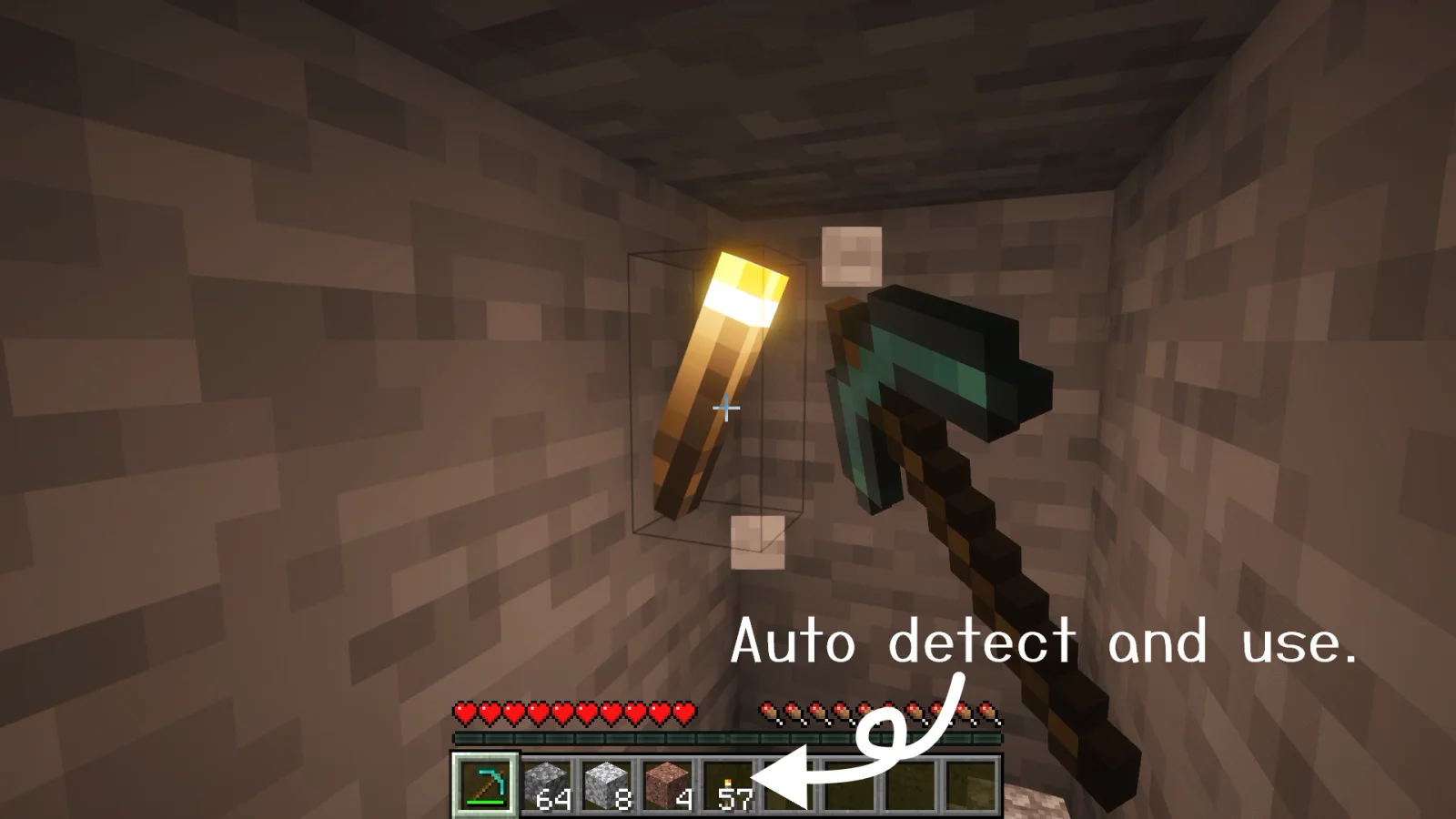
SwiftTorch (mod) es obra de nekodon. Place torches from your inventory without switching away from your pickaxe.
Es compatible con Minecraft 26.x. Se ha descargado 38 veces en Modrinth. La última actualización salió el 08/11/2026.
SwiftTorch ha publicado 5 versiones en Modrinth desde el 30/09/2026. 5 salieron en el último año. La más reciente es 26.3-1.0.1, publicada el 08/11/2026. Está hecha para Minecraft 26.3. Funciona en Fabric. La descarga ocupa 71 KB.
| Versión | Publicado | Minecraft | Tipo |
|---|---|---|---|
26.3-1.0.1 | 08/11/2026 | 26.3 | Estable |
26.2-1.0.1 | 08/11/2026 | 26.2 | Estable |
26.1.1-1.0.1 | 08/11/2026 | 26.1.1 | Estable |
26.1-1.0.1 | 08/11/2026 | 26.1 | Estable |
1.0.1 | 30/09/2026 | 26.1.2 | Estable |
SwiftTorch is a Fabric mod that lets you place torches from your inventory without switching away from your pickaxe.
For more details, see the README.
ツルハシから持ち替えずにインベントリ内の松明を設置できるFabric製MODです。
さらに詳細はREADMEを参照してください。
Escrita por nekodon. Léela con imágenes en Modrinth.
Este mod hace falta en el servidor y en cada jugador que entra.
Instala Fabric para Minecraft 26.x.
Añade los mods que necesita: API de Fabric.
Descarga el archivo .jar desde Modrinth y ponlo en la carpeta mods de tu directorio .minecraft.
Inicia Minecraft con el perfil de Fabric.
Más fácil: en Prism Launcher o la Modrinth App, busca SwiftTorch en los mods de tu instancia y haz clic en Install. Añade el loader y los mods que necesita por ti.
| Recurso | Descargas | Versiones | Última actualización | Precio |
|---|---|---|---|---|
| SwiftTorchel que estabas viendo | 38 | 26.x | hace 5 días | Gratis |
| Handy TablesEinstein | 26 | 26.x | hace 19 días | Gratis |
 Overflowing BarsFuzs | 10.6M | 1.18 – 26.x | 26 sept 2026 | Gratis |
 Item BordersGrend | 9.1M | 1.12 – 26.x | 22 sept 2026 | Gratis |
Sí. SwiftTorch es compatible con Minecraft 26.x. Todas las versiones compatibles: 26.x.
Sí. SwiftTorch se puede descargar gratis desde Modrinth.
Ambos. El servidor y cada jugador necesitan SwiftTorch instalado.
Sí: Fabric API. Instálalo antes de SwiftTorch.
Sí. La última actualización salió en el último día.
Los más parecidos son Handy Tables, Overflowing Bars y Item Borders. Comparar todas las alternativas
Handy TablesMods · 26.xUse your crafting table, stonecutter, loom, anvil and more straight from your inventory: middle-click the item and it opens, no need to place it.
Overflowing BarsMods · 1.18 – 26.xExpand health, armor and armor toughness bars beyond vanilla. Nice and compact without confusing colors.
Item BordersMods · 1.12 – 26.xAdd colored borders to inventory slots to make your rare items stand out!
 Enchanting InfuserMods · 1.19 – 26.x
An all-new enchanting table for choosing your enchantments at fair prices without the randomness.
 TrashSlotMods · 1.18 – 26.x
Adds a draggable trash slot to all inventory screens. Press T to toggle.
 Keybind FixMods · 1.18 – 1.20
Allows multiple functions to be mapped to the same keybind without (as much) conflict
Inicia sesión para dejar una reseña.