
 Handy TablesMods · 26.x
Use your crafting table, stonecutter, loom, anvil and more straight from your inventory: middle-click the item and it opens, no need to place it.
Free2 downloads

Place torches from your inventory without switching away from your pickaxe.
Direct download from Modrinth · 10 downloads
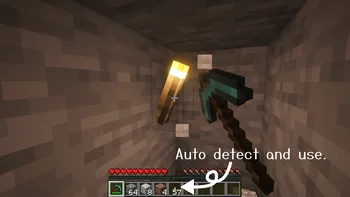
SwiftTorch is a mod made by nekodon. Place torches from your inventory without switching away from your pickaxe.
It supports Minecraft 26.x. It has been downloaded 10 times on Modrinth. The last update came out on Nov 8, 2026.
SwiftTorch has had 5 releases on Modrinth since Sep 30, 2026. 5 of them came out in the past year. The newest is 26.3-1.0.1, released on Nov 8, 2026. It is made for Minecraft 26.3. It runs on Fabric. The download is 71 KB.
| Version | Released | Minecraft | Type |
|---|---|---|---|
26.3-1.0.1 | Nov 8, 2026 | 26.3 | Release |
26.2-1.0.1 | Nov 8, 2026 | 26.2 | Release |
26.1.1-1.0.1 | Nov 8, 2026 | 26.1.1 | Release |
26.1-1.0.1 | Nov 8, 2026 | 26.1 | Release |
1.0.1 | Sep 30, 2026 | 26.1.2 | Release |
SwiftTorch is a Fabric mod that lets you place torches from your inventory without switching away from your pickaxe.
For more details, see the README.
ツルハシから持ち替えずにインベントリ内の松明を設置できるFabric製MODです。
さらに詳細はREADMEを参照してください。
Written by nekodon. Read it with pictures on Modrinth.
This mod is needed on both the server and every player who joins.
Install Fabric for Minecraft 26.x.
Add the mods it needs: Fabric API.
Download the .jar file from Modrinth and put it in the mods folder of your .minecraft directory.
Start Minecraft with the Fabric profile.
Easier: in Prism Launcher or the Modrinth App, search for SwiftTorch in your instance's mods and click Install. It adds the loader and the mods it needs for you.
Full guide: How to install Minecraft mods
| Resource | Downloads | Versions | Last update | Price |
|---|---|---|---|---|
| SwiftTorchthe one you looked at | 10 | 26.x | 3 days ago | Free |
| Handy TablesEinstein | 2 | 26.x | 18 days ago | Free |
 Overflowing BarsFuzs | 10.6M | 1.18 – 26.x | Sep 26, 2026 | Free |
 Item BordersGrend | 9.1M | 1.12 – 26.x | Sep 22, 2026 | Free |
Yes. SwiftTorch supports Minecraft 26.x. All supported versions: 26.x.
Yes. SwiftTorch is free to download from Modrinth.
Both. The server and every player need SwiftTorch installed.
Yes: Fabric API. Install it before SwiftTorch.
Yes. The last update came out in the past day.
The closest ones are Handy Tables, Overflowing Bars and Item Borders. Compare all alternatives
Handy TablesMods · 26.xUse your crafting table, stonecutter, loom, anvil and more straight from your inventory: middle-click the item and it opens, no need to place it.
Overflowing BarsMods · 1.18 – 26.xExpand health, armor and armor toughness bars beyond vanilla. Nice and compact without confusing colors.
Item BordersMods · 1.12 – 26.xAdd colored borders to inventory slots to make your rare items stand out!
 Enchanting InfuserMods · 1.19 – 26.x
An all-new enchanting table for choosing your enchantments at fair prices without the randomness.
 TrashSlotMods · 1.18 – 26.x
Adds a draggable trash slot to all inventory screens. Press T to toggle.
 Keybind FixMods · 1.18 – 1.20
Allows multiple functions to be mapped to the same keybind without (as much) conflict
Log in to leave a review.