NuevoCraftRank SitesWeb y tienda gratisHaz la tuya ›
AshlarSoftware de servidor gratis basado en Paper, con protección DDoS y contra backdoors Ver Ashlar ›Security RadarA free check of your server's login, anti-bot and proxy settings, only with your OK Mira cómo funciona ›ComunidadHaz preguntas, comparte construcciones y encuentra gente para jugar Únete al foro ›
Recursos / Plugins / LivingBlueprints

LivingBlueprints

3D Holographic Projections & Autonomous Drone Swarm Construction

PluginsGratis1.21 – 26.x
por IsadGame · listado desde Modrinth
Descargar ›

Descarga directa desde Modrinth · 2 descargas
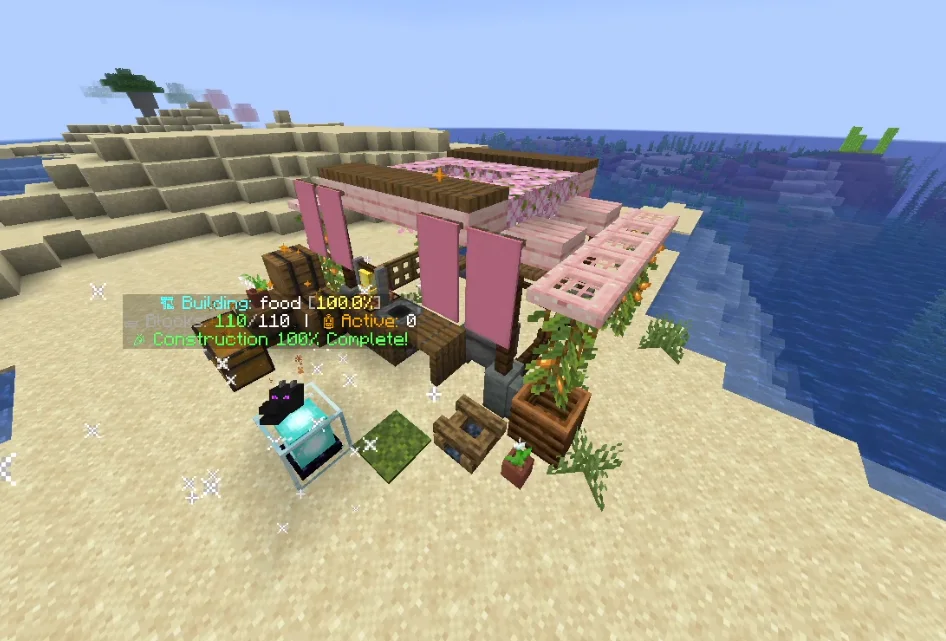
LivingBlueprints, captura 1

Qué hace

IsadGame creó LivingBlueprints (plugin) para servidores Paper / Spigot. 3D Holographic Projections & Autonomous Drone Swarm Construction.

Es compatible con Minecraft 1.21 – 26.x. Se ha descargado 2 veces en Modrinth. Eso lo sitúa en el puesto 63 de los 64 plugins de tecnología de esta lista. La última actualización salió el 30/10/2026.

Versiones compatibles

26.x1.21

Historial de versiones

La más reciente es 1.0.0, publicada el 30/10/2026. Está hecha para Minecraft 1.21 – 26.3. Funciona en Bukkit, Folia, Paper, Purpur y Spigot. La descarga ocupa 391 KB.

VersiónPublicadoMinecraftTipo
1.0.030/10/20261.21 – 26.3Estable

Comandos

Los comandos que aparecen en la página de LivingBlueprints en Modrinth:

/lb

Permisos

Permisos que se nombran allí, para dar con un plugin como LuckPerms:

livingblueprints.playerlivingblueprints.player.scanlivingblueprints.player.sharelivingblueprints.player.publishlivingblueprints.pro.schematicslivingblueprints.admin.givecorelivingblueprints.admin.reload
Descripción del autor en Modrinth

LivingBlueprints

Turn Any Schematic into a 3D Hologram Built by Autonomous Drone Swarms

SpigotMC Profile | Modrinth | BuiltByBit | Discord (IsadG#6424)


Ever wanted to bring your favorite WorldEdit schematics or internet builds into survival without breaking immersion, using admin commands, or spending weeks placing thousands of blocks by hand?

LivingBlueprints turns any building or structure into an interactive experience. Project complete 3D holograms directly into your world, link your storage chests, and watch a fleet of autonomous worker drones carry materials and construct your schematics block by block with realistic welding particles and sound effects!

The Ultimate Schematic & Build Automation Engine

  • Drag & Drop Schematics: Simply drop any standard .schem file into your schematics folder and it instantly appears in the in-game catalog ready to project.
  • Built-In World Scanner: Select any existing building in your world with the scanning tool and save it instantly as a ready-to-build blueprint.
  • Export to File: Finished designing something amazing? Export your blueprints directly into standard schematic files to share with friends or use across servers.
  • 100% Survival Friendly: Drones pull real items from your chests. If you run low on stone bricks or wood, the swarm pauses and tells you exactly what is missing.
  • Claim & Protection Safe: Fully integrates with WorldGuard, GriefPrevention, and Towny. Players cannot project or construct inside protected land or other players' claims.
  • Crash & Restart Proof: Server restarts, chunk unloads, or crashes? Your construction never resets. Progress and drone states resume automatically where they left off.

How It Works in 3 Easy Steps

  1. Place Your Architecture Core: Place down a beacon core to open the blueprint catalog and select any schematic.
  2. Align Your 3D Hologram: Use the intuitive calibration hotbar to move, raise/lower, rotate 90°, or mirror your structure until it fits your terrain.
  3. Link Chests & Watch the Magic: Shift + Right-Click your supply chests, click Start, and let your automated drone swarm handle all the heavy building!

Commands & Permissions

Click to expand Commands & Permissions

Player Commands

  • /lb help - Opens the command guide. (Permission: livingblueprints.player)
  • /lb materials - Shows the full checklist of blocks needed for your schematic. (Permission: livingblueprints.player)
  • /lb pause - Pauses or resumes your active construction swarm. (Permission: livingblueprints.player)
  • /lb about - Shows plugin version and author information. (Permission: livingblueprints.player)
  • /lb wand - Gives the 3D area selection wand to scan structures [Pro]. (Permission: livingblueprints.player.scan)
  • /lb scan [displayName] - Saves a selected structure as a blueprint [Pro]. (Permission: livingblueprints.player.scan)
  • /lb share - Shares a custom blueprint with another builder [Pro]. (Permission: livingblueprints.player.share)
  • /lb publish - Publishes your blueprint to the public server catalog [Pro]. (Permission: livingblueprints.player.publish)

Admin Commands

  • /lb import [name] - Imports any .schem file into the server catalog [Pro]. (Permission: livingblueprints.pro.schematics)
  • /lb export [file.schem] - Exports a blueprint into a standard .schem file [Pro]. (Permission: livingblueprints.pro.schematics)
  • /lb givecore [amount] - Grants an Architecture Core beacon (Tier 1-3). (Permission: livingblueprints.admin.givecore)
  • /lb reload - Reloads configs, language files, and blueprints instantly. (Permission: livingblueprints.admin.reload)

Free Community vs Pro Enterprise Comparison

Click to expand Edition Comparison

LivingBlueprints Community (Free Edition)

  • Full drone swarm building mechanics
  • 3D holographic projection & real-time calibration hotbar
  • Auto-tethers with supply chests, barrels, and shulkers
  • Automatic progress resume after server restarts or crashes
  • Full claim protection checks (WorldGuard, GriefPrevention, Towny)
  • 4-Language support (English, Spanish, Portuguese, French)
  • Max blueprint dimensions: 15x15x15 blocks
  • Max active cores per player: 1
  • Standard Copper Golem drone appearance

LivingBlueprints Enterprise (Pro Edition) [Coming Soon]

  • No Size Limits: Construct massive castles, megabases, and entire cities with unlimited dimensions
  • Direct Schematic Import & Export: Load or export .schem files on the fly (/lb import & /lb export)
  • In-Game 3D Scanner Wand: Scan any world structure into a blueprint with a few clicks
  • Multiple Simultaneous Cores: Run multiple construction sites at the same time
  • 13 Drone Skins: Customize your swarm with Mechanical Bees, Light Orbs, Fireballs, Skulls, and more
  • Multi-Block Trip Batching: Drones carry 8, 16, 32, or 64 blocks per trip for lightning-fast builds
  • Swarm Speed Multipliers: Adjust flight speed from 1x up to 5x hyper-drive
  • Autonomous Auto-Repair: Drones automatically repair griefed, mined, or exploded blocks
  • Smart Obstacle Clearing: Clears terrain obstacles and stores drops into linked chests with Silk Touch support
  • Partial Build Mode: Start constructing immediately with whatever materials you currently have

Configuration Preview

Click to expand Configuration Preview

language: "en_US"
use_client_language: false

limits:
max_cores_per_player: 1
max_blueprint_dimension: 15
max_drones_per_core: 5

holograms:
enable_glow: false

drones:
ticks_per_flight_segment: 18
welding_ticks: 8
arc_height_multiplier: 1.5

Escrita por IsadGame. Léela con imágenes en Modrinth.

Cómo instalar LivingBlueprints

  1. Asegúrate de que tu servidor use Paper y Spigot en Minecraft 1.21 – 26.x.

  2. Descarga el archivo .jar desde Modrinth y ponlo en la carpeta plugins de tu servidor.

  3. Reinicia el servidor. Evita /reload, muchos plugins no lo llevan bien.

  4. Escribe /plugins en la consola: LivingBlueprints debería aparecer en verde. Sus archivos de configuración se crean en la carpeta plugins al primer arranque.

Guía completa: Cómo instalar plugins en un servidor de Minecraft

Compatibilidad

Versiones de Minecraft
26.x, 1.21
Funciona en
Paper, Spigot
Edición
Java
Necesita
Nada más
Licencia
De uso gratuito
Precio
Gratis
Mantenimiento
Se actualiza activamente (14/11/2026)

LivingBlueprints comparado con otros similares Comparar todas las alternativas

RecursoDescargasVersionesÚltima actualizaciónPrecio
LivingBlueprintsel que estabas viendo21.21 – 26.xhace 14 díasGratis
GunshellJazzkuh85K1.12 – 1.2128 feb 2026Gratis
PacketEventsretrooper926K1.8 – 26.x23 sept 2026Gratis
Axiom Paper PluginMoulberry279K1.20 – 26.x21 sept 2026Gratis

Preguntas

¿LivingBlueprints funciona en Minecraft 26.x?

Sí. LivingBlueprints es compatible con Minecraft 26.x. Todas las versiones compatibles: 26.x, 1.21.

¿LivingBlueprints es gratis?

Sí. LivingBlueprints se puede descargar gratis desde Modrinth.

¿En qué software de servidor funciona LivingBlueprints?

LivingBlueprints funciona en servidores Paper y Spigot.

¿LivingBlueprints sigue recibiendo actualizaciones?

Sí. La última actualización salió en el último día.

¿Cuáles son las mejores alternativas a LivingBlueprints?

Los más parecidos son Gunshell, PacketEvents y Axiom Paper Plugin. Comparar todas las alternativas

Alternativas a LivingBlueprints

PacketEventsPlugins · 1.8 – 26.x

PacketEvents is a protocol library tailored to Minecraft Java Edition, designed to facilitate the processing and transmission of packets.

Gratis926,092 descargas
LoginToPlugins · 1.8 – 26.x

A complete authentication solution for Minecraft servers, providing secure login, database storage, premium autologin and secure otp code with qrcode
Gratis68,193 descargas
LOD Server SupportPlugins · 1.20 – 26.x

Unofficial multiplayer support for Voxy: servers send distant terrain and far-away players to clients. También fills Xaero's World Map y JourneyMap, y works…

Gratis57,552 descargas
Comparar todas las alternativas ›

Reseñas

–★★★★★
0 reseñas
50
40
30
20
10

Inicia sesión para dejar una reseña.