NewCraftRank SitesA free website and storeMake yours ›
AshlarFree server software built on Paper, with DDoS and backdoor protection See Ashlar ›Security RadarA free check of your server's login, anti-bot and proxy settings, only with your OK See how it works ›CommunityAsk questions, share builds and find people to play with Join the forum ›
Resources / Plugins / LivingBlueprints

LivingBlueprints

3D Holographic Projections & Autonomous Drone Swarm Construction

PluginsFree1.21 – 26.x
by IsadGame · listed from Modrinth
Download ›

Direct download from Modrinth · 2 downloads
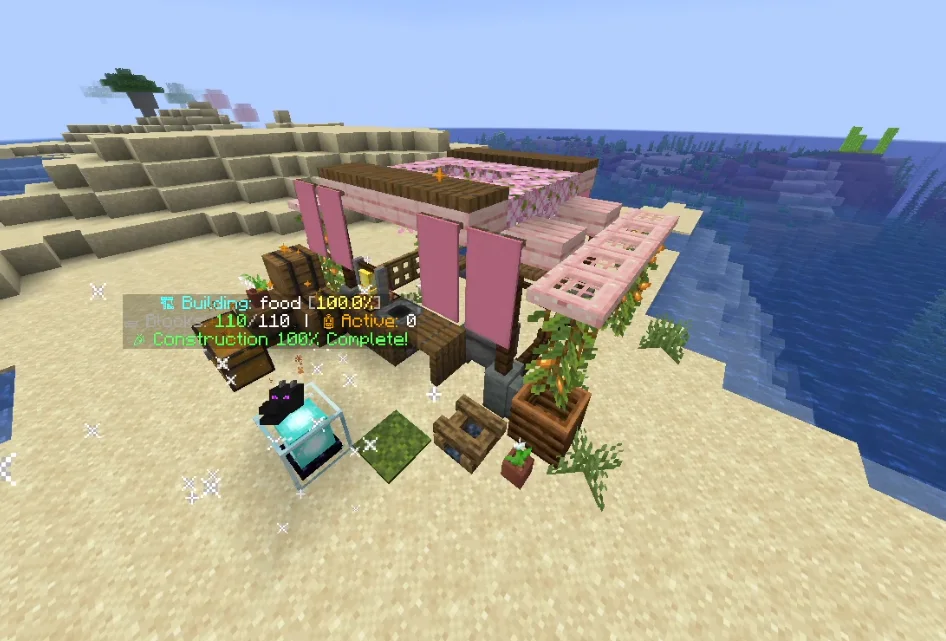
LivingBlueprints screenshot 1

What it does

LivingBlueprints is a plugin for Paper / Spigot servers, made by IsadGame. 3D Holographic Projections & Autonomous Drone Swarm Construction.

It supports Minecraft 1.21 – 26.x. It has been downloaded 2 times on Modrinth. That puts it at #63 of the 63 technology plugins listed here. The last update came out on Oct 30, 2026.

Supported versions

26.x1.21

Release history

The newest is 1.0.0, released on Oct 30, 2026. It is made for Minecraft 1.21 – 26.3. It runs on Bukkit, Folia, Paper, Purpur and Spigot. The download is 391 KB.

VersionReleasedMinecraftType
1.0.0Oct 30, 20261.21 – 26.3Release

Commands

The commands named on the Modrinth page of LivingBlueprints:

/lb

Permissions

Permission nodes named there, to give with a plugin like LuckPerms:

livingblueprints.playerlivingblueprints.player.scanlivingblueprints.player.sharelivingblueprints.player.publishlivingblueprints.pro.schematicslivingblueprints.admin.givecorelivingblueprints.admin.reload
Description from the author on Modrinth

LivingBlueprints

Turn Any Schematic into a 3D Hologram Built by Autonomous Drone Swarms

SpigotMC Profile | Modrinth | BuiltByBit | Discord (IsadG#6424)


Ever wanted to bring your favorite WorldEdit schematics or internet builds into survival without breaking immersion, using admin commands, or spending weeks placing thousands of blocks by hand?

LivingBlueprints turns any building or structure into an interactive experience. Project complete 3D holograms directly into your world, link your storage chests, and watch a fleet of autonomous worker drones carry materials and construct your schematics block by block with realistic welding particles and sound effects!

The Ultimate Schematic & Build Automation Engine

  • Drag & Drop Schematics: Simply drop any standard .schem file into your schematics folder and it instantly appears in the in-game catalog ready to project.
  • Built-In World Scanner: Select any existing building in your world with the scanning tool and save it instantly as a ready-to-build blueprint.
  • Export to File: Finished designing something amazing? Export your blueprints directly into standard schematic files to share with friends or use across servers.
  • 100% Survival Friendly: Drones pull real items from your chests. If you run low on stone bricks or wood, the swarm pauses and tells you exactly what is missing.
  • Claim & Protection Safe: Fully integrates with WorldGuard, GriefPrevention, and Towny. Players cannot project or construct inside protected land or other players' claims.
  • Crash & Restart Proof: Server restarts, chunk unloads, or crashes? Your construction never resets. Progress and drone states resume automatically where they left off.

How It Works in 3 Easy Steps

  1. Place Your Architecture Core: Place down a beacon core to open the blueprint catalog and select any schematic.
  2. Align Your 3D Hologram: Use the intuitive calibration hotbar to move, raise/lower, rotate 90°, or mirror your structure until it fits your terrain.
  3. Link Chests & Watch the Magic: Shift + Right-Click your supply chests, click Start, and let your automated drone swarm handle all the heavy building!

Commands & Permissions

Click to expand Commands & Permissions

Player Commands

  • /lb help - Opens the command guide. (Permission: livingblueprints.player)
  • /lb materials - Shows the full checklist of blocks needed for your schematic. (Permission: livingblueprints.player)
  • /lb pause - Pauses or resumes your active construction swarm. (Permission: livingblueprints.player)
  • /lb about - Shows plugin version and author information. (Permission: livingblueprints.player)
  • /lb wand - Gives the 3D area selection wand to scan structures [Pro]. (Permission: livingblueprints.player.scan)
  • /lb scan [displayName] - Saves a selected structure as a blueprint [Pro]. (Permission: livingblueprints.player.scan)
  • /lb share - Shares a custom blueprint with another builder [Pro]. (Permission: livingblueprints.player.share)
  • /lb publish - Publishes your blueprint to the public server catalog [Pro]. (Permission: livingblueprints.player.publish)

Admin Commands

  • /lb import [name] - Imports any .schem file into the server catalog [Pro]. (Permission: livingblueprints.pro.schematics)
  • /lb export [file.schem] - Exports a blueprint into a standard .schem file [Pro]. (Permission: livingblueprints.pro.schematics)
  • /lb givecore [amount] - Grants an Architecture Core beacon (Tier 1-3). (Permission: livingblueprints.admin.givecore)
  • /lb reload - Reloads configs, language files, and blueprints instantly. (Permission: livingblueprints.admin.reload)

Free Community vs Pro Enterprise Comparison

Click to expand Edition Comparison

LivingBlueprints Community (Free Edition)

  • Full drone swarm building mechanics
  • 3D holographic projection & real-time calibration hotbar
  • Auto-tethers with supply chests, barrels, and shulkers
  • Automatic progress resume after server restarts or crashes
  • Full claim protection checks (WorldGuard, GriefPrevention, Towny)
  • 4-Language support (English, Spanish, Portuguese, French)
  • Max blueprint dimensions: 15x15x15 blocks
  • Max active cores per player: 1
  • Standard Copper Golem drone appearance

LivingBlueprints Enterprise (Pro Edition) [Coming Soon]

  • No Size Limits: Construct massive castles, megabases, and entire cities with unlimited dimensions
  • Direct Schematic Import & Export: Load or export .schem files on the fly (/lb import & /lb export)
  • In-Game 3D Scanner Wand: Scan any world structure into a blueprint with a few clicks
  • Multiple Simultaneous Cores: Run multiple construction sites at the same time
  • 13 Drone Skins: Customize your swarm with Mechanical Bees, Light Orbs, Fireballs, Skulls, and more
  • Multi-Block Trip Batching: Drones carry 8, 16, 32, or 64 blocks per trip for lightning-fast builds
  • Swarm Speed Multipliers: Adjust flight speed from 1x up to 5x hyper-drive
  • Autonomous Auto-Repair: Drones automatically repair griefed, mined, or exploded blocks
  • Smart Obstacle Clearing: Clears terrain obstacles and stores drops into linked chests with Silk Touch support
  • Partial Build Mode: Start constructing immediately with whatever materials you currently have

Configuration Preview

Click to expand Configuration Preview

language: "en_US"
use_client_language: false

limits:
max_cores_per_player: 1
max_blueprint_dimension: 15
max_drones_per_core: 5

holograms:
enable_glow: false

drones:
ticks_per_flight_segment: 18
welding_ticks: 8
arc_height_multiplier: 1.5

Written by IsadGame. Read it with pictures on Modrinth.

How to install LivingBlueprints

  1. Make sure your server runs Paper and Spigot on Minecraft 1.21 – 26.x.

  2. Download the .jar file from Modrinth and put it in the plugins folder of your server.

  3. Restart the server. Avoid /reload, many plugins do not handle it well.

  4. Type /plugins in the console: LivingBlueprints should be listed in green. Its config files are created in the plugins folder on the first start.

Full guide: How to install plugins on a Minecraft server

Compatibility

Minecraft versions
26.x, 1.21
Runs on
Paper, Spigot
Edition
Java
Needs
Nothing else
License
Free to use
Price
Free
Upkeep
Actively updated (Nov 14, 2026)

LivingBlueprints compared with similar ones Compare all alternatives

ResourceDownloadsVersionsLast updatePrice
LivingBlueprintsthe one you looked at21.21 – 26.x14 days agoFree
GunshellJazzkuh85K1.12 – 1.21Feb 28, 2026Free
PacketEventsretrooper926K1.8 – 26.xSep 23, 2026Free
Axiom Paper PluginMoulberry279K1.20 – 26.xSep 21, 2026Free

Questions

Does LivingBlueprints work on Minecraft 26.x?

Yes. LivingBlueprints supports Minecraft 26.x. All supported versions: 26.x, 1.21.

Is LivingBlueprints free?

Yes. LivingBlueprints is free to download from Modrinth.

Which server software does LivingBlueprints run on?

LivingBlueprints runs on Paper and Spigot servers.

Is LivingBlueprints still updated?

Yes. The last update came out in the past day.

What are the best alternatives to LivingBlueprints?

The closest ones are Gunshell, PacketEvents and Axiom Paper Plugin. Compare all alternatives

Alternatives to LivingBlueprints

PacketEventsPlugins · 1.8 – 26.x

PacketEvents is a protocol library tailored to Minecraft Java Edition, designed to facilitate the processing and transmission of packets.

Free926,092 downloads
LoginToPlugins · 1.8 – 26.x

A complete authentication solution for Minecraft servers, providing secure login, database storage, premium autologin and secure otp code with qrcode

Free68,193 downloads
LOD Server SupportPlugins · 1.20 – 26.x

Voxy multiplayer support and Distant Horizons compatibility (unofficial). See fully rendered chunks and players thousands of blocks away in multiplayer.

Free55,981 downloads
Compare all alternatives ›

Reviews

–★★★★★
0 reviews
50
40
30
20
10

Log in to leave a review.