
 HyroCorePlugins · 1.20 – 1.21
Comprehensive Paper & Purpur core plugin providing server bank savings, daily reward streaks, deluxe GUI menus, marketplace mailbox, and website account…
Gratis34 descargas

Menus built on Minecraft's native dialog screens instead of chest GUIs, you can also create a dialog that shows on the escape menu, easy to configure.
Descarga directa desde Modrinth · 11 descargas
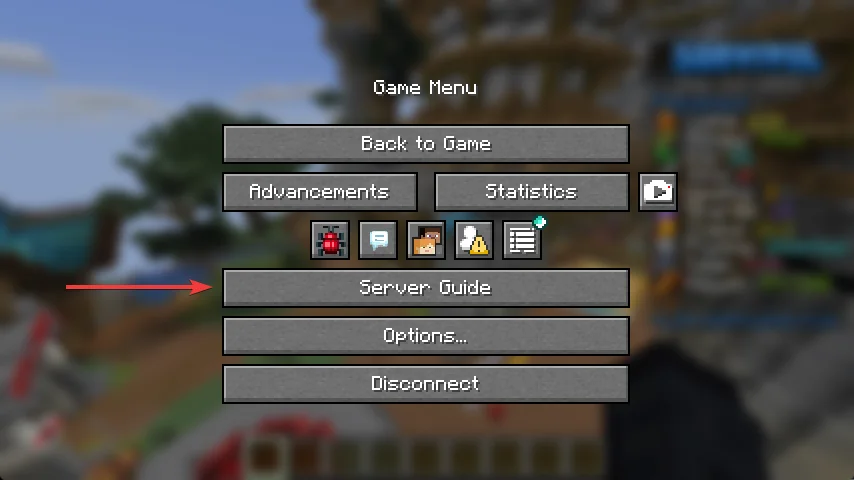
Pizzalopa creó Vista Dialogs (plugin) para servidores Paper / Spigot. Menus built on Minecraft's native dialog screens instead of chest GUIs, you can also create a dialog that shows on the escape menu, easy to configure.
Es compatible con Minecraft 1.21 – 26.x. Se ha descargado 11 veces en Modrinth. Eso lo sitúa en el puesto 123 de los 165 plugins de economía y tiendas de esta lista. La última actualización salió el 24/09/2026.
La más reciente es 1.0.0, publicada el 24/09/2026. Está hecha para Minecraft 1.21.7 – 26.3. Funciona en Folia, Paper y Purpur. La descarga ocupa 137 KB.
| Versión | Publicado | Minecraft | Tipo |
|---|---|---|---|
1.0.0 | 24/09/2026 | 1.21.7 – 26.3 | Estable |
Los comandos que aparecen en la página de Vista Dialogs en Modrinth:
/keys/thatname/vistaNo chest inventories. No filler panes. No item names pretending to be labels.
One YAML file per screen, rendered for each player who opens it.
With other dialog plugins a button runs one command, and that is the whole feature. Vista adds
everything a real menu needs, put price: 1000 on a button and it is a shop that checks their
balance, confirms, takes the money and if they're short, it tells them how short they are; buttons can be hidden from, the wrong ranks, locked behind a level, or marked Owned once bought; players get on/off settings, and player lookup; and the G key and the Escape-menu button work from the first start, with no datapack and no second restart.
A server hub. The G key opens it, every feature is one press away, and staff-only entries
appear with a show-if on a permission.
A profile. One file, lookup: true, and a search box for anyone else's numbers.
Leaderboards. Body lines of placeholders with `` drawn beside each one.
Kits, warps, crates. A list screen, one button each, click-if for the requirement and
deny for the reason.
Rules and guides. Body text, a button per section, no plugin dependency at all.
Settings. type: toggle buttons that flip on and off in place, remember themselves per
player, and run a command on each side.
The possibilities are nearly endless. If you can imagine a menu, Vista gives you the tools to build it.
Vista automatically adds its G key Quick Actions and Escape menu integration. Just drop the plugin in, start your server, and it works. No datapacks, reloads, or extra setup required.
quick-actions:
enabled: true
dialog: menu
label: 'Menu'
pause-screen:
enabled: true
dialog: menu
label: 'Menu'
Point both at the same dialog and editing that one file changes both.
Every key is optional except title and buttons.
title: 'Crate Keys' # window title. Placeholders work.
external-title: 'Keys' # the label when opened from the pause menu
command: 'keys' # registers /keys
aliases: ['k', 'crates'] # extra names for it
overwrite: true # take /keys even if another plugin has it
permission: 'server.keys' # required to open at all
back: 'shop' # where Back goes when there is no history
columns: 2 # buttons per row
escape: true # can Esc close it
close-button: 'Close' # bottom-right button that closes; omit for none
back-button: 'Back' # or one that goes back; omit for none
currency: 'coins' # what price: is counted in
prefix: 'SHOP ▶ ' # chat prefix for messages this screen causes
lookup: false # resolve placeholders for a searched player
open-if: # conditions checked before it opens
Key · Meaning
title · Window title. Placeholders resolve per viewer
external-title · Label used when this screen is the pause-menu button
command · Registers /thatname, live — no restart
aliases · Extra names for that command
overwrite · Whether command and aliases take a name another plugin already uses. Default true
permission · Node required to open the screen
back · Dialog the Back button falls back to
columns · Buttons per row. 1 is a tall list, 2 suits a hub
escape · Whether Esc closes it. Default true
close-button · Text of a bottom-right button that closes. Omit it for none
back-button · Text of a bottom-right button that goes back. Omit it for none
currency · Which currency price: means here
prefix · Chat prefix for messages this screen causes
lookup · Resolve placeholders for a searched player instead of the viewer
open-if · Conditions, all of which must pass
Lines of text above the buttons. An empty string is a blank line.
body:
Each key under buttons: names one button. The name is yours and shows up in /vista list.
buttons:
vote-key:
label: 'Vote Key'
tooltip:
width: 150
slot: 1
priority: 0
permission: 'server.keys.vote'
show-if:
click-if:
deny:
price: 100
owned: 'server.perk.fly'
url: 'example.com';
run:
Key · Meaning
label · The button text
| tooltip | A list of lines, or one string using `
` |
width · Pixels, 1–1024. Default 150
slot · Draw order. Buttons sharing one are resolved by priority
priority · Lower wins the slot. Default 0
permission · Node required to see and press it
show-if · Conditions; failing hides the button
click-if · Conditions; failing blocks the press and runs deny
deny · Actions run when click-if fails
price · Cost in the screen's currency
amounts · Quantity-to-price map, for anything sold in sizes
owned · Permission meaning "already bought"
url · Opens a link instead of running anything
with-permission · Permissions the player holds only while this button's actions run
type: toggle · Makes it a switch over a setting named after the button
for-each: items · Repeats the button once per item in the game — see [Item lists](#item-lists)
search · With for-each, the input whose text narrows the list
run · The actions, in order
Text fields, drawn above the buttons and written like buttons: a name, then what it is. A button
reads one back as $(name).
inputs:
player:
label: 'Look up a player'
max-length: 16
initial: '%player_name%'
width: 200
search:
label: 'Search'
run:
$(name) works in conditions too, so a click-if can check what was typed before anything runs,
and in an input's own initial: — initial: '$(search)' keeps the text in the box when the
screen redraws. Opening a screen starts its inputs empty.
What was typed can be tidied on the way in:
Written · " My Home " becomes
$(name\ · trim) · My Home — outer and doubled spaces dropped
$(name\ · lower) / $(name\ · upper) · my home / MY HOME
$(name\ · slug) · my_home — one safe word, for ids and commands
They chain, left to right: $(name|trim|upper).
run: is a list, carried out in order. A chain stops at the first step that refuses.
Action · Does
[player] · Runs the command as the player
[console] · Runs it as the console
[message] · Sends the player a message
[broadcast] · Sends it to everyone
[log] · Writes a console line
[sound] [volume] [pitch] · Plays a sound
[open] · Opens another dialog
[server] · Sends the player to that server through the proxy
[back] · Goes back one screen
[close] · Closes the screen
[refresh] · Redraws it in place
[lookup] · Makes the next screen describe that player
[set] · Remembers text for this player — see [Variables](#variables)
[unset] · Forgets it
[givepermission] · Grants a permission
[takepermission] · Removes one
An untagged line is treated as [message].
A step can also be a choice, made when the chain reaches it:
run:
run:
else:
if: takes any [condition](#conditions) line, or a list of them. else: is optional.
[server] is how a server selector works. /server belongs to the proxy, not to the server the
player is standing on, so running it as them does nothing; [server] survival asks the proxy
directly over the BungeeCord plugin channel, which Velocity answers as well. Nothing to install
or configure on either side.
There is no click-sound setting, on purpose: the client plays its own click when a dialog button
is pressed, so a second from the server doubles it up. A button that wants a particular noise
asks with [sound].
show-if hides a button. click-if lets it be seen but blocks the press. Both are lists, and
every line must pass. A leading ! inverts one.
show-if:
Operator · Compares
| > >= `
Define a currency once:
currencies:
coins:
name: 'Coins'
balance: '%economy_balance%'
take: 'eco take %player_name% %amount%'
format: '
Escrita por Pizzalopa. Léela con imágenes en Modrinth.
Asegúrate de que tu servidor use Paper y Spigot en Minecraft 1.21 – 26.x.
Descarga el archivo .jar desde Modrinth y ponlo en la carpeta plugins de tu servidor.
Reinicia el servidor. Evita /reload, muchos plugins no lo llevan bien.
Escribe /plugins en la consola: Vista Dialogs debería aparecer en verde. Sus archivos de configuración se crean en la carpeta plugins al primer arranque.
Guía completa: Cómo instalar plugins en un servidor de Minecraft
| Recurso | Descargas | Versiones | Última actualización | Precio |
|---|---|---|---|---|
| Vista Dialogsel que estabas viendo | 11 | 1.21 – 26.x | 24 sept 2026 | Gratis |
| HyroCoreikoya. | 34 | 1.20 – 1.21 | 27 sept 2026 | Gratis |
 CommandPanelsRockyHawk | 4,407 | 1.8 – 26.x | 2 oct 2026 | Gratis |
 Chorus TradeControll3r24 | 9 | 26.x | hace 10 días | Gratis |
Sí. Vista Dialogs es compatible con Minecraft 26.x. Todas las versiones compatibles: 26.x, 1.21.
Sí. Vista Dialogs se puede descargar gratis desde Modrinth.
Vista Dialogs funciona en servidores Paper y Spigot.
Sí. La última actualización salió en el último día.
Los más parecidos son HyroCore, CommandPanels y Chorus Trade. Comparar todas las alternativas
HyroCorePlugins · 1.20 – 1.21Comprehensive Paper & Purpur core plugin providing server bank savings, daily reward streaks, deluxe GUI menus, marketplace mailbox, and website account…
CommandPanelsPlugins · 1.8 – 26.xCustom GUI Maker & Menu Builder. Create interactive inventories, dialogs, or Floodgate menus with animations & logic.
Chorus TradePlugins · 26.xSecure, fully customizable player-to-player trading for Paper 26.2: dupe-proof GUI, money trades via Vault, hex colors, every message and menu editable…
 BedrockMenusPlugins · 1.21 – 26.x
Shows any plugin's chest menus to Bedrock (Geyser) players as native forms with item pictures.
 Shopkeepers AddonPlugins · 1.16 – 26.x
Navigation & Economy » No more searching the shopkeepers marketplace to buy your favorite items.
 Auction House PluginPlugins · 1.21 – 26.x
Use /ah to open the auctionHouse.
Inicia sesión para dejar una reseña.