
 HyroCorePluginy · 1.20 – 1.21
Comprehensive Paper & Purpur core plugin providing server bank savings, daily reward streaks, deluxe GUI menus, marketplace mailbox, and website account…
Za darmoPobrania: 34

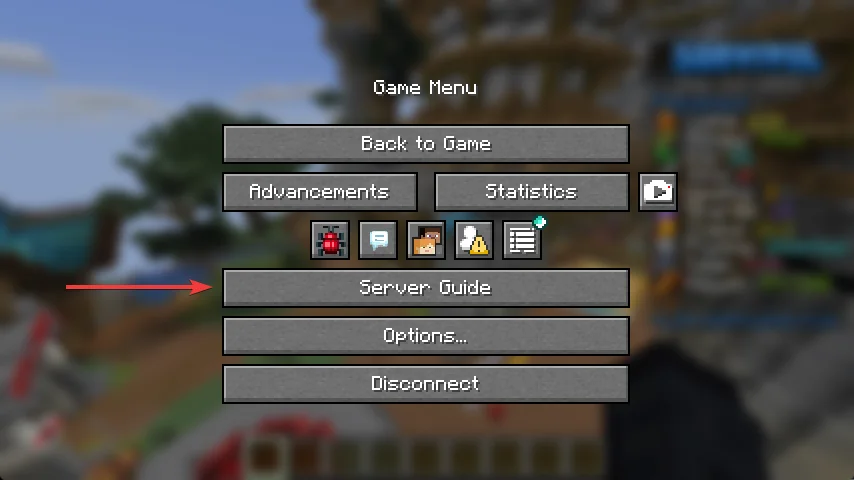
Menus built on Minecraft's native dialog screens instead of chest GUIs, you can also create a dialog that shows on the escape menu, easy to configure.
Bezpośrednie pobieranie z Modrinth · 11 pobrań
Vista Dialogs to plugin do serwerów Paper / Spigot, autor: Pizzalopa. Menus built on Minecraft's native dialog screens instead of chest GUIs, you can also create a dialog that shows on the escape menu, easy to configure.
Obsługiwane wersje: Minecraft 1.21 – 26.x. Liczba pobrań w serwisie Modrinth: 11. Zajmuje 123. miejsce w kategorii „pluginy ekonomii i sklepów” (łącznie: 165). Ostatnia aktualizacja: 24.09.2026.
Najnowsza to 1.0.0, wydana 24.09.2026. Jest zrobiona dla Minecraft 1.21.7 – 26.3. Działa na Folia, Paper i Purpur. Plik ma 137 KB.
| Wersja | Wydano | Minecraft | Typ |
|---|---|---|---|
1.0.0 | 24.09.2026 | 1.21.7 – 26.3 | Wydanie |
Komendy wymienione na stronie Vista Dialogs w Modrinth:
/keys/thatname/vistaNo chest inventories. No filler panes. No item names pretending to be labels.
One YAML file per screen, rendered for each player who opens it.
With other dialog plugins a button runs one command, and that is the whole feature. Vista adds
everything a real menu needs, put price: 1000 on a button and it is a shop that checks their
balance, confirms, takes the money and if they're short, it tells them how short they are; buttons can be hidden from, the wrong ranks, locked behind a level, or marked Owned once bought; players get on/off settings, and player lookup; and the G key and the Escape-menu button work from the first start, with no datapack and no second restart.
A server hub. The G key opens it, every feature is one press away, and staff-only entries
appear with a show-if on a permission.
A profile. One file, lookup: true, and a search box for anyone else's numbers.
Leaderboards. Body lines of placeholders with `` drawn beside each one.
Kits, warps, crates. A list screen, one button each, click-if for the requirement and
deny for the reason.
Rules and guides. Body text, a button per section, no plugin dependency at all.
Settings. type: toggle buttons that flip on and off in place, remember themselves per
player, and run a command on each side.
The possibilities are nearly endless. If you can imagine a menu, Vista gives you the tools to build it.
Vista automatically adds its G key Quick Actions and Escape menu integration. Just drop the plugin in, start your server, and it works. No datapacks, reloads, or extra setup required.
quick-actions:
enabled: true
dialog: menu
label: 'Menu'
pause-screen:
enabled: true
dialog: menu
label: 'Menu'
Point both at the same dialog and editing that one file changes both.
Every key is optional except title and buttons.
title: 'Crate Keys' # window title. Placeholders work.
external-title: 'Keys' # the label when opened from the pause menu
command: 'keys' # registers /keys
aliases: ['k', 'crates'] # extra names for it
overwrite: true # take /keys even if another plugin has it
permission: 'server.keys' # required to open at all
back: 'shop' # where Back goes when there is no history
columns: 2 # buttons per row
escape: true # can Esc close it
close-button: 'Close' # bottom-right button that closes; omit for none
back-button: 'Back' # or one that goes back; omit for none
currency: 'coins' # what price: is counted in
prefix: 'SHOP ▶ ' # chat prefix for messages this screen causes
lookup: false # resolve placeholders for a searched player
open-if: # conditions checked before it opens
Key · Meaning
title · Window title. Placeholders resolve per viewer
external-title · Label used when this screen is the pause-menu button
command · Registers /thatname, live — no restart
aliases · Extra names for that command
overwrite · Whether command and aliases take a name another plugin already uses. Default true
permission · Node required to open the screen
back · Dialog the Back button falls back to
columns · Buttons per row. 1 is a tall list, 2 suits a hub
escape · Whether Esc closes it. Default true
close-button · Text of a bottom-right button that closes. Omit it for none
back-button · Text of a bottom-right button that goes back. Omit it for none
currency · Which currency price: means here
prefix · Chat prefix for messages this screen causes
lookup · Resolve placeholders for a searched player instead of the viewer
open-if · Conditions, all of which must pass
Lines of text above the buttons. An empty string is a blank line.
body:
Each key under buttons: names one button. The name is yours and shows up in /vista list.
buttons:
vote-key:
label: 'Vote Key'
tooltip:
width: 150
slot: 1
priority: 0
permission: 'server.keys.vote'
show-if:
click-if:
deny:
price: 100
owned: 'server.perk.fly'
url: 'example.com';
run:
Key · Meaning
label · The button text
| tooltip | A list of lines, or one string using `
` |
width · Pixels, 1–1024. Default 150
slot · Draw order. Buttons sharing one are resolved by priority
priority · Lower wins the slot. Default 0
permission · Node required to see and press it
show-if · Conditions; failing hides the button
click-if · Conditions; failing blocks the press and runs deny
deny · Actions run when click-if fails
price · Cost in the screen's currency
amounts · Quantity-to-price map, for anything sold in sizes
owned · Permission meaning "already bought"
url · Opens a link instead of running anything
with-permission · Permissions the player holds only while this button's actions run
type: toggle · Makes it a switch over a setting named after the button
for-each: items · Repeats the button once per item in the game — see [Item lists](#item-lists)
search · With for-each, the input whose text narrows the list
run · The actions, in order
Text fields, drawn above the buttons and written like buttons: a name, then what it is. A button
reads one back as $(name).
inputs:
player:
label: 'Look up a player'
max-length: 16
initial: '%player_name%'
width: 200
search:
label: 'Search'
run:
$(name) works in conditions too, so a click-if can check what was typed before anything runs,
and in an input's own initial: — initial: '$(search)' keeps the text in the box when the
screen redraws. Opening a screen starts its inputs empty.
What was typed can be tidied on the way in:
Written · " My Home " becomes
$(name\ · trim) · My Home — outer and doubled spaces dropped
$(name\ · lower) / $(name\ · upper) · my home / MY HOME
$(name\ · slug) · my_home — one safe word, for ids and commands
They chain, left to right: $(name|trim|upper).
run: is a list, carried out in order. A chain stops at the first step that refuses.
Action · Does
[player] · Runs the command as the player
[console] · Runs it as the console
[message] · Sends the player a message
[broadcast] · Sends it to everyone
[log] · Writes a console line
[sound] [volume] [pitch] · Plays a sound
[open] · Opens another dialog
[server] · Sends the player to that server through the proxy
[back] · Goes back one screen
[close] · Closes the screen
[refresh] · Redraws it in place
[lookup] · Makes the next screen describe that player
[set] · Remembers text for this player — see [Variables](#variables)
[unset] · Forgets it
[givepermission] · Grants a permission
[takepermission] · Removes one
An untagged line is treated as [message].
A step can also be a choice, made when the chain reaches it:
run:
run:
else:
if: takes any [condition](#conditions) line, or a list of them. else: is optional.
[server] is how a server selector works. /server belongs to the proxy, not to the server the
player is standing on, so running it as them does nothing; [server] survival asks the proxy
directly over the BungeeCord plugin channel, which Velocity answers as well. Nothing to install
or configure on either side.
There is no click-sound setting, on purpose: the client plays its own click when a dialog button
is pressed, so a second from the server doubles it up. A button that wants a particular noise
asks with [sound].
show-if hides a button. click-if lets it be seen but blocks the press. Both are lists, and
every line must pass. A leading ! inverts one.
show-if:
Operator · Compares
| > >= `
Define a currency once:
currencies:
coins:
name: 'Coins'
balance: '%economy_balance%'
take: 'eco take %player_name% %amount%'
format: '
Autor: Pizzalopa. Z obrazkami na Modrinth.
Upewnij się, że twój serwer działa na Paper i Spigot w Minecraft 1.21 – 26.x.
Pobierz plik .jar z Modrinth i wrzuć go do folderu plugins na serwerze.
Zrestartuj serwer. Unikaj /reload, wiele pluginów źle to znosi.
Wpisz /plugins w konsoli: Vista Dialogs powinien być na zielono. Pliki konfiguracyjne tworzą się w folderze plugins przy pierwszym starcie.
Pełny poradnik: Jak zainstalować pluginy na serwerze Minecraft
| Zasób | Pobrania | Wersje | Aktualizacja | Cena |
|---|---|---|---|---|
| Vista Dialogsten, który oglądałeś | 11 | 1.21 – 26.x | 24 wrz 2026 | Za darmo |
| HyroCoreikoya. | 34 | 1.20 – 1.21 | 27 wrz 2026 | Za darmo |
 CommandPanelsRockyHawk | 4,407 | 1.8 – 26.x | 2 paź 2026 | Za darmo |
 Chorus TradeControll3r24 | 9 | 26.x | 10 d. temu | Za darmo |
Tak. Vista Dialogs działa w wersji Minecrafta 26.x. Wszystkie obsługiwane wersje: 26.x, 1.21.
Tak. Vista Dialogs można pobrać za darmo z serwisu Modrinth.
Vista Dialogs działa na serwerach Paper i Spigot.
Tak. Ostatnia aktualizacja wyszła w ciągu ostatniej doby.
Najbliższe to HyroCore, CommandPanels i Chorus Trade. Porównaj wszystkie alternatywy
HyroCorePluginy · 1.20 – 1.21Comprehensive Paper & Purpur core plugin providing server bank savings, daily reward streaks, deluxe GUI menus, marketplace mailbox, and website account…
CommandPanelsPluginy · 1.8 – 26.xCustom GUI Maker & Menu Builder. Create interactive inventories, dialogs, or Floodgate menus with animations & logic.
Chorus TradePluginy · 26.xSecure, fully customizable player-to-player trading for Paper 26.2: dupe-proof GUI, money trades via Vault, hex colors, every message and menu editable…
 BedrockMenusPluginy · 1.21 – 26.x
Shows any plugin's chest menus to Bedrock (Geyser) players as native forms with item pictures.
 Shopkeepers AddonPluginy · 1.16 – 26.x
Navigation & Economy » No more searching the shopkeepers marketplace to buy your favorite items.
 Auction House PluginPluginy · 1.21 – 26.x
Use /ah to open the auctionHouse.
Zaloguj się, aby wystawić opinię.