
 OpenSpeakersMods · 1.12
OpenSpeakers adds a configurable speaker network to Minecraft, allowing you to link speakers and broadcast custom sounds from content packs throughout your…
Gratis9 descargas
Connect independent Minecraft worlds and servers through configurable in-game portals, with safe player-data transfer and support for compatible mods.
Descarga directa desde Modrinth · 6 descargas
Origen y titularidad. Esta página se generó automáticamente a partir de datos públicos que Modrinth ofrece a través de su API pública. El nombre, las descripciones, las imágenes, las marcas y todo el demás contenido de este proyecto pertenecen a thausle y a sus respectivos titulares. CraftRank no es el autor de este proyecto y no está afiliado, respaldado ni patrocinado por su autor ni por Modrinth.
Alojamiento y distribución. CraftRank no aloja, almacena, sube ni distribuye los archivos de descarga de este proyecto, y no conserva ningún archivo de ese tipo en sus servidores. Todas las descargas las proporciona directamente Modrinth desde sus propios servidores; el botón Descargar solo enlaza al archivo allí. La licencia indicada en Modrinth es MIT.
Uso de API públicas. Modrinth, Hangar (PaperMC) y SpigotMC (a través de la API de Spiget) ponen sus API a disposición pública de sitios web y aplicaciones de terceros. Los Términos de uso de Modrinth otorgan a los usuarios de la API una licencia para descargar, mostrar y consultar contenido a través de sus propios servicios (sección “API Usage”), y los creadores que publican en Modrinth conceden a Modrinth y a sus licenciatarios el derecho a mostrar y distribuir su contenido a terceros (sección “User Contributions”). CraftRank utiliza estas API conforme a las normas publicadas de las plataformas: se identifica en cada solicitud y respeta sus límites de uso.
Sin garantía. La información de esta página se ofrece "tal cual", sin ninguna garantía. Descargar y usar este proyecto es bajo su propia responsabilidad y está sujeto a la licencia y las condiciones de su autor.
Avisos de derechos de autor (DMCA). Solo el titular de los derechos de autor o alguien autorizado a actuar en su nombre puede presentar un aviso, y debe hacerlo una persona mayor de edad o su padre, madre o tutor legal. Un aviso válido enviado a abuse@craftrank.org debe incluir: el enlace de esta página; la obra presuntamente infringida; su nombre completo, dirección postal, teléfono y correo electrónico; una declaración de que cree de buena fe que el uso no está autorizado por el titular, su agente o la ley; una declaración, bajo pena de perjurio, de que el aviso es exacto y de que usted es el titular o está autorizado a actuar en su nombre; y su firma física o electrónica. Los avisos incompletos no se tramitan. Los avisos válidos se atienden en un plazo de 48 horas, sin necesidad de pasar por Google.
Avisos falsos. Quien afirme a sabiendas y falsamente que un material es infractor responde de los daños causados, incluidas las costas y los honorarios de abogados (17 U.S.C. § 512(f)). Los avisos presentados de mala fe o por quien no es titular de los derechos quedan registrados y serán impugnados.
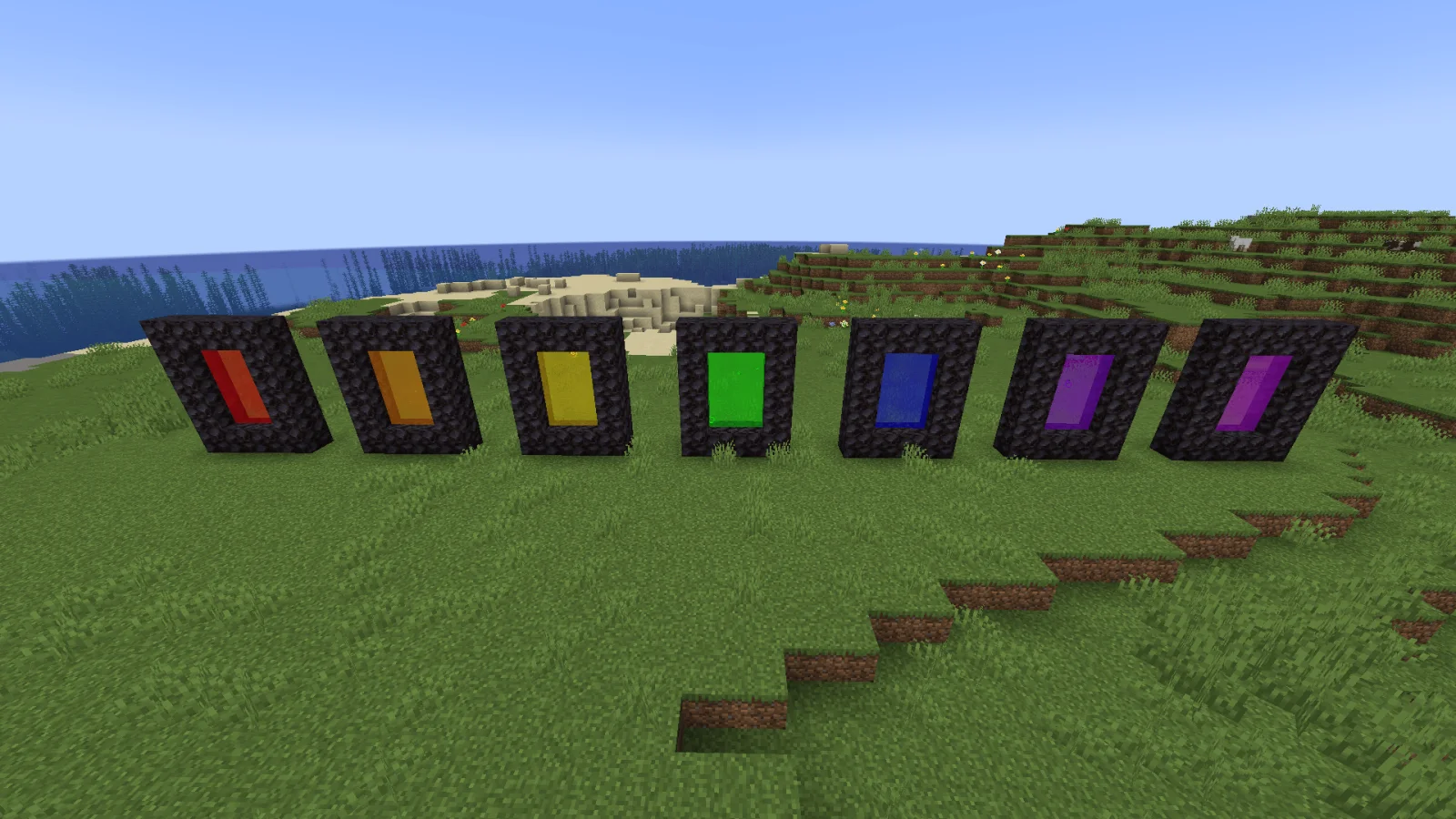
WorldLink (mod) es obra de thausle. Connect independent Minecraft worlds and servers through configurable in-game portals, with safe player-data transfer and support for compatible mods.
Es compatible con Minecraft 1.20. Se ha descargado 6 veces en Modrinth. La última actualización salió el 28/09/2026.
La más reciente es 0.2.2, publicada el 28/09/2026. Está hecha para Minecraft 1.20.1. Funciona en Forge. La descarga ocupa 1.2 MB.
| Versión | Publicado | Minecraft | Tipo |
|---|---|---|---|
0.2.2 | 28/09/2026 | 1.20.1 | Estable |
🌀 WorldLink
Your worlds were never meant to be islands.
Every Minecraft world normally exists alone.
Your survival world. Your building world. An old save you haven't visited in years. A friend's server. A massive modpack server running somewhere else entirely.
They're separate places, divided by menus, loading screens, server lists, and save folders.
WorldLink turns them into destinations.
Build a portal.
Ignite it.
Choose where it leads.
Step inside—and continue your adventure somewhere else.
No server-selection screen pretending to be a portal.
Just walk through.
🌎 Connect Minecraft Worlds
WorldLink is a Forge 1.20.1 mod that connects independent Minecraft worlds and servers through physical, configurable in-game portals.
A WorldLink portal can lead to another configured local world or a remote Minecraft server, allowing places that normally exist completely independently to become part of one connected adventure.
Instead of leaving the game, navigating menus, finding another save or server, and reconnecting manually, the portal becomes the boundary between worlds.
Walk in here.
Walk out there.
🌀 A Portal That Feels Like a Portal
WorldLink portals are designed to feel like part of Minecraft—not like a server-selection menu disguised as a block.
Build the frame, ignite it with Flint and Steel, configure the destination, and the interior comes alive.
WorldLink portals feature:
Configurable portal destinations
Customizable portal colors
Dynamic rectangular portal sizes
Optional frame corners
Animated portal rendering
Layered visual effects
Swirling ambient particles
Lightning ignition
Portal implosion effects
Nether-inspired travel distortion
Nether-style ambient sound
Survival travel countdown
Arrival protection
Automatic portal rearming
Protection against accidental travel after login
Player-facing travel status and failure messages
Automatic collapse when required frame blocks are destroyed
Explosion-aware portal collapse
Support for complicated shared-frame portal structures
When you ignite a valid frame, lightning strikes the point of activation as the portal comes alive.
Step inside and the screen begins to distort. As the travel countdown progresses, the effect intensifies until the transition begins.
Destroy a required part of an active portal and the membrane implodes, accompanied by its collapse effects rather than simply disappearing.
WorldLink also understands that portals can get weird.
Shared frames, intersecting structures, large portals, missing metadata, and orphaned portal membranes are handled defensively. If the physical structure of an active portal is compromised—including by an explosion—WorldLink works to invalidate the affected portal instead of leaving a floating ghost membrane behind.
The portal isn't just how you select another world.
It's how you get there.
🚀 The Player Can Travel Too
Connecting worlds was only the beginning.
WorldLink includes a transactional player-data transfer system designed to allow supported player state to follow the player between independent Minecraft environments.
Before travel, the source prepares a snapshot of participating player data.
WorldLink then manages that snapshot through the journey:
Capture → Persist → Travel → Claim → Restore → Verify → Consume
The destination doesn't simply assume the transfer worked.
It verifies it.
Only after restoration succeeds and the resulting player state has been verified is the transaction considered complete.
WorldLink treats player-data movement as a transaction rather than a blind copy operation.
🎒 Pack Your Bags—or Leave Them Behind
Sometimes you want the player and their supported data to cross worlds.
Sometimes you only want the player to travel.
WorldLink supports both.
Administrators can enable or disable player-data transfer for a WorldLink environment.
PLAYER_DATA_TRANSFER
When player-data transfer is enabled, WorldLink prepares a transfer transaction and attempts to carry supported player state through the journey.
The player is told:
Your bags are packed.
TRAVEL_ONLY
When player-data transfer is disabled, WorldLink performs the journey without creating a player-data transaction.
No player snapshot.
No transfer UUID.
No pending transfer.
No restore claim.
The player simply travels to the destination while transferable player data is left behind.
The player is told:
Your items are left behind.
This allows WorldLink to function both as a player-data transfer system and as a portal network connecting otherwise independent Minecraft environments.
🧩 WorldLink 0.2.1 — Player Data Compatibility Update
Minecraft players don't stop at their vanilla inventory.
Modded Minecraft can attach equipment, progression, capabilities, backing storage, skills, and other persistent state to a player.
WorldLink 0.2.1 dramatically expands the amount of modded player data that can make the journey.
⛏️ Project MMO
WorldLink includes compatibility with Project MMO (PMMO).
Supported PMMO player progression participates in WorldLink's transactional player-data process:
Capture → Restore → Synchronize → Verify
PMMO progression can therefore follow the player through supported WorldLink transfers instead of being treated as unrelated server-side state.
🎒 Sophisticated Backpacks
WorldLink 0.2.1 adds dedicated support for Sophisticated Backpacks.
A Sophisticated Backpack is more than the ItemStack visible in a player's inventory. Its contents can exist in separate backing storage referenced by the backpack.
WorldLink understands that distinction.
For supported backpacks carried through the player's normal inventory, WorldLink can:
Detect backpack backing-storage references
Capture the corresponding backpack contents
Transfer that backing data with the player transaction
Restore it at the destination
Verify the restored backing data before declaring the handler successful
That means the backpack doesn't merely arrive.
Its supported contents can arrive with it.
💍 Curios
WorldLink 0.2.1 includes Curios player-data transfer support.
Rather than hard-coding individual equipment slots, WorldLink transfers the participating Curios capability state.
This allows supported equipped items and their slot assignments to participate in the same transactional journey as the rest of the player.
Curios data is:
Captured → Restored → Reprocessed → Verified
Because WorldLink works with the Curios capability rather than maintaining a fixed list of equipment slots, this compatibility can naturally extend to mods that build their equipment systems on Curios.
Which leads to...
☁️ The Aether
The Aether's accessory slots are supported through WorldLink's Curios integration.
WorldLink has been runtime-tested with Aether-specific accessory equipment slots, including Aether's specialized Curios equipment.
Items remain equipped in their appropriate slots after the supported transfer.
No separate WorldLink Aether handler was required.
Curios already gave us the bridge. WorldLink simply takes it across worlds.
🛠️ Tool Belt
Tool Belt presented a different challenge.
Tool Belts placed in ordinary Curios equipment participate through WorldLink's Curios integration.
But Tool Belt also provides its own dedicated V-key equipment slot, separate from the ordinary Curios state.
WorldLink 0.2.1 therefore includes dedicated compatibility for that slot.
The dedicated Tool Belt state is:
Captured → Serialized → Restored → Verified
This allows Tool Belt's special equipment state to participate in WorldLink's transactional player-data system without requiring modifications to Tool Belt itself.
🔌 Optional Compatibility
Project MMO, Sophisticated Backpacks, Curios, The Aether, and Tool Belt are not required dependencies of WorldLink.
WorldLink remains usable without them.
Compatibility handlers participate when their corresponding mods and supported data are present.
That allows WorldLink to provide deeper integration in heavily modded environments without requiring every WorldLink installation to use the same collection of mods.
🛡️ Designed to Fail Safely
Cross-server player data is something WorldLink treats carefully.
A transfer can involve multiple independent mods, persistent state, two Minecraft environments, a client disconnect, another connection, and plenty of opportunities for something to go wrong.
WorldLink therefore uses a fail-closed transactional design.
If participating player data cannot be safely prepared, travel preparation can be aborted rather than intentionally creating a partial transfer.
If a compatibility handler throws an exception, WorldLink isolates the failure instead of allowing an incomplete snapshot to silently continue.
If ownership doesn't match, the transfer isn't restored to the wrong player.
If restoration cannot be verified, the transaction isn't treated as successfully completed.
And a successful transfer isn't considered finished merely because some data was written.
Restore first. Verify second. Consume last.
WorldLink also maintains persistent recovery state where appropriate so interrupted journeys don't have to depend entirely on volatile server or client memory.
🌐 Built for Independent Servers
WorldLink supports travel to remote Minecraft servers.
For supported player-data transfers between independent environments, WorldLink includes an authenticated client-relay transfer path.
The source prepares the transaction.
The client carries the prepared transfer envelope through the server transition.
The destination validates the arriving transaction before attempting restoration.
Remote WorldLink environments therefore do not inherently need to share the same physical transfer directory just to perform a supported relay transfer.
The destination still owns the important decisions:
Is this transfer valid?
Does it belong to this player?
Was restoration actually successful?
Only after successful restoration and verification does the player-data transaction complete.
🔌 Public Player Data API
WorldLink's built-in integrations are not intended to be the end of mod compatibility.
A heavily modded Minecraft player can contain:
Skills
Levels
Mana
Progression
Capabilities
Persistent attributes
Unlocks
Statistics
Equipment systems
Other mod-specific player state
WorldLink cannot safely guess what another mod's data means.
So it doesn't try.
Instead, WorldLink provides a public Player Data API that allows another Forge mod or compatibility addon to teach WorldLink how its data should participate.
A handler owns its data:
Should I participate? → Capture → Restore → Verify
WorldLink owns the infrastructure around it:
Transactions → Persistence → Claims → Recovery → Cleanup → Failure Isolation
A compatibility implementation doesn't need to recreate WorldLink's entire cross-world transfer system just to move its own player state.
Implement a handler.
Register it.
Let WorldLink handle the journey.
🧠 You Own Your Data. WorldLink Owns the Journey.
The Player Data API supports stable handler IDs and handler data versions so compatibility implementations can evolve without silently treating incompatible data formats as valid.
Multiple handlers can participate in the same transaction.
Each handler remains responsible for understanding and verifying its own data.
If a participating handler fails during preparation, WorldLink can identify the failure and abort rather than deliberately creating a snapshot already known to be incomplete.
WorldLink's compatibility philosophy is simple:
You own your mod's data. WorldLink owns the journey.
📦 Persistent Transfer Storage
WorldLink maintains persistent transaction storage for transfer states that require durable recovery.
A fresh local installation uses:
WorldLink-Transfers
Transfer storage separates pending and consumed transactions.
A pending transaction represents player data that has been prepared but has not yet successfully completed its lifecycle.
After successf
Escrita por thausle. Léela con imágenes en Modrinth.
Este mod hace falta en el servidor y en cada jugador que entra.
Instala Forge para Minecraft 1.20.
Descarga el archivo .jar desde Modrinth y ponlo en la carpeta mods de tu directorio .minecraft.
Inicia Minecraft con el perfil de Forge.
Más fácil: en Prism Launcher o la Modrinth App, busca WorldLink en los mods de tu instancia y haz clic en Install. Añade el loader y los mods que necesita por ti.
| Recurso | Descargas | Versiones | Última actualización | Precio |
|---|---|---|---|---|
| WorldLinkel que estabas viendo | 6 | 1.20 | 28 sept 2026 | Gratis |
| OpenSpeakersMjderheftige | 9 | 1.12 | 27 sept 2026 | Gratis |
 Portal RelocatorMrbysco | 1 | 1.21 | hace 2 días | Gratis |
 ResourcifyDeDiamondPro | 14.1M | 1.8 – 26.x | 24 oct 2026 | Gratis |
Todavía no. La versión más reciente que admite es Minecraft 1.20.
Sí. WorldLink se puede descargar gratis desde Modrinth.
Ambos. El servidor y cada jugador necesitan WorldLink instalado.
Sí. La última actualización salió en el último día.
Los más parecidos son OpenSpeakers, Portal Relocator y Resourcify. Comparar todas las alternativas
OpenSpeakersMods · 1.12OpenSpeakers adds a configurable speaker network to Minecraft, allowing you to link speakers and broadcast custom sounds from content packs throughout your…
Portal RelocatorMods · 1.21Changes where you end up when going through a Nether Portal
ResourcifyMods · 1.8 – 26.xIn-game resource pack, data pack and shader browser and updater.
 Seamless Loading ScreenMods · 1.16 – 1.21
Takes a screenshot of the game when you leave a world or server, and displays it when you rejoin it.
 Create: ConnectedMods · 1.18 – 1.21
QoL blocks that you wish existed in Create - Highly configurable, disable what you don't need
 Xaero ZoomoutMods · 1.19 – 26.x
Reduces the minimum zoom of Xaero's World Map from 0.0625x to 0.0025x, so you can see everything!
Inicia sesión para dejar una reseña.