
 OpenSpeakersMody · 1.12
OpenSpeakers adds a configurable speaker network to Minecraft, allowing you to link speakers and broadcast custom sounds from content packs throughout your…
Za darmoPobrania: 9
Źródło i własność. Ta strona została wygenerowana automatycznie z publicznych danych, które Modrinth udostępnia przez swoje publiczne API. Nazwa, opisy, obrazy, znaki towarowe i wszelkie inne treści tego projektu należą do thausle i ich odpowiednich właścicieli. CraftRank nie jest autorem tego projektu i nie jest powiązany z jego autorem ani z Modrinth, ani przez nich popierany lub sponsorowany.
Hosting i dystrybucja. CraftRank nie hostuje, nie przechowuje, nie wgrywa i nie rozpowszechnia plików do pobrania tego projektu, a na serwerach CraftRank nie jest przechowywany żaden taki plik. Każde pobranie jest udostępniane bezpośrednio przez Modrinth z jego własnych serwerów; przycisk Pobierz jedynie prowadzi do pliku tam. Licencja podana na Modrinth to MIT.
Korzystanie z publicznych API. Modrinth, Hangar (PaperMC) i SpigotMC (przez API Spiget) udostępniają publicznie swoje API zewnętrznym stronom i aplikacjom. Warunki korzystania z Modrinth dają użytkownikom API licencję na pobieranie, wyświetlanie i odpytywanie treści przez ich własne usługi (sekcja „API Usage”), a twórcy publikujący na Modrinth udzielają Modrinth i jego licencjobiorcom prawa do wyświetlania i rozpowszechniania ich treści osobom trzecim (sekcja „User Contributions”). CraftRank korzysta z tych API zgodnie z opublikowanymi zasadami platform: przedstawia się w każdym zapytaniu i przestrzega limitów.
Brak gwarancji. Informacje na tej stronie są udostępniane „tak jak są”, bez żadnej gwarancji. Pobieranie i używanie tego projektu odbywa się na własne ryzyko i podlega licencji oraz warunkom jego autora.
Zgłoszenia naruszeń praw autorskich (DMCA). Zgłoszenie może złożyć wyłącznie właściciel praw autorskich lub osoba upoważniona do działania w jego imieniu, a musi ono pochodzić od osoby pełnoletniej albo jej rodzica lub opiekuna prawnego. Ważne zgłoszenie wysłane na abuse@craftrank.org musi zawierać: link do tej strony; utwór, którego naruszenie się zarzuca; Twoje imię i nazwisko, adres pocztowy, numer telefonu i e-mail; oświadczenie, że w dobrej wierze uważasz, iż korzystanie nie jest dozwolone przez właściciela, jego przedstawiciela ani prawo; oświadczenie, złożone pod rygorem odpowiedzialności za fałszywe zeznania, że zgłoszenie jest prawdziwe i że jesteś właścicielem lub osobą upoważnioną; oraz Twój podpis fizyczny lub elektroniczny. Niekompletne zgłoszenia nie są rozpatrywane. Ważne zgłoszenia są obsługiwane w ciągu 48 godzin, bez potrzeby zgłaszania przez Google.
Fałszywe zgłoszenia. Kto świadomie i nieprawdziwie twierdzi, że materiał narusza prawa, odpowiada za wyrządzone szkody, w tym koszty i honoraria prawników (17 U.S.C. § 512(f)). Zgłoszenia składane w złej wierze lub przez osoby, którym nie przysługują prawa, są rejestrowane i będą kwestionowane.
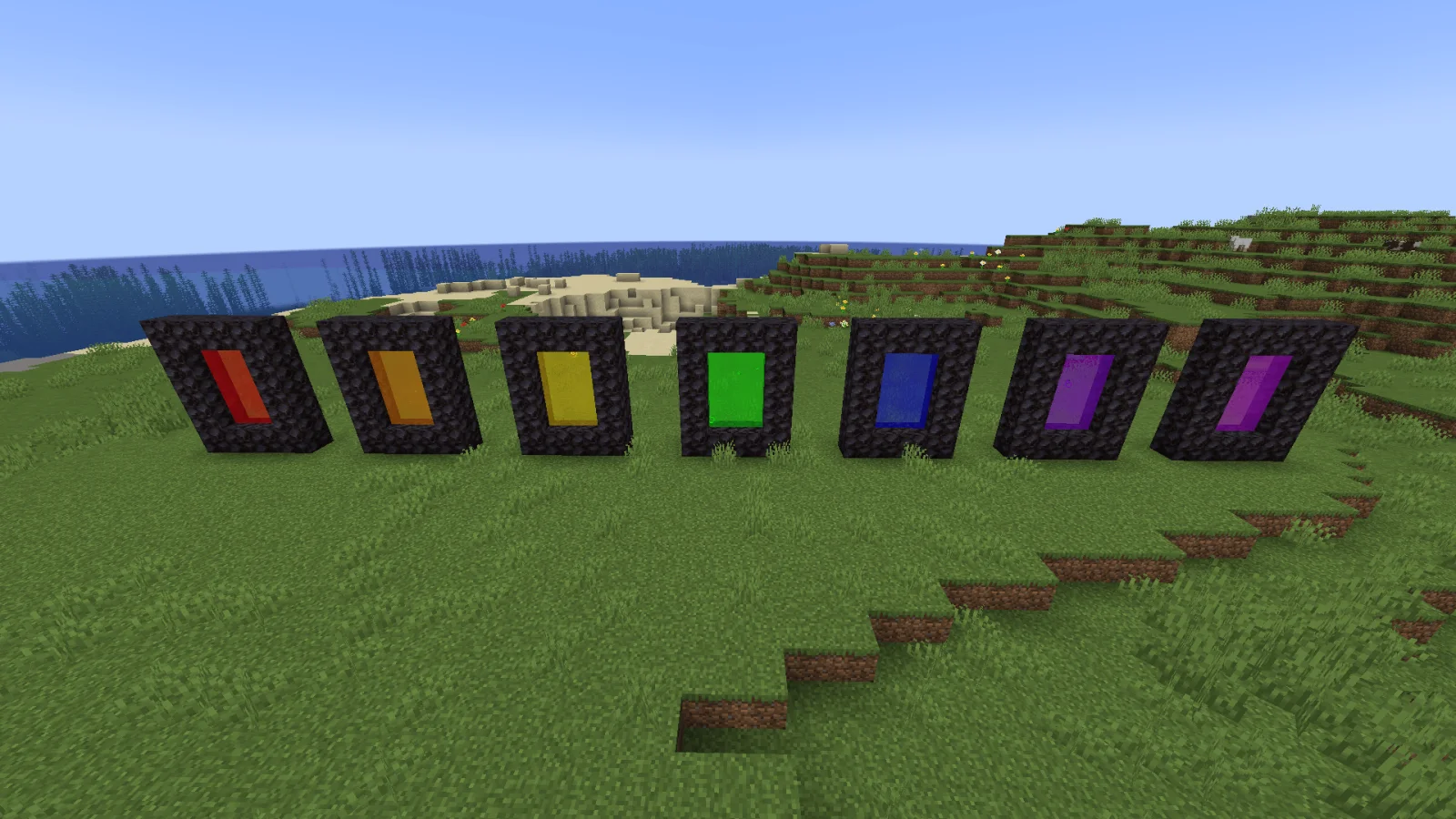
WorldLink to mod, autor: thausle. Connect independent Minecraft worlds and servers through configurable in-game portals, with safe player-data transfer and support for compatible mods.
Obsługiwane wersje: Minecraft 1.20. Liczba pobrań w serwisie Modrinth: 6. Ostatnia aktualizacja: 28.09.2026.
Najnowsza to 0.2.2, wydana 28.09.2026. Jest zrobiona dla Minecraft 1.20.1. Działa na Forge. Plik ma 1.2 MB.
| Wersja | Wydano | Minecraft | Typ |
|---|---|---|---|
0.2.2 | 28.09.2026 | 1.20.1 | Wydanie |
🌀 WorldLink
Your worlds were never meant to be islands.
Every Minecraft world normally exists alone.
Your survival world. Your building world. An old save you haven't visited in years. A friend's server. A massive modpack server running somewhere else entirely.
They're separate places, divided by menus, loading screens, server lists, and save folders.
WorldLink turns them into destinations.
Build a portal.
Ignite it.
Choose where it leads.
Step inside—and continue your adventure somewhere else.
No server-selection screen pretending to be a portal.
Just walk through.
🌎 Connect Minecraft Worlds
WorldLink is a Forge 1.20.1 mod that connects independent Minecraft worlds and servers through physical, configurable in-game portals.
A WorldLink portal can lead to another configured local world or a remote Minecraft server, allowing places that normally exist completely independently to become part of one connected adventure.
Instead of leaving the game, navigating menus, finding another save or server, and reconnecting manually, the portal becomes the boundary between worlds.
Walk in here.
Walk out there.
🌀 A Portal That Feels Like a Portal
WorldLink portals are designed to feel like part of Minecraft—not like a server-selection menu disguised as a block.
Build the frame, ignite it with Flint and Steel, configure the destination, and the interior comes alive.
WorldLink portals feature:
Configurable portal destinations
Customizable portal colors
Dynamic rectangular portal sizes
Optional frame corners
Animated portal rendering
Layered visual effects
Swirling ambient particles
Lightning ignition
Portal implosion effects
Nether-inspired travel distortion
Nether-style ambient sound
Survival travel countdown
Arrival protection
Automatic portal rearming
Protection against accidental travel after login
Player-facing travel status and failure messages
Automatic collapse when required frame blocks are destroyed
Explosion-aware portal collapse
Support for complicated shared-frame portal structures
When you ignite a valid frame, lightning strikes the point of activation as the portal comes alive.
Step inside and the screen begins to distort. As the travel countdown progresses, the effect intensifies until the transition begins.
Destroy a required part of an active portal and the membrane implodes, accompanied by its collapse effects rather than simply disappearing.
WorldLink also understands that portals can get weird.
Shared frames, intersecting structures, large portals, missing metadata, and orphaned portal membranes are handled defensively. If the physical structure of an active portal is compromised—including by an explosion—WorldLink works to invalidate the affected portal instead of leaving a floating ghost membrane behind.
The portal isn't just how you select another world.
It's how you get there.
🚀 The Player Can Travel Too
Connecting worlds was only the beginning.
WorldLink includes a transactional player-data transfer system designed to allow supported player state to follow the player between independent Minecraft environments.
Before travel, the source prepares a snapshot of participating player data.
WorldLink then manages that snapshot through the journey:
Capture → Persist → Travel → Claim → Restore → Verify → Consume
The destination doesn't simply assume the transfer worked.
It verifies it.
Only after restoration succeeds and the resulting player state has been verified is the transaction considered complete.
WorldLink treats player-data movement as a transaction rather than a blind copy operation.
🎒 Pack Your Bags—or Leave Them Behind
Sometimes you want the player and their supported data to cross worlds.
Sometimes you only want the player to travel.
WorldLink supports both.
Administrators can enable or disable player-data transfer for a WorldLink environment.
PLAYER_DATA_TRANSFER
When player-data transfer is enabled, WorldLink prepares a transfer transaction and attempts to carry supported player state through the journey.
The player is told:
Your bags are packed.
TRAVEL_ONLY
When player-data transfer is disabled, WorldLink performs the journey without creating a player-data transaction.
No player snapshot.
No transfer UUID.
No pending transfer.
No restore claim.
The player simply travels to the destination while transferable player data is left behind.
The player is told:
Your items are left behind.
This allows WorldLink to function both as a player-data transfer system and as a portal network connecting otherwise independent Minecraft environments.
🧩 WorldLink 0.2.1 — Player Data Compatibility Update
Minecraft players don't stop at their vanilla inventory.
Modded Minecraft can attach equipment, progression, capabilities, backing storage, skills, and other persistent state to a player.
WorldLink 0.2.1 dramatically expands the amount of modded player data that can make the journey.
⛏️ Project MMO
WorldLink includes compatibility with Project MMO (PMMO).
Supported PMMO player progression participates in WorldLink's transactional player-data process:
Capture → Restore → Synchronize → Verify
PMMO progression can therefore follow the player through supported WorldLink transfers instead of being treated as unrelated server-side state.
🎒 Sophisticated Backpacks
WorldLink 0.2.1 adds dedicated support for Sophisticated Backpacks.
A Sophisticated Backpack is more than the ItemStack visible in a player's inventory. Its contents can exist in separate backing storage referenced by the backpack.
WorldLink understands that distinction.
For supported backpacks carried through the player's normal inventory, WorldLink can:
Detect backpack backing-storage references
Capture the corresponding backpack contents
Transfer that backing data with the player transaction
Restore it at the destination
Verify the restored backing data before declaring the handler successful
That means the backpack doesn't merely arrive.
Its supported contents can arrive with it.
💍 Curios
WorldLink 0.2.1 includes Curios player-data transfer support.
Rather than hard-coding individual equipment slots, WorldLink transfers the participating Curios capability state.
This allows supported equipped items and their slot assignments to participate in the same transactional journey as the rest of the player.
Curios data is:
Captured → Restored → Reprocessed → Verified
Because WorldLink works with the Curios capability rather than maintaining a fixed list of equipment slots, this compatibility can naturally extend to mods that build their equipment systems on Curios.
Which leads to...
☁️ The Aether
The Aether's accessory slots are supported through WorldLink's Curios integration.
WorldLink has been runtime-tested with Aether-specific accessory equipment slots, including Aether's specialized Curios equipment.
Items remain equipped in their appropriate slots after the supported transfer.
No separate WorldLink Aether handler was required.
Curios already gave us the bridge. WorldLink simply takes it across worlds.
🛠️ Tool Belt
Tool Belt presented a different challenge.
Tool Belts placed in ordinary Curios equipment participate through WorldLink's Curios integration.
But Tool Belt also provides its own dedicated V-key equipment slot, separate from the ordinary Curios state.
WorldLink 0.2.1 therefore includes dedicated compatibility for that slot.
The dedicated Tool Belt state is:
Captured → Serialized → Restored → Verified
This allows Tool Belt's special equipment state to participate in WorldLink's transactional player-data system without requiring modifications to Tool Belt itself.
🔌 Optional Compatibility
Project MMO, Sophisticated Backpacks, Curios, The Aether, and Tool Belt are not required dependencies of WorldLink.
WorldLink remains usable without them.
Compatibility handlers participate when their corresponding mods and supported data are present.
That allows WorldLink to provide deeper integration in heavily modded environments without requiring every WorldLink installation to use the same collection of mods.
🛡️ Designed to Fail Safely
Cross-server player data is something WorldLink treats carefully.
A transfer can involve multiple independent mods, persistent state, two Minecraft environments, a client disconnect, another connection, and plenty of opportunities for something to go wrong.
WorldLink therefore uses a fail-closed transactional design.
If participating player data cannot be safely prepared, travel preparation can be aborted rather than intentionally creating a partial transfer.
If a compatibility handler throws an exception, WorldLink isolates the failure instead of allowing an incomplete snapshot to silently continue.
If ownership doesn't match, the transfer isn't restored to the wrong player.
If restoration cannot be verified, the transaction isn't treated as successfully completed.
And a successful transfer isn't considered finished merely because some data was written.
Restore first. Verify second. Consume last.
WorldLink also maintains persistent recovery state where appropriate so interrupted journeys don't have to depend entirely on volatile server or client memory.
🌐 Built for Independent Servers
WorldLink supports travel to remote Minecraft servers.
For supported player-data transfers between independent environments, WorldLink includes an authenticated client-relay transfer path.
The source prepares the transaction.
The client carries the prepared transfer envelope through the server transition.
The destination validates the arriving transaction before attempting restoration.
Remote WorldLink environments therefore do not inherently need to share the same physical transfer directory just to perform a supported relay transfer.
The destination still owns the important decisions:
Is this transfer valid?
Does it belong to this player?
Was restoration actually successful?
Only after successful restoration and verification does the player-data transaction complete.
🔌 Public Player Data API
WorldLink's built-in integrations are not intended to be the end of mod compatibility.
A heavily modded Minecraft player can contain:
Skills
Levels
Mana
Progression
Capabilities
Persistent attributes
Unlocks
Statistics
Equipment systems
Other mod-specific player state
WorldLink cannot safely guess what another mod's data means.
So it doesn't try.
Instead, WorldLink provides a public Player Data API that allows another Forge mod or compatibility addon to teach WorldLink how its data should participate.
A handler owns its data:
Should I participate? → Capture → Restore → Verify
WorldLink owns the infrastructure around it:
Transactions → Persistence → Claims → Recovery → Cleanup → Failure Isolation
A compatibility implementation doesn't need to recreate WorldLink's entire cross-world transfer system just to move its own player state.
Implement a handler.
Register it.
Let WorldLink handle the journey.
🧠 You Own Your Data. WorldLink Owns the Journey.
The Player Data API supports stable handler IDs and handler data versions so compatibility implementations can evolve without silently treating incompatible data formats as valid.
Multiple handlers can participate in the same transaction.
Each handler remains responsible for understanding and verifying its own data.
If a participating handler fails during preparation, WorldLink can identify the failure and abort rather than deliberately creating a snapshot already known to be incomplete.
WorldLink's compatibility philosophy is simple:
You own your mod's data. WorldLink owns the journey.
📦 Persistent Transfer Storage
WorldLink maintains persistent transaction storage for transfer states that require durable recovery.
A fresh local installation uses:
WorldLink-Transfers
Transfer storage separates pending and consumed transactions.
A pending transaction represents player data that has been prepared but has not yet successfully completed its lifecycle.
After successf
Autor: thausle. Z obrazkami na Modrinth.
Ten mod jest potrzebny na serwerze i u każdego gracza, który dołącza.
Zainstaluj Forge dla Minecraft 1.20.
Pobierz plik .jar z Modrinth i wrzuć go do folderu mods w katalogu .minecraft.
Uruchom Minecraft z profilem Forge.
Prościej: w Prism Launcher lub Modrinth App wyszukaj WorldLink w modach swojej instancji i kliknij Install. Loader i potrzebne mody zostaną dodane za ciebie.
| Zasób | Pobrania | Wersje | Aktualizacja | Cena |
|---|---|---|---|---|
 WorldLinkten, który oglądałeś | 6 | 1.20 | 28 wrz 2026 | Za darmo |
| OpenSpeakersMjderheftige | 9 | 1.12 | 27 wrz 2026 | Za darmo |
 Portal RelocatorMrbysco | 1 | 1.21 | 2 d. temu | Za darmo |
 ResourcifyDeDiamondPro | 14.1M | 1.8 – 26.x | 24 paź 2026 | Za darmo |
Jeszcze nie. Najnowsza obsługiwana wersja to Minecraft 1.20.
Tak. WorldLink można pobrać za darmo z serwisu Modrinth.
Obie. Serwer i każdy gracz muszą mieć zainstalowany WorldLink.
Tak. Ostatnia aktualizacja wyszła w ciągu ostatniej doby.
Najbliższe to OpenSpeakers, Portal Relocator i Resourcify. Porównaj wszystkie alternatywy
OpenSpeakersMody · 1.12OpenSpeakers adds a configurable speaker network to Minecraft, allowing you to link speakers and broadcast custom sounds from content packs throughout your…
Portal RelocatorMody · 1.21Changes where you end up when going through a Nether Portal
ResourcifyMody · 1.8 – 26.xIn-game resource pack, data pack and shader browser and updater.
 Seamless Loading ScreenMody · 1.16 – 1.21
Takes a screenshot of the game when you leave a world or server, and displays it when you rejoin it.
 Create: ConnectedMody · 1.18 – 1.21
QoL blocks that you wish existed in Create - Highly configurable, disable what you don't need
 Xaero ZoomoutMody · 1.19 – 26.x
Reduces the minimum zoom of Xaero's World Map from 0.0625x to 0.0025x, so you can see everything!
Zaloguj się, aby wystawić opinię.