
 Geyser and Floodgate auto uploaderPlugins · 1.16 – 26.x
An automatic updater plugin for GeyserMC / Floodgate/MCXboxBroadcast./viaversion/viabackwards/ Supports Spigot (and forks like Paper), BungeeCord, and Velocity.
Gratuit153,513 téléchargements
a plugin that only shows the player his death point
Téléchargement direct depuis Modrinth · 8 téléchargements
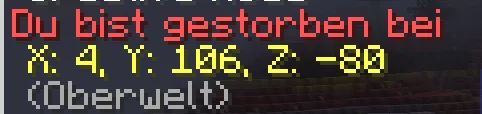
ErlingHailand a créé Death-Coordinates (plugin) pour les serveurs Paper / Spigot. a plugin that only shows the player his death point.
Versions prises en charge : Minecraft 26.x. On compte 8 téléchargements sur Modrinth. Il arrive ainsi en position n° 45 sur les 54 plugins de technologie listés ici. La dernière mise à jour date du 03/11/2026.
La plus récente est 1.0.0, sortie le 03/11/2026. Elle est faite pour Minecraft 26.3. Elle fonctionne sur Paper. Le téléchargement fait 5 KB.
| Version | Publié | Minecraft | Type |
|---|---|---|---|
1.0.0 | 03/11/2026 | 26.3 | Stable |
The Custom Death Coordinates Plugin is a lightweight and useful Minecraft Paper plugin designed to make finding your items after death much easier. Whenever a player dies, the plugin automatically detects their exact death location and sends the coordinates directly to their chat.
Instead of having to remember where you died or trying to find your death location manually, you will instantly receive a private chat message containing your exact X, Y, and Z coordinates. This allows you to quickly return to the location of your death and recover your items without unnecessary frustration.
One of the main features of this plugin is its privacy-focused design. Death coordinates are sent exclusively to the player who died. Other players will not receive the coordinates, meaning nobody else can see where you died through the plugin. Additionally, the coordinates are not broadcast publicly or stored in server logs by the plugin, keeping your death locations private.
The plugin works automatically in the background without requiring players to use any commands or interact with additional menus. Simply die, and your coordinates will appear in your chat immediately.
Features:
The Custom Death Coordinates Plugin is perfect for SMP, Survival, Lifesteal, and PvP servers that want to make item recovery easier while keeping death locations completely private. A simple, lightweight, and convenient addition to any Minecraft Paper server!
Écrite par ErlingHailand. À lire avec les images sur Modrinth.
Vérifie que ton serveur tourne sous Paper et Spigot en Minecraft 26.x.
Télécharge le fichier .jar depuis Modrinth et place-le dans le dossier plugins de ton serveur.
Redémarre le serveur. Évite /reload, beaucoup de plugins le supportent mal.
Tape /plugins dans la console : Death-Coordinates doit apparaître en vert. Ses fichiers de config sont créés dans le dossier plugins au premier démarrage.
Guide complet: Comment installer des plugins sur un serveur Minecraft
| Ressource | Téléchargements | Versions | Mise à jour | Prix |
|---|---|---|---|---|
| Death-Coordinatescelle que tu regardais | 8 | 26.x | il y a 7 jours | Gratuit |
| Geyser and Floodgate auto uploadernehatsu. | 154K | 1.16 – 26.x | il y a 13 jours | Gratuit |
 Lag ProtectionVyndral | 30K | 1.16 – 26.x | 19 sept. 2026 | Gratuit |
| CombatLogHitShift | 13 | 1.20 – 26.x | il y a 7 jours | Gratuit |
Oui. Death-Coordinates prend en charge Minecraft 26.x. Toutes les versions prises en charge : 26.x.
Oui. Death-Coordinates se télécharge gratuitement sur Modrinth.
Death-Coordinates fonctionne sur les serveurs Paper et Spigot.
Oui. La dernière mise à jour date des dernières 24 heures.
Les plus proches sont Geyser and Floodgate auto uploader, Lag Protection et CombatLog. Comparer toutes les alternatives
Geyser and Floodgate auto uploaderPlugins · 1.16 – 26.xAn automatic updater plugin for GeyserMC / Floodgate/MCXboxBroadcast./viaversion/viabackwards/ Supports Spigot (and forks like Paper), BungeeCord, and Velocity.
Lag ProtectionPlugins · 1.16 – 26.xSaves your players from bad ping by cancelling out damage taken!
Combat Log plugin, that punishes players for disconnecting instead of fighting
 NetworkLockPlugins · 1.8 – 26.x
Players can only join your game servers through your proxy. One jar for everything.
 Axiom Paper PluginPlugins · 1.20 – 26.x
The Paper Plugin of the server-side implementation for Axiom, the all in one tool for editing Minecraft worlds.
 AntixrayPlugins · 1.20 – 26.x
A Simple Antyxray plugin for your server
Connecte-toi pour laisser un avis.