
 Geyser and Floodgate auto uploaderPlugins · 1.16 – 26.x
An automatic updater plugin for GeyserMC / Floodgate/MCXboxBroadcast./viaversion/viabackwards/ Supports Spigot (and forks like Paper), BungeeCord, and Velocity.
Free153,513 downloads
a plugin that only shows the player his death point
Opens Modrinth · 7 downloads there
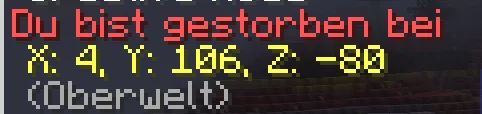
a plugin that only shows the player his death point
Death-Coordinates is a plugin for Paper / Spigot servers, made by ErlingHailand. It supports Minecraft 26.x. It has been downloaded 7 times on Modrinth. That puts it at #38 of the 49 technology plugins listed here. The last update came out on Nov 3, 2026.
The newest is 1.0.0, released on Nov 3, 2026. It is made for Minecraft 26.3. It runs on Paper. The download is 5 KB.
| Version | Released | Minecraft | Type |
|---|---|---|---|
1.0.0 | Nov 3, 2026 | 26.3 | Release |
The Custom Death Coordinates Plugin is a lightweight and useful Minecraft Paper plugin designed to make finding your items after death much easier. Whenever a player dies, the plugin automatically detects their exact death location and sends the coordinates directly to their chat.
Instead of having to remember where you died or trying to find your death location manually, you will instantly receive a private chat message containing your exact X, Y, and Z coordinates. This allows you to quickly return to the location of your death and recover your items without unnecessary frustration.
One of the main features of this plugin is its privacy-focused design. Death coordinates are sent exclusively to the player who died. Other players will not receive the coordinates, meaning nobody else can see where you died through the plugin. Additionally, the coordinates are not broadcast publicly or stored in server logs by the plugin, keeping your death locations private.
The plugin works automatically in the background without requiring players to use any commands or interact with additional menus. Simply die, and your coordinates will appear in your chat immediately.
Features:
The Custom Death Coordinates Plugin is perfect for SMP, Survival, Lifesteal, and PvP servers that want to make item recovery easier while keeping death locations completely private. A simple, lightweight, and convenient addition to any Minecraft Paper server!
Written by ErlingHailand. Read it with pictures on Modrinth.
Make sure your server runs Paper and Spigot on Minecraft 26.x.
Download the .jar file from Modrinth and put it in the plugins folder of your server.
Restart the server. Avoid /reload, many plugins do not handle it well.
Type /plugins in the console: Death-Coordinates should be listed in green. Its config files are created in the plugins folder on the first start.
| Resource | Downloads | Versions | Last update | Price |
|---|---|---|---|---|
| Death-Coordinatesthe one you looked at | 7 | 26.x | 7 days ago | Free |
| Geyser and Floodgate auto uploadernehatsu. | 154K | 1.16 – 26.x | 13 days ago | Free |
 Lag ProtectionVyndral | 30K | 1.16 – 26.x | Sep 19, 2026 | Free |
| CombatLogHitShift | 10 | 1.20 – 26.x | 7 days ago | Free |
Yes. Death-Coordinates supports Minecraft 26.x. All supported versions: 26.x.
Yes. Death-Coordinates is free to download from Modrinth.
Death-Coordinates runs on Paper and Spigot servers.
Yes. The last update came out in the past day.
The closest ones are Geyser and Floodgate auto uploader, Lag Protection and CombatLog. Compare all alternatives
Geyser and Floodgate auto uploaderPlugins · 1.16 – 26.xAn automatic updater plugin for GeyserMC / Floodgate/MCXboxBroadcast./viaversion/viabackwards/ Supports Spigot (and forks like Paper), BungeeCord, and Velocity.
Lag ProtectionPlugins · 1.16 – 26.xSaves your players from bad ping by cancelling out damage taken!
Combat Log plugin, that punishes players for disconnecting instead of fighting
 NetworkLockPlugins · 1.21 – 26.x
Stops proxy bypass: players can only join your Paper or Sponge servers through your Velocity or BungeeCord proxy. One jar.
 Axiom Paper PluginPlugins · 1.20 – 26.x
The Paper Plugin of the server-side implementation for Axiom, the all in one tool for editing Minecraft worlds.
 AntixrayPlugins · 1.20 – 26.x
A Simple Antyxray plugin for your server
Log in to leave a review.