
 inventorysorterPlugins · 26.x
Shift-double-click an empty slot to combine stacks and sort by item group, even with a crafting table or furnace open.
Gratuit27 téléchargements

Upgradeable furnaces with faster smelting.
Téléchargement direct depuis Modrinth · 30 téléchargements
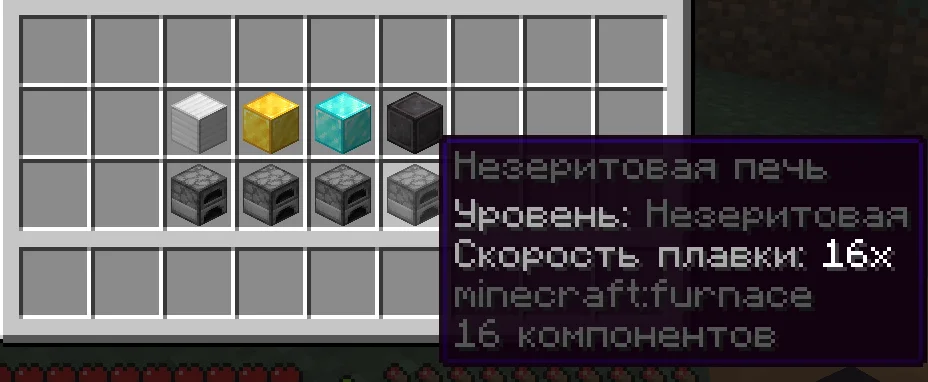
AmazonFix a créé The Fastest Furnace (plugin) pour les serveurs Paper / Spigot. Upgradeable furnaces with faster smelting.
Versions prises en charge : Minecraft 1.20 – 26.x. On compte 30 téléchargements sur Modrinth. Il arrive ainsi en position n° 39 sur les 72 plugins de technologie listés ici. La dernière mise à jour date du 09/11/2026.
La plus récente est 1.0-Release, sortie le 04/11/2026. Elle est faite pour Minecraft 1.20 – 26.3. Elle fonctionne sur Bukkit, Paper, Purpur et Spigot. Le téléchargement fait 19 KB.
| Version | Publié | Minecraft | Type |
|---|---|---|---|
1.0-Release | 04/11/2026 | 1.20 – 26.3 | Stable |
Les commandes citées sur la page Modrinth de The Fastest Furnace :
/ffUpgrade regular furnaces and significantly increase their smelting speed.
The Fastest Furnace adds four furnace tiers, configurable speed multipliers, visual identification, upgrade animations, sounds, and protection against common exploits.
Tier · Required Item · Default Speed
Iron · Iron Block · 2x
Gold · Gold Block · 4x
Diamond · Diamond Block · 8x
Netherite · Netherite Block · 16x
Upgrades must be applied in order:
Regular → Iron → Gold → Diamond → Netherite
Right-click a furnace with the required block to upgrade it.
Each upgraded furnace has its own name, item description, Action Bar text, and particle color:
Tier · Particle Color
Iron · Silver
Gold · Orange-gold
Diamond · Aqua
Netherite · Dark purple
Particles, upgrade animations, sounds, and Action Bar messages can be enabled or disabled separately.
Command · Description
/ff reload · Reloads the plugin configuration
Permission · Description · Default
fastestfurnace.upgrade · Allows players to upgrade furnaces · Everyone
fastestfurnace.reload · Allows configuration reloads · Operators
Every furnace tier has an independent speed multiplier:
tiers:
iron:
speed: 2.0
gold:
speed: 4.0
diamond:
speed: 8.0
netherite:
speed: 16.0
Placement hints can be configured or disabled:
placement-hint:
enabled: true
cooldown-seconds: 600
Visual effects can be controlled separately:
particles:
upgrade:
enabled: true
ambient:
enabled: true
action-bar:
enabled: true
range: 6
text: "&e{tier} Furnace &7• &fSpeed: {speed}x"
Upgrade sounds are configurable:
sounds:
upgrade:
enabled: true
sound: ENTITY_PLAYER_LEVELUP
volume: 1.0
pitch: 1.2
Use /ff reload after changing the configuration.
Missing settings are automatically added when the plugin is updated. Existing administrator-defined values are preserved.
The plugin uses the Bukkit API and does not depend on internal Minecraft server code.
Улучшайте обычные печи и значительно увеличивайте скорость переплавки.
The Fastest Furnace добавляет четыре уровня печей, настраиваемые множители скорости, визуальное отображение уровня, анимацию улучшения, звуки и защиту от распространённых способов обхода механики.
Уровень · Необходимый предмет · Скорость по умолчанию
Железный · Железный блок · 2x
Золотой · Золотой блок · 4x
Алмазный · Алмазный блок · 8x
Незеритовый · Незеритовый блок · 16x
Улучшения устанавливаются строго по порядку:
Обычная → Железная → Золотая → Алмазная → Незеритовая
Для улучшения нажмите ПКМ по печи, удерживая необходимый блок.
Каждый уровень имеет собственное название, описание предмета, надпись над полосой опыта и цвет частиц:
Уровень · Цвет частиц
Железный · Серебристый
Золотой · Оранжево-золотой
Алмазный · Голубой
Незеритовый · Тёмно-фиолетовый
Постоянные частицы, анимацию улучшения, звук и надпись над полосой опыта можно отключать отдельно.
Команда · Описание
/ff reload · Перезагружает конфигурацию плагина
Право · Описание · По умолчанию
fastestfurnace.upgrade · Разрешает улучшать печи · Все игроки
fastestfurnace.reload · Разрешает перезагружать конфиг · Операторы
Для каждого уровня можно установить отдельный множитель скорости:
tiers:
iron:
speed: 2.0
gold:
speed: 4.0
diamond:
speed: 8.0
netherite:
speed: 16.0
Подсказку при установке обычной печи можно настроить или отключить:
placement-hint:
enabled: true
cooldown-seconds: 600
Визуальные эффекты настраиваются отдельно:
particles:
upgrade:
enabled: true
ambient:
enabled: true
action-bar:
enabled: true
range: 6
text: "&e{tier} печь &7• &fСкорость: {speed}x"
Настройки звука улучшения:
sounds:
upgrade:
enabled: true
sound: ENTITY_PLAYER_LEVELUP
volume: 1.0
pitch: 1.2
После изменения настроек используйте /ff reload.
При обновлении плагин автоматически добавляет отсутствующие параметры. Значения, изменённые администратором, сохраняются.
Плагин использует Bukkit API и не зависит от внутренних классов сервера Minecraft.
Écrite par AmazonFix. À lire avec les images sur Modrinth.
Vérifie que ton serveur tourne sous Paper et Spigot en Minecraft 1.20 – 26.x.
Télécharge le fichier .jar depuis Modrinth et place-le dans le dossier plugins de ton serveur.
Redémarre le serveur. Évite /reload, beaucoup de plugins le supportent mal.
Tape /plugins dans la console : The Fastest Furnace doit apparaître en vert. Ses fichiers de config sont créés dans le dossier plugins au premier démarrage.
Guide complet: Comment installer des plugins sur un serveur Minecraft
| Ressource | Téléchargements | Versions | Mise à jour | Prix |
|---|---|---|---|---|
| The Fastest Furnacecelle que tu regardais | 30 | 1.20 – 26.x | il y a 6 jours | Gratuit |
| inventorysorterrewrite123 | 27 | 26.x | il y a 22 jours | Gratuit |
 InteractionVisualizerLOOHP | 13K | 1.12 – 26.x | 19 sept. 2026 | Gratuit |
 BlockProtspnda | 1,997 | 1.17 – 1.20 | 28 mai 2024 | Gratuit |
Oui. The Fastest Furnace prend en charge Minecraft 26.x. Toutes les versions prises en charge : 26.x, 1.21, 1.20.
Oui. The Fastest Furnace se télécharge gratuitement sur Modrinth.
The Fastest Furnace fonctionne sur les serveurs Paper et Spigot.
Oui. The Fastest Furnace est un plugin serveur : il va dans le dossier plugins du serveur, pas dans le dossier mods du jeu d'un joueur.
Oui. La dernière mise à jour date des dernières 24 heures.
Les plus proches sont inventorysorter, InteractionVisualizer et BlockProt. Comparer toutes les alternatives
inventorysorterPlugins · 26.xShift-double-click an empty slot to combine stacks and sort by item group, even with a crafting table or furnace open.
InteractionVisualizerPlugins · 1.12 – 26.xVisualize Crafting Tables, Furnaces, Enchantment Tables and more with animations through packets!
BlockProtPlugins · 1.17 – 1.20Protect and lock Chests, Furnaces, etc. with a easy to use GUI.
 ChestLockerPlugins · 1.18 – 1.21
A dead simple and light-weight plugin to lock your chests, barrels, droppers, furnaces and more!
 Copper Golem ClerkPlugins · 26.x
Turn copper golems into a storage staff that actually keeps your base in order. They sort smartly and can manage your furnaces.
 SmelterPlugins · 26.x
Smelter is an enchantment that you can add to pickaxes that will turn metal ores into ingots upon breaking!
Connecte-toi pour laisser un avis.