
 Universal Vein MinerPlugins · 1.17 – 26.x
A faster way to mine ores, logs
Free42,171 downloads

Upgradeable furnaces with faster smelting.
Direct download from Modrinth · 23 downloads
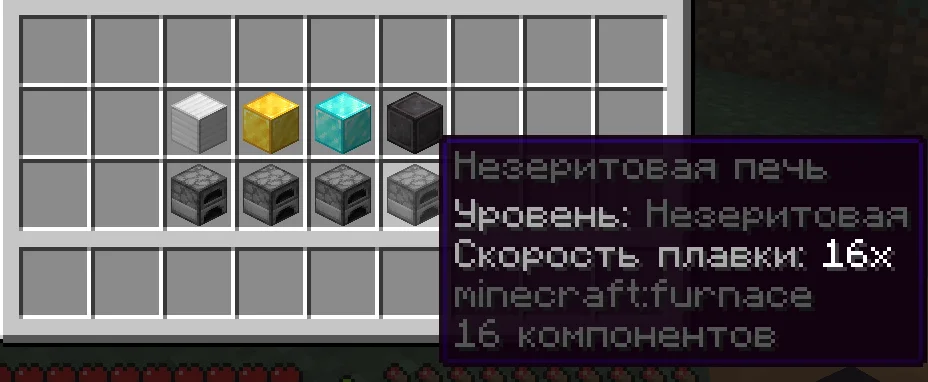
The Fastest Furnace is a plugin for Paper / Spigot servers, made by AmazonFix. Upgradeable furnaces with faster smelting.
It supports Minecraft 1.20 – 26.x. It has been downloaded 23 times on Modrinth. That puts it at #42 of the 72 technology plugins listed here. The last update came out on Nov 9, 2026.
The newest is 1.0-Release, released on Nov 4, 2026. It is made for Minecraft 1.20 – 26.3. It runs on Bukkit, Paper, Purpur and Spigot. The download is 19 KB.
| Version | Released | Minecraft | Type |
|---|---|---|---|
1.0-Release | Nov 4, 2026 | 1.20 – 26.3 | Release |
The commands named on the Modrinth page of The Fastest Furnace:
/ffUpgrade regular furnaces and significantly increase their smelting speed.
The Fastest Furnace adds four furnace tiers, configurable speed multipliers, visual identification, upgrade animations, sounds, and protection against common exploits.
Tier · Required Item · Default Speed
Iron · Iron Block · 2x
Gold · Gold Block · 4x
Diamond · Diamond Block · 8x
Netherite · Netherite Block · 16x
Upgrades must be applied in order:
Regular → Iron → Gold → Diamond → Netherite
Right-click a furnace with the required block to upgrade it.
Each upgraded furnace has its own name, item description, Action Bar text, and particle color:
Tier · Particle Color
Iron · Silver
Gold · Orange-gold
Diamond · Aqua
Netherite · Dark purple
Particles, upgrade animations, sounds, and Action Bar messages can be enabled or disabled separately.
Command · Description
/ff reload · Reloads the plugin configuration
Permission · Description · Default
fastestfurnace.upgrade · Allows players to upgrade furnaces · Everyone
fastestfurnace.reload · Allows configuration reloads · Operators
Every furnace tier has an independent speed multiplier:
tiers:
iron:
speed: 2.0
gold:
speed: 4.0
diamond:
speed: 8.0
netherite:
speed: 16.0
Placement hints can be configured or disabled:
placement-hint:
enabled: true
cooldown-seconds: 600
Visual effects can be controlled separately:
particles:
upgrade:
enabled: true
ambient:
enabled: true
action-bar:
enabled: true
range: 6
text: "&e{tier} Furnace &7• &fSpeed: {speed}x"
Upgrade sounds are configurable:
sounds:
upgrade:
enabled: true
sound: ENTITY_PLAYER_LEVELUP
volume: 1.0
pitch: 1.2
Use /ff reload after changing the configuration.
Missing settings are automatically added when the plugin is updated. Existing administrator-defined values are preserved.
The plugin uses the Bukkit API and does not depend on internal Minecraft server code.
Улучшайте обычные печи и значительно увеличивайте скорость переплавки.
The Fastest Furnace добавляет четыре уровня печей, настраиваемые множители скорости, визуальное отображение уровня, анимацию улучшения, звуки и защиту от распространённых способов обхода механики.
Уровень · Необходимый предмет · Скорость по умолчанию
Железный · Железный блок · 2x
Золотой · Золотой блок · 4x
Алмазный · Алмазный блок · 8x
Незеритовый · Незеритовый блок · 16x
Улучшения устанавливаются строго по порядку:
Обычная → Железная → Золотая → Алмазная → Незеритовая
Для улучшения нажмите ПКМ по печи, удерживая необходимый блок.
Каждый уровень имеет собственное название, описание предмета, надпись над полосой опыта и цвет частиц:
Уровень · Цвет частиц
Железный · Серебристый
Золотой · Оранжево-золотой
Алмазный · Голубой
Незеритовый · Тёмно-фиолетовый
Постоянные частицы, анимацию улучшения, звук и надпись над полосой опыта можно отключать отдельно.
Команда · Описание
/ff reload · Перезагружает конфигурацию плагина
Право · Описание · По умолчанию
fastestfurnace.upgrade · Разрешает улучшать печи · Все игроки
fastestfurnace.reload · Разрешает перезагружать конфиг · Операторы
Для каждого уровня можно установить отдельный множитель скорости:
tiers:
iron:
speed: 2.0
gold:
speed: 4.0
diamond:
speed: 8.0
netherite:
speed: 16.0
Подсказку при установке обычной печи можно настроить или отключить:
placement-hint:
enabled: true
cooldown-seconds: 600
Визуальные эффекты настраиваются отдельно:
particles:
upgrade:
enabled: true
ambient:
enabled: true
action-bar:
enabled: true
range: 6
text: "&e{tier} печь &7• &fСкорость: {speed}x"
Настройки звука улучшения:
sounds:
upgrade:
enabled: true
sound: ENTITY_PLAYER_LEVELUP
volume: 1.0
pitch: 1.2
После изменения настроек используйте /ff reload.
При обновлении плагин автоматически добавляет отсутствующие параметры. Значения, изменённые администратором, сохраняются.
Плагин использует Bukkit API и не зависит от внутренних классов сервера Minecraft.
Written by AmazonFix. Read it with pictures on Modrinth.
Make sure your server runs Paper and Spigot on Minecraft 1.20 – 26.x.
Download the .jar file from Modrinth and put it in the plugins folder of your server.
Restart the server. Avoid /reload, many plugins do not handle it well.
Type /plugins in the console: The Fastest Furnace should be listed in green. Its config files are created in the plugins folder on the first start.
Full guide: How to install plugins on a Minecraft server
| Resource | Downloads | Versions | Last update | Price |
|---|---|---|---|---|
| The Fastest Furnacethe one you looked at | 23 | 1.20 – 26.x | 6 days ago | Free |
| Universal Vein Minerlongz3r | 42K | 1.17 – 26.x | Jun 24, 2026 | Free |
 Geyser and Floodgate auto uploadernehatsu. | 155K | 1.16 – 26.x | 18 days ago | Free |
 AutoTreeChopMagicTeaMC | 122K | 1.17 – 26.x | 17 days ago | Free |
Yes. The Fastest Furnace supports Minecraft 26.x. All supported versions: 26.x, 1.21, 1.20.
Yes. The Fastest Furnace is free to download from Modrinth.
The Fastest Furnace runs on Paper and Spigot servers.
Yes. The last update came out in the past day.
The closest ones are Universal Vein Miner, Geyser and Floodgate auto uploader and AutoTreeChop. Compare all alternatives
Universal Vein MinerPlugins · 1.17 – 26.xA faster way to mine ores, logs
Geyser and Floodgate auto uploaderPlugins · 1.16 – 26.xAn automatic updater plugin for GeyserMC / Floodgate/MCXboxBroadcast./viaversion/viabackwards/ Supports Spigot (and forks like Paper), BungeeCord, and Velocity.
AutoTreeChopPlugins · 1.17 – 26.xA lightweight, customizable automatic tree chopping plugin for Paper/Folia servers.
 GunshellPlugins · 1.12 – 1.21
With this plugin you can add guns, ammo, throwables and melee weapons to your server.
 SimpleClaimSystemPlugins · 1.18 – 26.x
Full claim system for Minecraft servers. Fully configurable and many plugins supported.
 PerfoBoosterPlugins · 1.8 – 26.x
Delivers powerful server optimization through intelligent resource management.
Log in to leave a review.