NouveauCraftRank SitesSite web et boutique gratuitsCrée la tienne ›
AshlarLogiciel serveur gratuit basé sur Paper, avec protection DDoS et anti-backdoor Voir Ashlar ›CommunautéPose des questions, partage tes constructions et trouve des joueurs Rejoindre le forum ›
Ressources / Mods / Chest Radar

Chest Radar

A mod that allows you to know where everything you stored is, and even works with custom storage (cells, double barrels, ...)

ModsGratuit1.21 – 26.x
par seraphin_be · repris depuis Modrinth
Télécharger ›

Téléchargement direct depuis Modrinth · 75 téléchargements
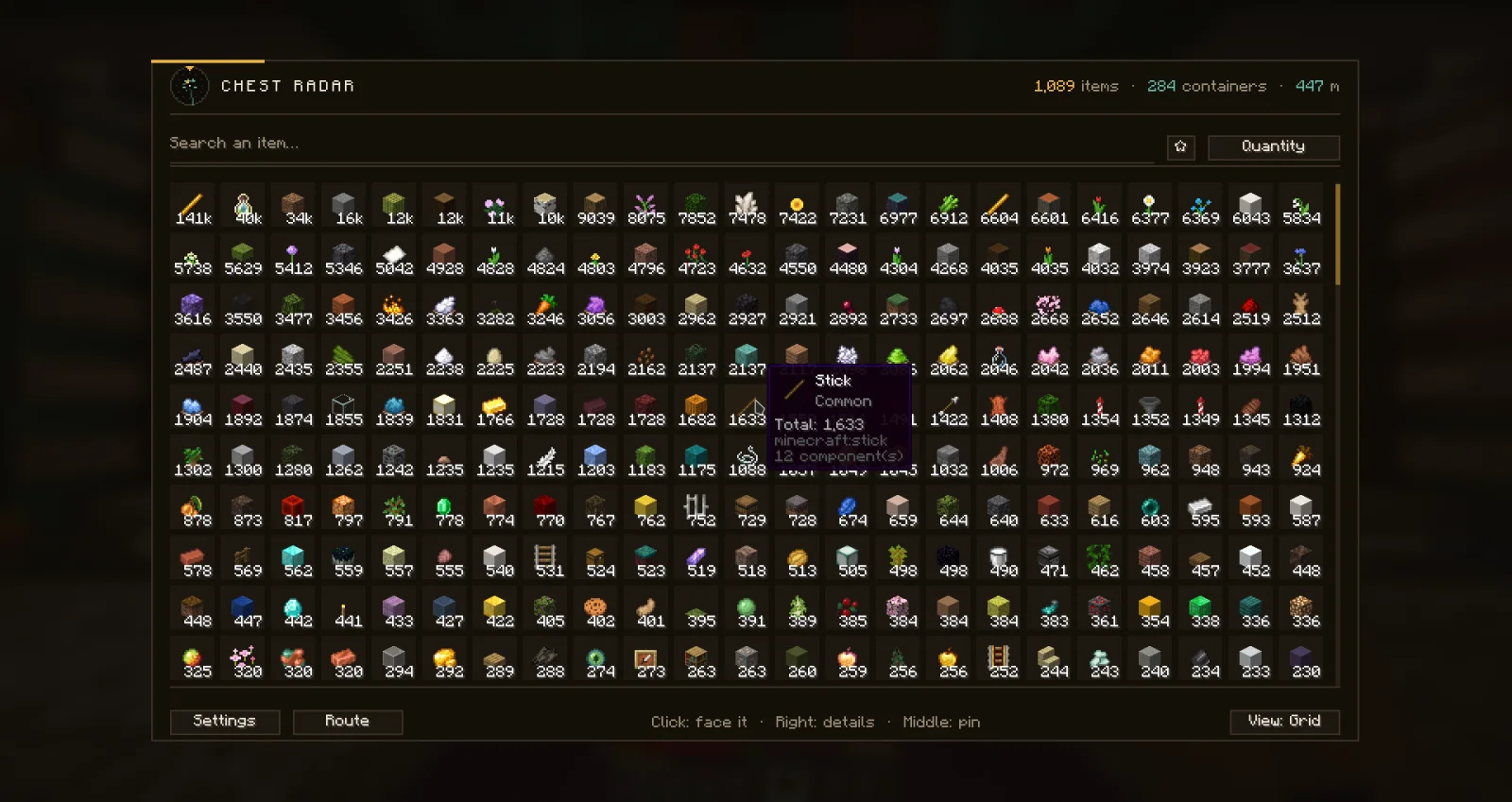
Chest Radar, capture 1

Ce qu'il fait

Chest Radar (mod) est une création de seraphin_be. A mod that allows you to know where everything you stored is, and even works with custom storage (cells, double barrels, ...).

Versions prises en charge : Minecraft 1.21 – 26.x. On compte 75 téléchargements sur Modrinth. La dernière mise à jour date du 07/11/2026.

Versions prises en charge

26.x1.21

Historique des versions

Chest Radar a publié 3 versions sur Modrinth depuis le 07/11/2026. 3 sont sorties au cours de l'année passée. La plus récente est 3.13+26.3, sortie le 07/11/2026. Elle est faite pour Minecraft 26.3. Elle fonctionne sur Fabric. Le téléchargement fait 425 KB.

VersionPubliéMinecraftType
3.13+26.307/11/202626.3Stable
3.13+26.207/11/202626.2Stable
3.1307/11/20261.21.10, 1.21.11Stable
Description de l'auteur sur Modrinth

Chest Radar

Chest Radar indexes the contents of every chest, barrel and placed shulker box you open, so that later you can ask "where did I put the diamonds" and actually get an answer: the item, the quantity, the container it is in and how far away it is.

It works with custom server items too. Items with their own name, lore and datapack enchantments are recorded exactly as your client received them, so a §bVoid Sword with three lines of lore is searchable by any of those words, not just by "sword".

The whole thing is client-side. Nothing is installed on the server, no packet is ever sent, and the servers you join do not need to know it exists. The mod only ever records what your own client already saw you open, which is also its main limitation: a chest you never opened is a chest the radar does not know about.

Only real blocks are indexed. A container has to exist in the world, at coordinates, to be recorded. Ender chests, your own inventory and blockless plugin menus are deliberately left out, because their contents are not at the place the radar would send you to.

Features

  • Opening a container indexes it. Chests, barrels, and shulker boxes placed in the world. No command, no scan, no "index my base" button. You play normally and the index fills itself.
  • Search from your hand. Press R while holding an item and the mod reports in chat every container within range holding it, with coordinates and distance. Hold Shift and it widens to every variant of that item instead of the exact one you hold.
  • The search key also works inside a container screen. It closes the screen and runs the search on the stack under your cursor, or the one you are dragging, or your main hand, in that order. You never have to put an item back in your hand just to ask where the rest of it is. A focused text field wins, so renaming at an anvil still types an r.
  • A full radar screen (G) listing everything indexed around you, filterable and sortable by name, quantity or distance, with an item count and a container count at the top.
  • Two views. A list with one row per item, or a grid of icons with quantity overlays. Toggle it with the button in the toolbar. Your search text survives the switch.
  • Left click takes you there. It closes the radar, outlines the container and turns your camera towards it. Right click shows the item's containers without leaving the screen. Middle click pins it.
  • A search grammar in the search box: multiple terms, exclusions, exact phrases, and prefixes for enchantment, item id, lore, container name, kind, dimension, quantity, distance and age.
  • The container highlight (ESP). After a search, every matching container gets an amber wireframe box drawn through walls, for a configurable number of seconds. The countdown only starts once you close the radar, not when you click.
  • Highlight labels. Each box is captioned with the container's name and how much of the searched item it holds. That is what turns a row of eight identical chests into an answer instead of eight boxes.
  • Slot highlighting. After a search, opening a container outlines the exact slots holding what you were looking for, with a pulsing amber frame, including a shulker box or a bundle that holds the item nested inside it. It has its own duration setting, because reaching the chest can take longer than the wireframe lives.
  • A compass. Once you pick a container, a heading arrow and the remaining distance stay on screen until you arrive. The wireframe expires after a few seconds; the walk across your base usually does not.
  • Look-at preview. Aim at a container the mod has already seen and its known contents appear in the corner, sorted by quantity, with the age of the record, without opening it.
  • "In your chests" on every tooltip. Any item, anywhere in the game, gets a line telling you how many you own in total. Hold Shift and it also shows the container count and the distance to the nearest one. Off by default.
  • Ages on everything. Every container line carries "seen 3 d ago". Past a configurable threshold (7 days by default) the line is greyed out.
  • Automatic purge. Walk past an indexed position whose chunk is loaded and where the block is no longer a container, and the record is deleted. It only ever fires on certainty: an unloaded chunk reads as air exactly like a broken chest, so unloaded positions are left alone.
  • A master switch for all of that. "Let the mod tidy up on its own" turns off purging and staleness at once, and the mod stops touching your index by itself.
  • Change reports. Close a chest the mod already knew and it says in chat what moved since your last visit: +3 diamonds, -64 stone. By default it compares against the state at the moment you opened it, so your own transfers are not read back at you. Turn "Ignore your own deposits and withdrawals" off to get the exhaustive log instead.
  • Cross-dimension search. A search from the Nether can also return your Overworld base, with horizontal distances converted by the portal rule. Those results are tagged with the dimension, because a "100 m" that needs a portal is not the same 100 m.
  • Nested contents. Items inside shulker boxes and bundles sitting in a chest are counted as those items, not as one opaque shulker. A shulker full of iron counts as iron.
  • Bulk quantity reading. On some servers a single item stands for thousands, with the real number written in its lore or in the menu title. The mod reads that number instead of counting 1. Configurable patterns.
  • Server menus. Some servers open a chest as a small hopper-style menu rather than a real chest screen. There is a setting to record those too.
  • Pins. Middle click an item to pin it. Pinned items sort to the top whatever the active sort, and the star button filters the view down to them. Shift + middle click sets a target quantity, which draws a progress bar and a 1234 / 2000 fraction that turns green when you reach it. Pins live in the global config, not in the world index, so "I need 6 stacks of iron" means the same thing on every server.
  • A craft planner. Tells you, for any recipe your recipe book knows, what you are missing and which chests to raid for the rest. Details below.
  • Collection routes. Chains the containers to visit into one trip, nearest first, and walks you through it with the compass. Details below.
  • Six keybinds, all ordinary vanilla keybinds under a Chest Radar category in Options → Controls: search held item (R), open radar (G), open settings, toggle highlight, open craft planner, cancel collection route. The last four are unbound by default.
  • A tooltip on every single setting explaining what it actually does, plus a filter box to find one. Settings switched off by another are greyed out and say why.
  • Everything is a setting. Every feature listed above can be turned off.

The search grammar

The search box takes more than one term. Every term is ANDed. Each prefix accepts an English and a French form.

Term · Matches
diamond · free text: name, item id, enchantment ids, and lore if that setting is on
-pickaxe · excludes
"void sword" · exact phrase, spaces no longer split
ench:sharpness · by enchantment
id:iron_ingot · by item identifier
lore:sold · in the lore, whether or not the lore setting is on
in:base · by container name
kind:chest · chest, barrel or shulker
dim:nether · by dimension
| >64 `

Écrite par seraphin_be. À lire avec les images sur Modrinth.

Comment installer Chest Radar

  1. Ce mod fonctionne uniquement dans ton jeu. Les serveurs n'en ont pas besoin, tu peux donc l'utiliser sur n'importe quel serveur.

  2. Installe Fabric pour Minecraft 1.21 – 26.x.

  3. Télécharge le fichier .jar depuis Modrinth et place-le dans le dossier mods de ton répertoire .minecraft.

  4. Lance Minecraft avec le profil Fabric.

  5. Plus simple : dans Prism Launcher ou la Modrinth App, cherche Chest Radar dans les mods de ton instance et clique sur Install. Le loader et les mods requis sont ajoutés pour toi.

Compatibilité

Versions de Minecraft
26.x, 1.21
Fonctionne sur
Fabric
Où il fonctionne
Client uniquement (ton jeu)
Édition
Java
Nécessite
Rien d'autre
Licence
Utilisation gratuite
Prix
Gratuit
Suivi
Mis à jour activement (11/11/2026)

Chest Radar comparé à des ressources similaires Comparer toutes les alternatives

RessourceTéléchargementsVersionsMise à jourPrix
Chest Radarcelle que tu regardais751.21 – 26.xil y a 5 joursGratuit
Tom's Simple Polymorphic Storage ModEneko__141.1930 sept. 2026Gratuit
Refined Flow AnalyticsUltramega351.21 – 26.xil y a 10 joursGratuit
InventoryHUD+DmitryLovin11.1M1.8 – 26.xil y a 18 joursGratuit

Questions

Est-ce que Chest Radar fonctionne sur Minecraft 26.x ?

Oui. Chest Radar prend en charge Minecraft 26.x. Toutes les versions prises en charge : 26.x, 1.21.

Est-ce que Chest Radar est gratuit ?

Oui. Chest Radar se télécharge gratuitement sur Modrinth.

Chest Radar est-il côté client ou côté serveur ?

Côté client. Chest Radar se place dans ton propre dossier mods et fonctionne sur n'importe quel serveur, même sans mods.

Chest Radar est-il encore mis à jour ?

Oui. La dernière mise à jour date des dernières 24 heures.

Quelles sont les meilleures alternatives à Chest Radar ?

Les plus proches sont Tom's Simple Polymorphic Storage Mod, Refined Flow Analytics et InventoryHUD+. Comparer toutes les alternatives

Alternatives à Chest Radar

InventoryHUD+Mods · 1.8 – 26.x

Adds your main inventory, potion effects and your equipments to your HUD. And few other features.

Gratuit11,110,503 téléchargements
Spatial_BlueprintMods · 1.20

Capture, preview, and rebuild structures as blueprints — with rotation, material lists, six library tabs, and server-safe uploads for Forge 1.20.1.
Gratuit16 téléchargements
Comparer toutes les alternatives ›

Avis

–★★★★★
0 avis
50
40
30
20
10

Connecte-toi pour laisser un avis.