
 Legendary TooltipsMods · 1.12 – 26.x
Give your rare items a fancier tooltip! Aussi adds additional tooltip configuration options.
Gratuit10,977,797 téléchargements
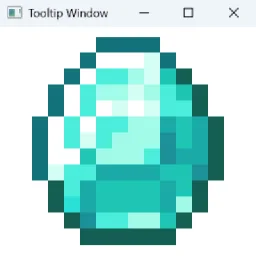
Allows you to open a seperate window to display to tooltips of hovered and held items.
Téléchargement direct depuis Modrinth · 14 téléchargements
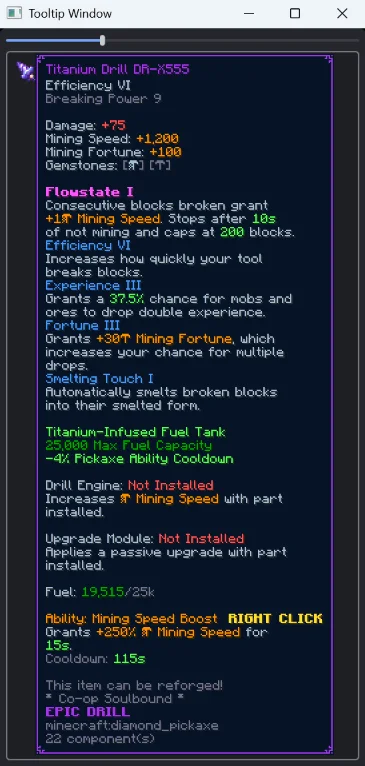
Big Tooltip Window (mod) est une création de Tcathebluecreper. Allows you to open a seperate window to display to tooltips of hovered and held items.
Versions prises en charge : Minecraft 1.21 – 26.x. On compte 14 téléchargements sur Modrinth. La dernière mise à jour date du 25/09/2026.
Big Tooltip Window a publié 7 versions sur Modrinth depuis le 19/09/2026. 7 sont sorties au cours de l'année passée. La plus récente est 1.0.1, sortie le 25/09/2026. Elle est faite pour Minecraft 26.3. Elle fonctionne sur NeoForge. Le téléchargement fait 15 KB.
| Version | Publié | Minecraft | Type |
|---|---|---|---|
1.0.1 | 25/09/2026 | 26.3 | Stable |
1.0.1 | 22/09/2026 | 26.2 | Stable |
1.0.1 | 22/09/2026 | 26.1, 26.1.1, 26.1.2 | Stable |
1.0.1 | 22/09/2026 | 1.21.1 – 1.21.11 | Stable |
1.0.0 | 19/09/2026 | 1.21.1 – 1.21.11 | Stable |
Allows you to open a separate window that can display the tooltip of the item you are holding in your hand, hovering in an inventory, or holding with your cursor in your inventory.
Open the window with /tooltip_window.
Ideal for multi monitor gaming. Particularly on game modes like Hypixel's Skyblock, where item descriptions are taller than your screen, you can now show them in a second window!
Écrite par Tcathebluecreper. À lire avec les images sur Modrinth.
Ce mod fonctionne uniquement dans ton jeu. Les serveurs n'en ont pas besoin, tu peux donc l'utiliser sur n'importe quel serveur.
Installe NeoForge pour Minecraft 1.21 – 26.x.
Ajoute les mods dont il a besoin : LDLib.
Télécharge le fichier .jar depuis Modrinth et place-le dans le dossier mods de ton répertoire .minecraft.
Lance Minecraft avec le profil NeoForge.
Plus simple : dans Prism Launcher ou la Modrinth App, cherche Big Tooltip Window dans les mods de ton instance et clique sur Install. Le loader et les mods requis sont ajoutés pour toi.
| Ressource | Téléchargements | Versions | Mise à jour | Prix |
|---|---|---|---|---|
| Big Tooltip Windowcelle que tu regardais | 14 | 1.21 – 26.x | 25 sept. 2026 | Gratuit |
| Legendary TooltipsGrend | 11M | 1.12 – 26.x | 22 sept. 2026 | Gratuit |
 Hotbar TooltipKGriffon | 8 | 26.x | 17 sept. 2026 | Gratuit |
 Boat Item View50ap5ud5 | 14.4M | 1.16 – 26.x | il y a 20 jours | Gratuit |
Oui. Big Tooltip Window prend en charge Minecraft 26.x. Toutes les versions prises en charge : 26.x, 1.21.
Oui. Big Tooltip Window se télécharge gratuitement sur Modrinth.
Côté client. Big Tooltip Window se place dans ton propre dossier mods et fonctionne sur n'importe quel serveur, même sans mods.
Oui : LDLib. Installe-le avant Big Tooltip Window.
Oui. La dernière mise à jour date des dernières 24 heures.
Les plus proches sont Legendary Tooltips, Hotbar Tooltip et Boat Item View. Comparer toutes les alternatives
Legendary TooltipsMods · 1.12 – 26.xGive your rare items a fancier tooltip! Aussi adds additional tooltip configuration options.
Hotbar TooltipMods · 26.xShows tooltips for items selected in your hotbar
Boat Item ViewMods · 1.16 – 26.xSee your held items as you row your boat!
 uku's Armor HUDMods · 1.20 – 26.x
Minimalist vanilla-like widget to display your armor items and their durability. Forked by uku.
 Tool StatsMods · 1.16 – 26.x
Provides additional tooltip info for items
 Better Trim TooltipsMods · 1.19 – 1.20
Condenses the tooltips of Trimmed Armor items.
Connecte-toi pour laisser un avis.