
 Legendary TooltipsMods · 1.12 – 26.x
Give your rare items a fancier tooltip! Also adds additional tooltip configuration options.
Free10,968,869 downloads
Allows you to open a seperate window to display to tooltips of hovered and held items.
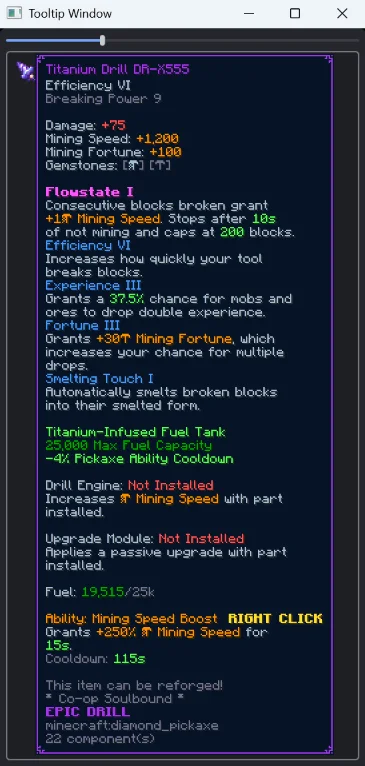
Allows you to open a seperate window to display to tooltips of hovered and held items.
Big Tooltip Window is a resource made by Tcathebluecreper. It supports Minecraft 1.21 – 26.x. It has been downloaded 14 times on Modrinth. The last update came out on Sep 25, 2026.
Big Tooltip Window has had 7 releases on Modrinth since Sep 19, 2026. 7 of them came out in the past year. The newest is 1.0.1, released on Sep 25, 2026. It is made for Minecraft 26.3. It runs on NeoForge. The download is 15 KB.
| Version | Released | Minecraft | Type |
|---|---|---|---|
1.0.1 | Sep 25, 2026 | 26.3 | Release |
1.0.1 | Sep 22, 2026 | 26.2 | Release |
1.0.1 | Sep 22, 2026 | 26.1, 26.1.1, 26.1.2 | Release |
1.0.1 | Sep 22, 2026 | 1.21.1 – 1.21.11 | Release |
1.0.0 | Sep 19, 2026 | 1.21.1 – 1.21.11 | Release |
Allows you to open a separate window that can display the tooltip of the item you are holding in your hand, hovering in an inventory, or holding with your cursor in your inventory.
Open the window with /tooltip_window.
Ideal for multi monitor gaming. Particularly on game modes like Hypixel's Skyblock, where item descriptions are taller than your screen, you can now show them in a second window!
Written by Tcathebluecreper. Read it with pictures on Modrinth.
This mod runs only on your own game. Servers do not need it, so you can use it on any server.
Install NeoForge for Minecraft 1.21 – 26.x.
Add the mods it needs: LDLib.
Download the .jar file from Modrinth and put it in the mods folder of your .minecraft directory.
Start Minecraft with the NeoForge profile.
With the CraftRank Launcher you can skip these steps: open Mods, search for Big Tooltip Window and click Install.
| Resource | Downloads | Versions | Last update | Price |
|---|---|---|---|---|
| Big Tooltip Windowthe one you looked at | 14 | 1.21 – 26.x | Sep 25, 2026 | Free |
| Legendary TooltipsGrend | 11M | 1.12 – 26.x | Sep 22, 2026 | Free |
 Hotbar TooltipKGriffon | 8 | 26.x | Sep 17, 2026 | Free |
 Boat Item View50ap5ud5 | 14.4M | 1.16 – 26.x | 19 days ago | Free |
Yes. Big Tooltip Window supports Minecraft 26.x. All supported versions: 26.x, 1.21.
Yes. Big Tooltip Window is free to download from Modrinth.
Client-side. Big Tooltip Window goes in your own mods folder and works on any server, including servers without mods.
Yes: LDLib. Install it before Big Tooltip Window.
Yes. The last update came out in the past day.
The closest ones are Legendary Tooltips, Hotbar Tooltip and Boat Item View. Compare all alternatives
Legendary TooltipsMods · 1.12 – 26.xGive your rare items a fancier tooltip! Also adds additional tooltip configuration options.
Hotbar TooltipMods · 26.xShows tooltips for items selected in your hotbar
Boat Item ViewMods · 1.16 – 26.xSee your held items as you row your boat!
 uku's Armor HUDMods · 1.20 – 26.x
Minimalist vanilla-like widget to display your armor items and their durability. Forked by uku.
 Tool StatsMods · 1.16 – 26.x
Provides additional tooltip info for items
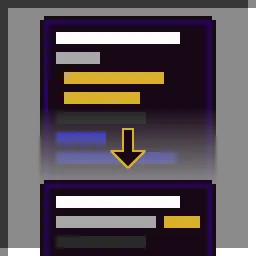 Better Trim TooltipsMods · 1.19 – 1.20
Condenses the tooltips of Trimmed Armor items.
Log in to leave a review.