
 WildRTPPlugins · 1.13 – 26.x
Another RTP Plugin build on Performance & Features
Gratuit98,443 téléchargements
DisasterZ is an enterprise-grade, high-performance natural disaster engine engineered for modern Paper, Bukkit, and Spigot servers.
Téléchargement direct depuis Modrinth · 1 téléchargements
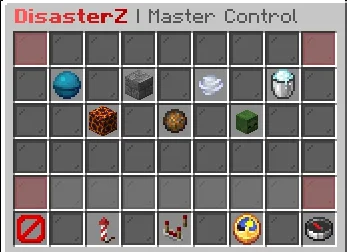
KakashiPlayz a créé DisasterZ (plugin) pour les serveurs Paper / Spigot. DisasterZ is an enterprise-grade, high-performance natural disaster engine engineered for modern Paper, Bukkit, and Spigot servers.
Versions prises en charge : Minecraft 1.21 – 26.x. On compte 1 téléchargements sur Modrinth. Il arrive ainsi en position n° 142 sur les 147 plugins de performance listés ici. La dernière mise à jour date du 04/11/2026.
La plus récente est 1.0.0, sortie le 04/11/2026. Elle est faite pour Minecraft 1.21 – 26.3. Elle fonctionne sur Bukkit, Paper et Spigot. Le téléchargement fait 134 KB.
| Version | Publié | Minecraft | Type |
|---|---|---|---|
1.0.0 | 04/11/2026 | 1.21 – 26.3 | Stable |
Les commandes citées sur la page Modrinth de DisasterZ :
/disasterzPermissions citées là-bas, à donner avec un plugin comme LuckPerms :
disasterz.admin.guidisasterz.admin.startdisasterz.admin.stopdisasterz.admin.reloaddisasterz.usedisasterzapi.isanydisasteractivedisasterzapi.getactivedisasterdisasterzapi.startdisasterdisastertype.tornadoDisasterZ est open source. Sa dernière version sur GitHub est DisasterZ v1.0.0, publiée le 04/11/2026.
An enterprise-grade, high-performance natural disaster engine for Minecraft servers featuring 7 cinematic cataclysms, Zero-TPS-Drop architecture, automatic block restoration, territory protection hooks, and full interactive in-game GUI control.
Lire toutes les notes sur GitHub
DisasterZ is an enterprise-grade, high-performance natural disaster engine engineered for modern Paper, Bukkit, and Spigot servers. Built with modern Java 21+ and a strict Zero-TPS-Drop architectural standard, DisasterZ unleashes 7 cinematic natural disasters while safeguarding server performance, chunk integrity, and player territories.
Icon · Disaster · Description
🌊 · Tsunami · Colossal moving wall of water with synchronized particle crests, violent forward surge physics, and drowning hazards.
🪨 · Earthquake · Violent tectonic fissures opening along fault lines, continuous screen-shaking tremors, stumbling mechanics without locking movement, and falling rubble.
🌪️ · Tornado · Rotating double-helix parametric spiral vortex with vacuum physics that sucks players and mobs inside, spirals them skyward, and violently hurls them across the land.
❄️ · Blizzard · Freezing squall that inflicts persistent Slowness and Weakness throughout the event, rapid frostbite screen vignette, hypothermia damage, and whiteout fog unless standing within radiant heat zones (campfires, torches, lava, furnaces).
🌋 · Volcanic Eruption · Dense atmospheric ash storms, launching explosive fireballs and molten magma/basalt bombs that shatter the surface into persistent lava pools and actively spreading wildfire fronts.
☄️ · Meteor Shower · High-velocity extraterrestrial impactors that blast apart blocks, forge molten impact craters, fling destructive rubble, and spread raging surface fires.
🧟 · Zombie Apocalypse · Blood Moon sky tint, towering Big Size Colossal Zombies (scaled via Attribute.GENERIC_SCALE), giant dreadnought bosses, and relentless undead hordes.
Command · Permission · Description
/disasterz gui · disasterz.admin.gui · Opens the Master Admin GUI
/disasterz start [duration] · disasterz.admin.start · Triggers a disaster warning and event
/disasterz stop [disaster] · disasterz.admin.stop · Halts active disaster and restores blocks
/disasterz reload · disasterz.admin.reload · Hot-reloads configuration files and tasks
/disasterz info · disasterz.use · Displays author, version, portfolio, and discord
Access the static API entry point via DisasterZAPI:
// Check if a disaster is active
if (DisasterZAPI.isAnyDisasterActive()) {
Disaster active = DisasterZAPI.getActiveDisaster().get();
Bukkit.broadcastMessage("Active disaster: " + active.getType().getDisplayName());
}
// Start a disaster
DisasterZAPI.startDisaster(DisasterType.TORNADO, 180);
gradle build
Output jar: build/libs/DisasterZ-1.0.0.jar.
Écrite par KakashiPlayz. À lire avec les images sur Modrinth.
Vérifie que ton serveur tourne sous Paper et Spigot en Minecraft 1.21 – 26.x.
Télécharge le fichier .jar depuis Modrinth et place-le dans le dossier plugins de ton serveur.
Redémarre le serveur. Évite /reload, beaucoup de plugins le supportent mal.
Tape /plugins dans la console : DisasterZ doit apparaître en vert. Ses fichiers de config sont créés dans le dossier plugins au premier démarrage.
Guide complet: Comment installer des plugins sur un serveur Minecraft
| Ressource | Téléchargements | Versions | Mise à jour | Prix |
|---|---|---|---|---|
| DisasterZcelle que tu regardais | 1 | 1.21 – 26.x | il y a 10 jours | Gratuit |
| WildRTPLasaJoniHD | 98K | 1.13 – 26.x | 27 sept. 2026 | Gratuit |
 LagFixerlajczi | 345K | 1.13 – 26.x | il y a 25 jours | Gratuit |
 SuperHarvestdru40309 | 36K | 1.8 – 26.x | 5 mars 2026 | Gratuit |
Oui. DisasterZ prend en charge Minecraft 26.x. Toutes les versions prises en charge : 26.x, 1.21.
Oui. DisasterZ se télécharge gratuitement sur Modrinth.
DisasterZ fonctionne sur les serveurs Paper et Spigot.
Oui. La dernière mise à jour date des dernières 24 heures.
Les plus proches sont WildRTP, LagFixer et SuperHarvest. Comparer toutes les alternatives
WildRTPPlugins · 1.13 – 26.xAnother RTP Plugin build on Performance & Features
LagFixerPlugins · 1.13 – 26.x⚡️ Best Performance Solution! 🗄️Trusted by 3000+ servers! ✅ Lightweight and highly Asynchronous!
SuperHarvestPlugins · 1.8 – 26.xFast harvest, mining and tree chopping easily with a single mine, 3 in one to Vein-Mining with Animations but without lag! It's light weight lag free. [Open…
 Origins-RebornPlugins · 1.18 – 26.x
An Origin plugin for PaperMC with an accurate custom GUI, high performance, high customisability and Skript support!
 ApxBountyPlugins · 1.20 – 26.x
Modern, lag-free player bounty system with clean custom GUIs, sorting, and Vault economy integration.
 ZonePracticeProPlugins · 1.21 – 26.x
Elevate your server with the ultimate high performance Minecraft Modern PvP practice core plugin for playing duels.
Connecte-toi pour laisser un avis.