
 WildRTPPlugins · 1.13 – 26.x
Another RTP Plugin build on Performance & Features
Free98,443 downloads
DisasterZ is an enterprise-grade, high-performance natural disaster engine engineered for modern Paper, Bukkit, and Spigot servers.
Direct download from Modrinth · 1 downloads
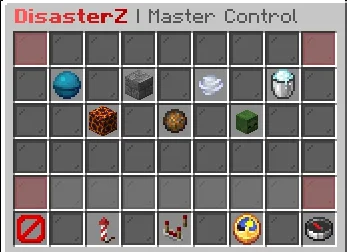
DisasterZ is a plugin for Paper / Spigot servers, made by KakashiPlayz. DisasterZ is an enterprise-grade, high-performance natural disaster engine engineered for modern Paper, Bukkit, and Spigot servers.
It supports Minecraft 1.21 – 26.x. It has been downloaded 1 times on Modrinth. That puts it at #142 of the 147 performance plugins listed here. The last update came out on Nov 4, 2026.
The newest is 1.0.0, released on Nov 4, 2026. It is made for Minecraft 1.21 – 26.3. It runs on Bukkit, Paper and Spigot. The download is 134 KB.
| Version | Released | Minecraft | Type |
|---|---|---|---|
1.0.0 | Nov 4, 2026 | 1.21 – 26.3 | Release |
The commands named on the Modrinth page of DisasterZ:
/disasterzPermission nodes named there, to give with a plugin like LuckPerms:
disasterz.admin.guidisasterz.admin.startdisasterz.admin.stopdisasterz.admin.reloaddisasterz.usedisasterzapi.isanydisasteractivedisasterzapi.getactivedisasterdisasterzapi.startdisasterdisastertype.tornadoDisasterZ is open source. Its newest release on GitHub is DisasterZ v1.0.0, published on Nov 4, 2026.
An enterprise-grade, high-performance natural disaster engine for Minecraft servers featuring 7 cinematic cataclysms, Zero-TPS-Drop architecture, automatic block restoration, territory protection hooks, and full interactive in-game GUI control.
Read all release notes on GitHub
DisasterZ is an enterprise-grade, high-performance natural disaster engine engineered for modern Paper, Bukkit, and Spigot servers. Built with modern Java 21+ and a strict Zero-TPS-Drop architectural standard, DisasterZ unleashes 7 cinematic natural disasters while safeguarding server performance, chunk integrity, and player territories.
Icon · Disaster · Description
🌊 · Tsunami · Colossal moving wall of water with synchronized particle crests, violent forward surge physics, and drowning hazards.
🪨 · Earthquake · Violent tectonic fissures opening along fault lines, continuous screen-shaking tremors, stumbling mechanics without locking movement, and falling rubble.
🌪️ · Tornado · Rotating double-helix parametric spiral vortex with vacuum physics that sucks players and mobs inside, spirals them skyward, and violently hurls them across the land.
❄️ · Blizzard · Freezing squall that inflicts persistent Slowness and Weakness throughout the event, rapid frostbite screen vignette, hypothermia damage, and whiteout fog unless standing within radiant heat zones (campfires, torches, lava, furnaces).
🌋 · Volcanic Eruption · Dense atmospheric ash storms, launching explosive fireballs and molten magma/basalt bombs that shatter the surface into persistent lava pools and actively spreading wildfire fronts.
☄️ · Meteor Shower · High-velocity extraterrestrial impactors that blast apart blocks, forge molten impact craters, fling destructive rubble, and spread raging surface fires.
🧟 · Zombie Apocalypse · Blood Moon sky tint, towering Big Size Colossal Zombies (scaled via Attribute.GENERIC_SCALE), giant dreadnought bosses, and relentless undead hordes.
Command · Permission · Description
/disasterz gui · disasterz.admin.gui · Opens the Master Admin GUI
/disasterz start [duration] · disasterz.admin.start · Triggers a disaster warning and event
/disasterz stop [disaster] · disasterz.admin.stop · Halts active disaster and restores blocks
/disasterz reload · disasterz.admin.reload · Hot-reloads configuration files and tasks
/disasterz info · disasterz.use · Displays author, version, portfolio, and discord
Access the static API entry point via DisasterZAPI:
// Check if a disaster is active
if (DisasterZAPI.isAnyDisasterActive()) {
Disaster active = DisasterZAPI.getActiveDisaster().get();
Bukkit.broadcastMessage("Active disaster: " + active.getType().getDisplayName());
}
// Start a disaster
DisasterZAPI.startDisaster(DisasterType.TORNADO, 180);
gradle build
Output jar: build/libs/DisasterZ-1.0.0.jar.
Written by KakashiPlayz. Read it with pictures on Modrinth.
Make sure your server runs Paper and Spigot on Minecraft 1.21 – 26.x.
Download the .jar file from Modrinth and put it in the plugins folder of your server.
Restart the server. Avoid /reload, many plugins do not handle it well.
Type /plugins in the console: DisasterZ should be listed in green. Its config files are created in the plugins folder on the first start.
Full guide: How to install plugins on a Minecraft server
| Resource | Downloads | Versions | Last update | Price |
|---|---|---|---|---|
| DisasterZthe one you looked at | 1 | 1.21 – 26.x | 10 days ago | Free |
| WildRTPLasaJoniHD | 98K | 1.13 – 26.x | Sep 27, 2026 | Free |
 LagFixerlajczi | 345K | 1.13 – 26.x | 25 days ago | Free |
 SuperHarvestdru40309 | 36K | 1.8 – 26.x | Mar 5, 2026 | Free |
Yes. DisasterZ supports Minecraft 26.x. All supported versions: 26.x, 1.21.
Yes. DisasterZ is free to download from Modrinth.
DisasterZ runs on Paper and Spigot servers.
Yes. The last update came out in the past day.
The closest ones are WildRTP, LagFixer and SuperHarvest. Compare all alternatives
WildRTPPlugins · 1.13 – 26.xAnother RTP Plugin build on Performance & Features
LagFixerPlugins · 1.13 – 26.x⚡️ Best Performance Solution! 🗄️Trusted by 3000+ servers! ✅ Lightweight and highly Asynchronous!
SuperHarvestPlugins · 1.8 – 26.xFast harvest, mining and tree chopping easily with a single mine, 3 in one to Vein-Mining with Animations but without lag! It's light weight lag free. [Open…
 Origins-RebornPlugins · 1.18 – 26.x
An Origin plugin for PaperMC with an accurate custom GUI, high performance, high customisability and Skript support!
 ApxBountyPlugins · 1.20 – 26.x
Modern, lag-free player bounty system with clean custom GUIs, sorting, and Vault economy integration.
 ZonePracticeProPlugins · 1.21 – 26.x
Elevate your server with the ultimate high performance Minecraft Modern PvP practice core plugin for playing duels.
Log in to leave a review.