Dialog Clicker to mod, autor: Bamberghh. Automatically perform dialog actions.
Obsługiwane wersje: Minecraft 26.x. Liczba pobrań w serwisie Modrinth: 8. Ostatnia aktualizacja: 22.09.2026.
Najnowsza to 0.1.0, wydana 22.09.2026. Jest zrobiona dla Minecraft 26.2. Działa na Fabric. Plik ma 126 KB.
| Wersja | Wydano | Minecraft | Typ |
|---|---|---|---|
0.1.0 | 22.09.2026 | 26.2 | Wydanie |
Dialog Clicker ma otwarty kod. Najnowsze wydanie na GitHubie to 0.1.0, opublikowane 22.09.2026.
Full Changelog: https://github.com/Bamberghh/dialogclicker/commits/0.1.0
This is a Minecraft Fabric mod that automatically performs the dialog actions that you saved before. This mod is useful for example when a server needs you to click a dialog action when joining it - you can let the mod click the action for you!
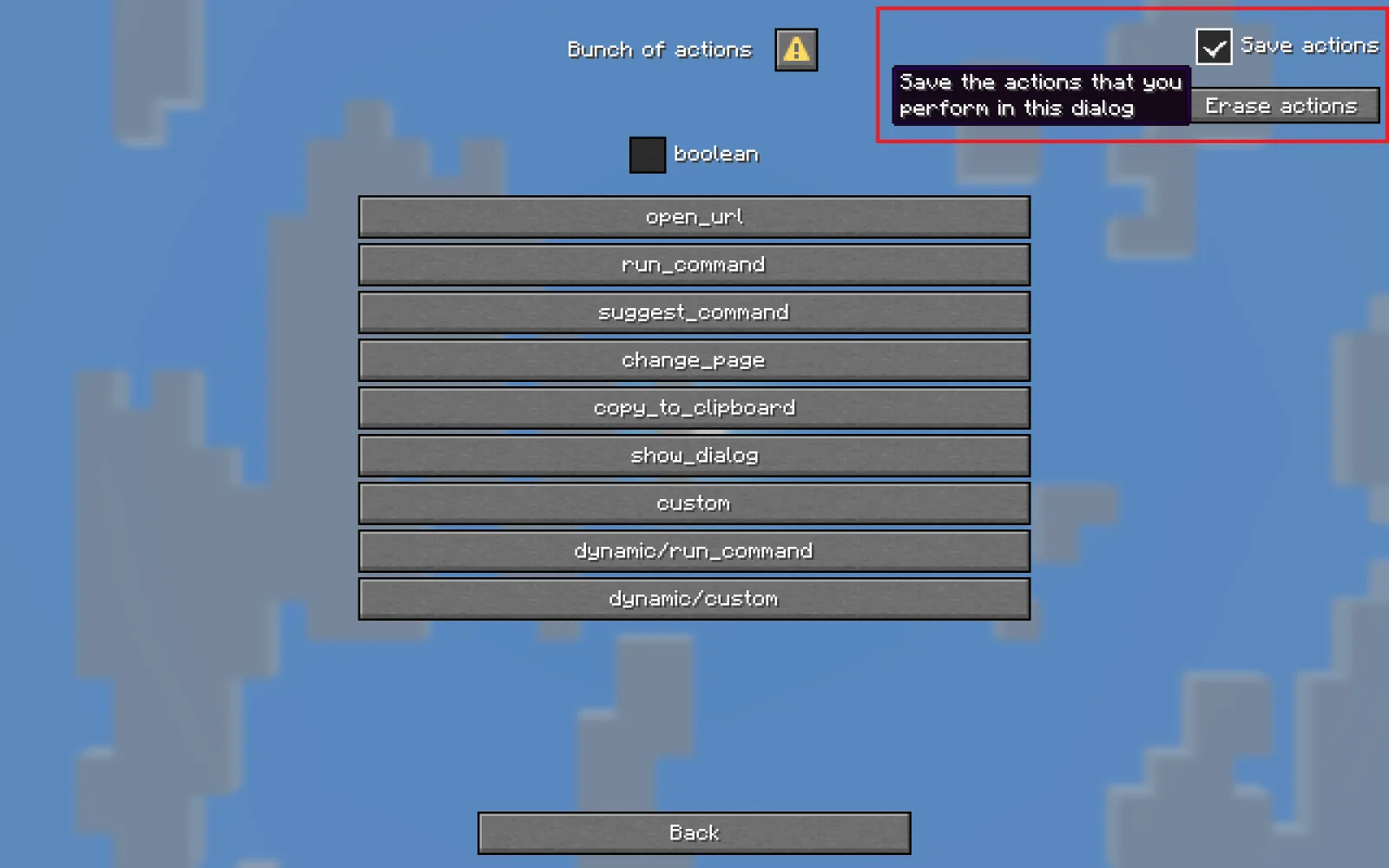
To use the mod, first wait for the dialog that you need the mod to remember to show up. Then check the "Save actions" checkbox and start performing the actions that you need the dialog to replay later, such as pressing buttons or closing the dialog.
If a saved dialog action is not present in the dialog (because the dialog got updated), it will not be performed by the mod, so you'll have to save actions again.
Actions are saved in Minecraft's .dialogclicker directory, and you can safely delete them.
If you made a mistake you can press the "Erase actions" button to erase the performed and saved actions.
⚠️ If you've saved a closing action in a dialog, and you want to erase it, you won't be able to simply press the "Erase actions" button because the dialog immediately gets closed by the mod. To resolve this you can disable the "Should apply saved actions" option in the mod config, erase the saved actions and re-enable the config option.
The entire mod is configured through the Mod Menu UI with helpful tooltips. Below is a short description of every option currently there:
Toggle if saved actions are performed by the mod. Enabled by default.
Control which messages should be logged:
Please open an issue on GitHub.
Autor: Bamberghh. Z obrazkami na Modrinth.
Ten mod jest potrzebny na serwerze i u każdego gracza, który dołącza.
Zainstaluj Fabric dla Minecraft 26.x.
Dodaj potrzebne mody: API Fabric i Fabric Language Kotlin.
Pobierz plik .jar z Modrinth i wrzuć go do folderu mods w katalogu .minecraft.
Uruchom Minecraft z profilem Fabric.
Prościej: w Prism Launcher lub Modrinth App wyszukaj Dialog Clicker w modach swojej instancji i kliknij Install. Loader i potrzebne mody zostaną dodane za ciebie.
Tak. Dialog Clicker działa w wersji Minecrafta 26.x. Wszystkie obsługiwane wersje: 26.x.
Tak. Dialog Clicker można pobrać za darmo z serwisu Modrinth.
Obie. Serwer i każdy gracz muszą mieć zainstalowany Dialog Clicker.
Tak: Fabric API, Fabric Language Kotlin. Zainstaluj to przed Dialog Clicker.
Tak. Ostatnia aktualizacja wyszła w ciągu ostatniej doby.
Zaloguj się, aby wystawić opinię.