Dialog Clicker (mod) é obra de Bamberghh. Automatically perform dialog actions.
É compatível com o Minecraft 26.x. Tem 16 downloads em Modrinth. A última atualização saiu em 22/09/2026.
A mais recente é 0.1.0, lançada em 22/09/2026. Ela é feita para o Minecraft 26.2. Ela roda em Fabric. O download tem 126 KB.
| Versão | Lançado | Minecraft | Tipo |
|---|---|---|---|
0.1.0 | 22/09/2026 | 26.2 | Estável |
Dialog Clicker é de código aberto. A versão mais recente no GitHub é 0.1.0, publicada em 22/09/2026.
Full Changelog: https://github.com/Bamberghh/dialogclicker/commits/0.1.0
This is a Minecraft Fabric mod that automatically performs the dialog actions that you saved before. This mod is useful for example when a server needs you to click a dialog action when joining it - you can let the mod click the action for you!
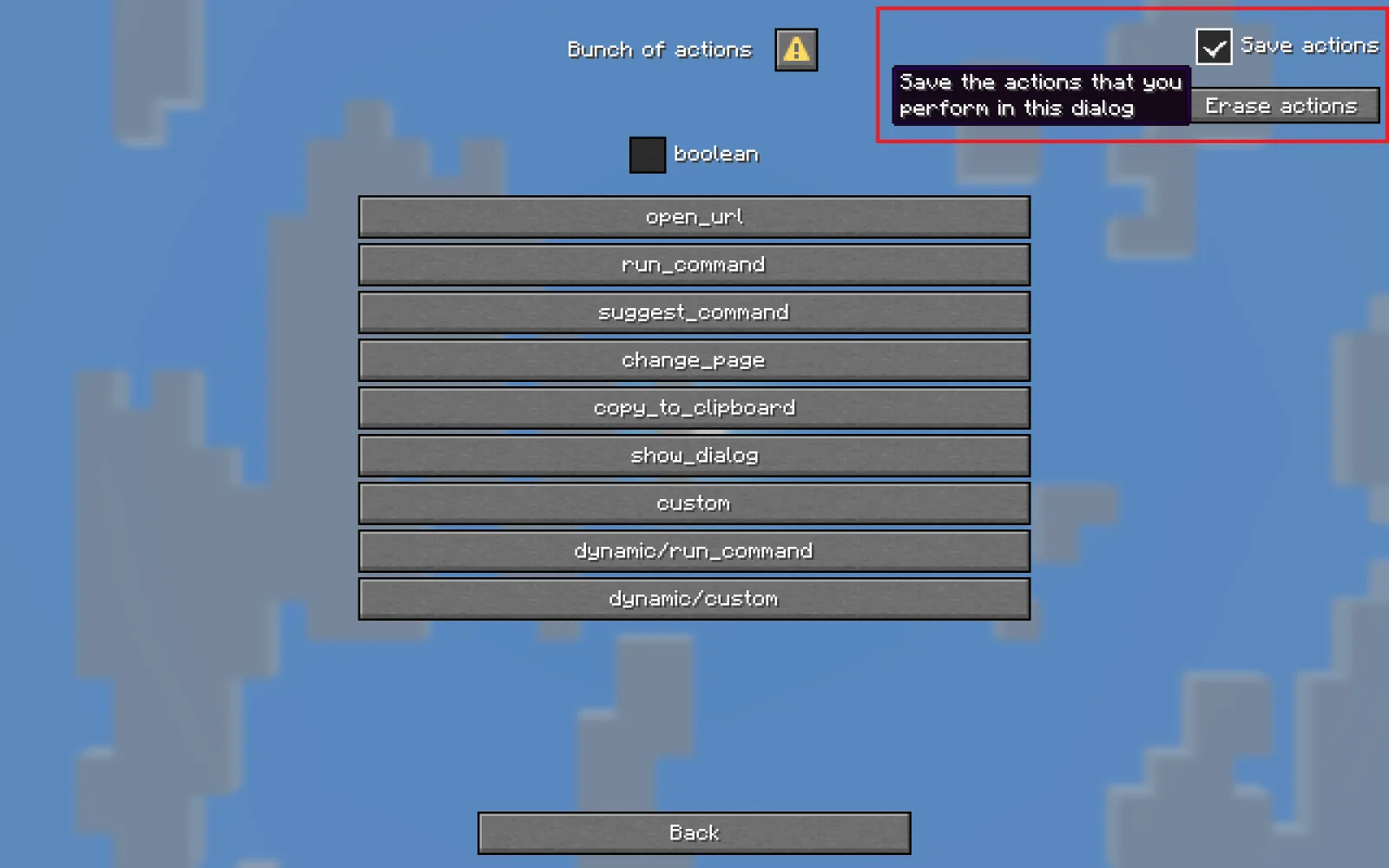
To use the mod, first wait for the dialog that you need the mod to remember to show up. Then check the "Save actions" checkbox and start performing the actions that you need the dialog to replay later, such as pressing buttons or closing the dialog.
If a saved dialog action is not present in the dialog (because the dialog got updated), it will not be performed by the mod, so you'll have to save actions again.
Actions are saved in Minecraft's .dialogclicker directory, and you can safely delete them.
If you made a mistake you can press the "Erase actions" button to erase the performed and saved actions.
⚠️ If you've saved a closing action in a dialog, and you want to erase it, you won't be able to simply press the "Erase actions" button because the dialog immediately gets closed by the mod. To resolve this you can disable the "Should apply saved actions" option in the mod config, erase the saved actions and re-enable the config option.
The entire mod is configured through the Mod Menu UI with helpful tooltips. Below is a short description of every option currently there:
Toggle if saved actions are performed by the mod. Enabled by default.
Control which messages should be logged:
Please open an issue on GitHub.
Escrita por Bamberghh. Leia com imagens no Modrinth.
Este mod é necessário no servidor e em cada jogador que entra.
Instale Fabric para o Minecraft 26.x.
Adicione os mods que ele precisa: API do Fabric e Fabric Language Kotlin.
Baixe o arquivo .jar pelo Modrinth e coloque na pasta mods do seu diretório .minecraft.
Abra o Minecraft com o perfil Fabric.
Mais fácil: no Prism Launcher ou no Modrinth App, procure Dialog Clicker nos mods da sua instância e clique em Install. Ele adiciona o loader e os mods necessários para você.
Sim. Dialog Clicker é compatível com o Minecraft 26.x. Todas as versões compatíveis: 26.x.
Sim. Você pode baixar Dialog Clicker de graça em Modrinth.
Os dois. O servidor e cada jogador precisam ter Dialog Clicker instalado.
Sim: Fabric API, Fabric Language Kotlin. Instale antes de Dialog Clicker.
Sim. A última atualização saiu no último dia.
Entre para deixar uma avaliação.